Chapter 2
I/O Ports
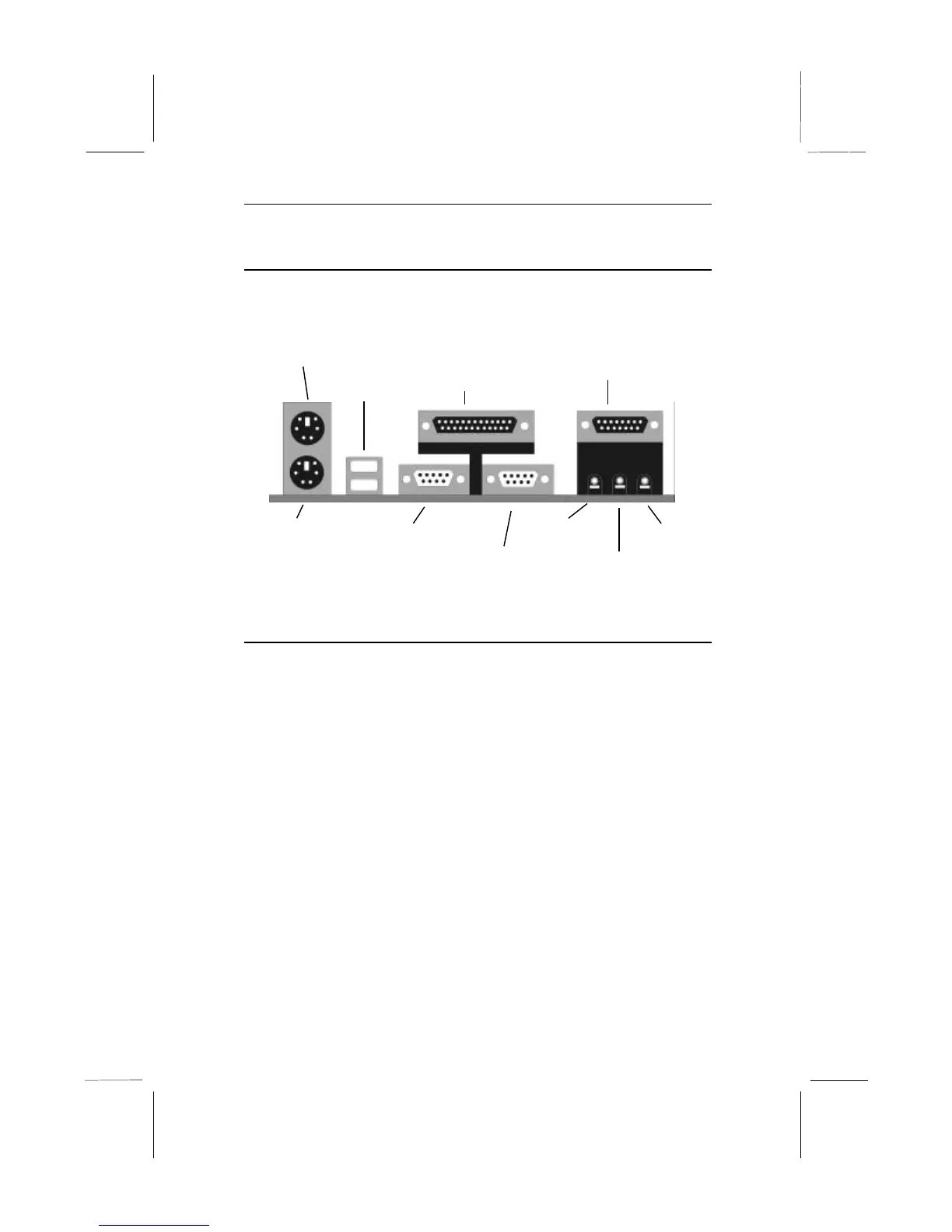
The illustration below shows a side view of the I/O ports installed
on the mainboard.
PS/2 Mouse
PS/2 Keyboard
USB Ports
Microphone
Game/MIDI Port
Stereo In
Parallel Port
Serial COM2/4
Serial COM1/3
Stereo Out
Install the Processor
This mainboard has a Slot-1 which can be installed with any Slot-1
processor cartridge including the Pentium-III, the Pentium-II, and
the SEPP Celeron. It also has a Socket-370 which can be installed
with the new Celeron processor which is shipped in a PPGA
(Plastic Pin Grid Array) package. To ensure reliability, make
sure that your PPGA Celeron processor is fitted with a
heatsink/cooling fan assembly.
You can install a Slot-1 processor or a PPGA Celeron. You cannot
install a PPGA and a Slot-1 processor cartridge together. Take care
that you do not try to install a Socket-7 processor into the Socket-
370. A Socket-7 processor such as the Pentium-MMX, or the AMD
K5/K6 does not fit in the socket-370.
The following table lists all the processors that are currently
supported by the two processor sockets. New processors may be a
released after this manual is printed.



 To Next Page