January 31, 2022
HOW TO USE
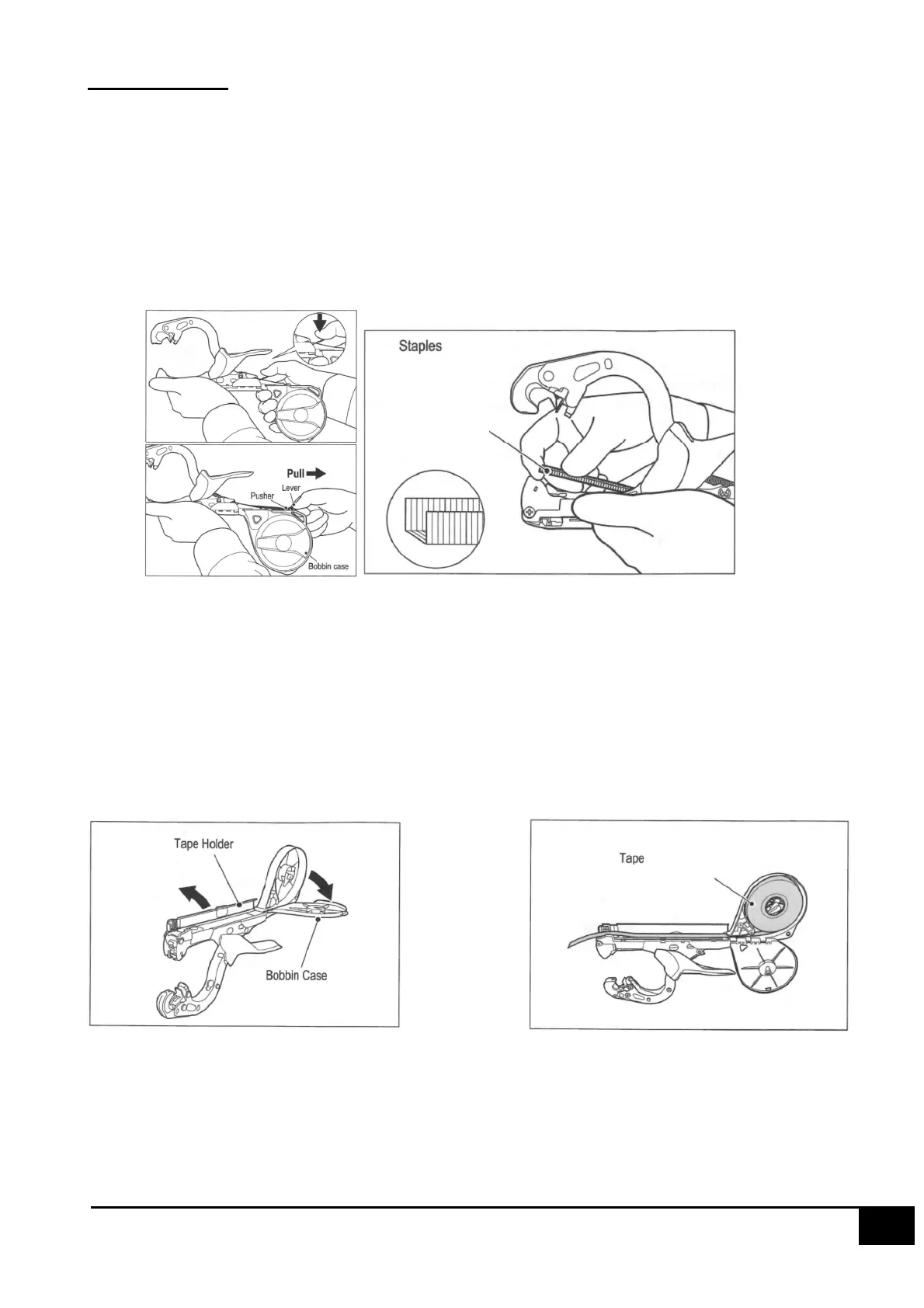
How to Load Staples
1. Hold the body with one hand, push the lever down and pull the lever towards your
direction.
* The pusher cannot be removed from the main body.
2. While holding the tool in one hand, insert staples into the magazine so that staples’ legs
point upward, and then set them in the pusher unit by sliding lever. You can load 604C
type or 604E type staples.
Caution
Be sure to use MAX staples and MAX tape.
NEVER place your fingers near the front end of the magazine unit because there is a
serrated blade and the staple ejection port nearby.
Do not insert a branch near the cutting blade. Doing so may damage the cutting blade
or peripheral parts.
How to Open Tape Holder and Bobbin Case and Load the Tape
How to Load the Tape
1. Open the tape holder and bobbin case, and insert the tape roll into the bobbin case.
2. Pull tape into the tape holder and make sure approximately 5cm of tape hangs out of
the edge of the tape holder.
3. Load the tape through the two guides of the tape guide.


 To Next Page