HEADPHONE OPERATIONS
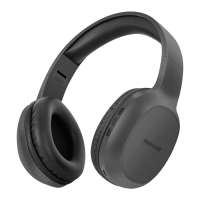
Using the MXH-BT600E with Bluetooth mobile phones
1. Answer a call: When there is an incoming call, your ring-tone will sound from the headphone and
Blue LED will flash quickly. Short press the multifunctional button to answer the call. Blue LED
flashes once quickly every 4 seconds.
2. End a call: if you want to end the call, short press the multifunction button to hang up, you will hear
an indication tone to confirm the call has been ended successfully.
3. Reject a call: Hold the multifunction button for 3 seconds to reject a call; you will hear an indication
tone to confirm the call has been rejected successfully.
4. Adjust the volume: when answering, dialling or during a call, short press “+” button to increase
volume one increment, and you will hear an indication tone when increase to maximum volume.
Similarly, short press “-” button to decrease the volume an increment, and also an indication tone
when decreased to minimum volume.
5. Redial the last number called: In idle mode, pressing the multifunction button twice will redial the
last outgoing number.
6. Voice dial: In the standby mode, hold the multifunction button for 3 seconds. This feature requires
the support of your mobile phones’ Bluetooth.
7. Call transfer from headphone to phone: During a call , hold the multifunction button for 3 seconds
until hear a tone, then the call has been transferred from the Bluetooth headphone to your phone ,
the same operation can transfer the call from your phone to the Bluetooth headphone
8. Play/Pause: While music is playing, short press the ►ll button to Play/Pause music.
9. Previous/Next song: During playing music, short press ▲ button to play the previous song and
short press the ▼ button to play the next song.


 To Next Page