15
SWITCHING FROM THE PLUNGE BASE TO THE FIXED BASE
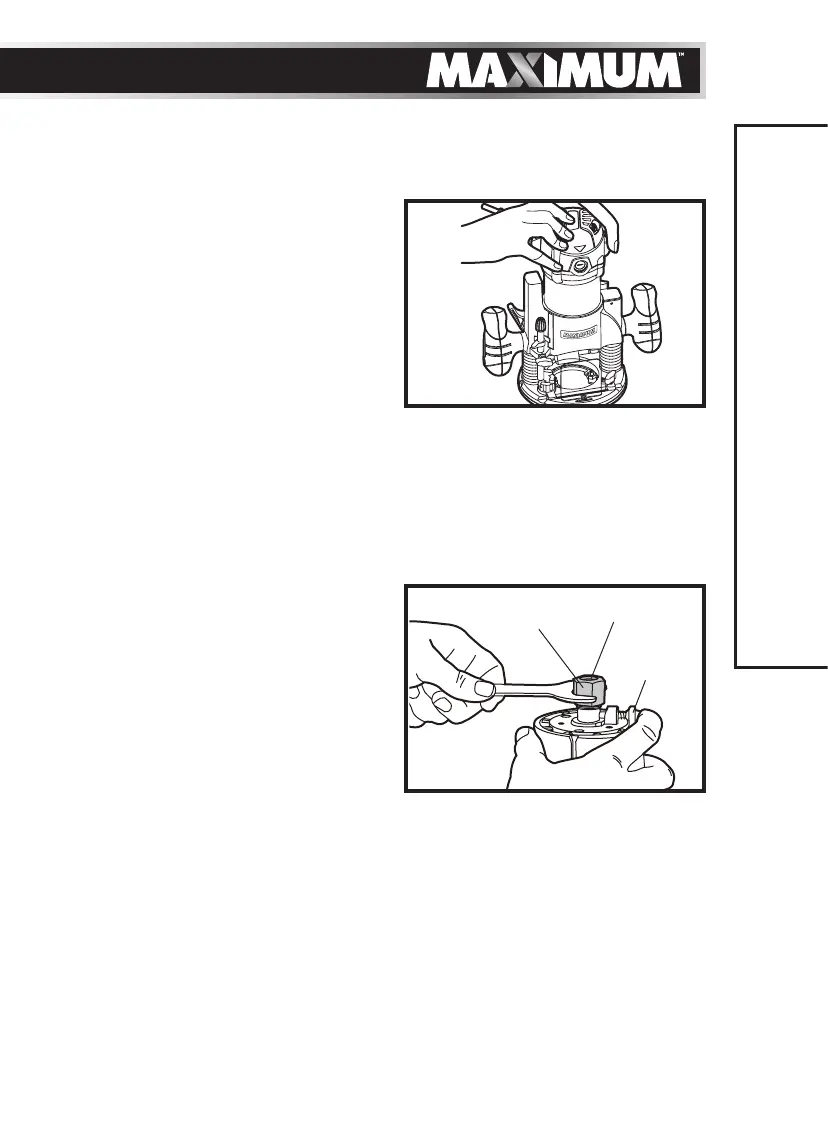
(see g 4 to g 7)
To remove the plunge base
1. Unplug the router.
2. Loosen the lock lever.
3. Tighten the locking arm for stability.
4. Remove the motor pack from the
plunge base.
To install the fixed base
1. Unplug the router.
2. Loosen the lock lever on the fixed base.
3. Depress and hold the adjustment button.
4. Align the tab on the motor pack with the slot in the fixed base.
5. Tighten the lock lever.
INSTALLING/REMOVING THE CUTTER
To install the cutter (see fig 8)
1. Unplug the router.
2. Hold the collet nut with the wrench
that is provided and depress the
spindle lock button until the spindle
locks into place.
3. Loosen the collet nut with the wrench
and remove the cutter. Insert the new
cutter.
4. Tighten the collet nut with the wrench that is provided.
5. Release the spindle lock button.
To remove the cutter
1. Unplug the router.
2. Hold the collet nut with the wrench that is provided and depress the spindle
lock button until the spindle locks into place.
3. Loosen the collet nut with the wrench and remove the cutter.
4. Release the spindle lock button.
ASSEMBLY INSTRUCTIONS
g 7
g 8
Nut
Collet
Spindle
Lock


 To Next Page