KK-641.002 Rev.No:1 01.08.12 ML-121X User Manual Page | 10
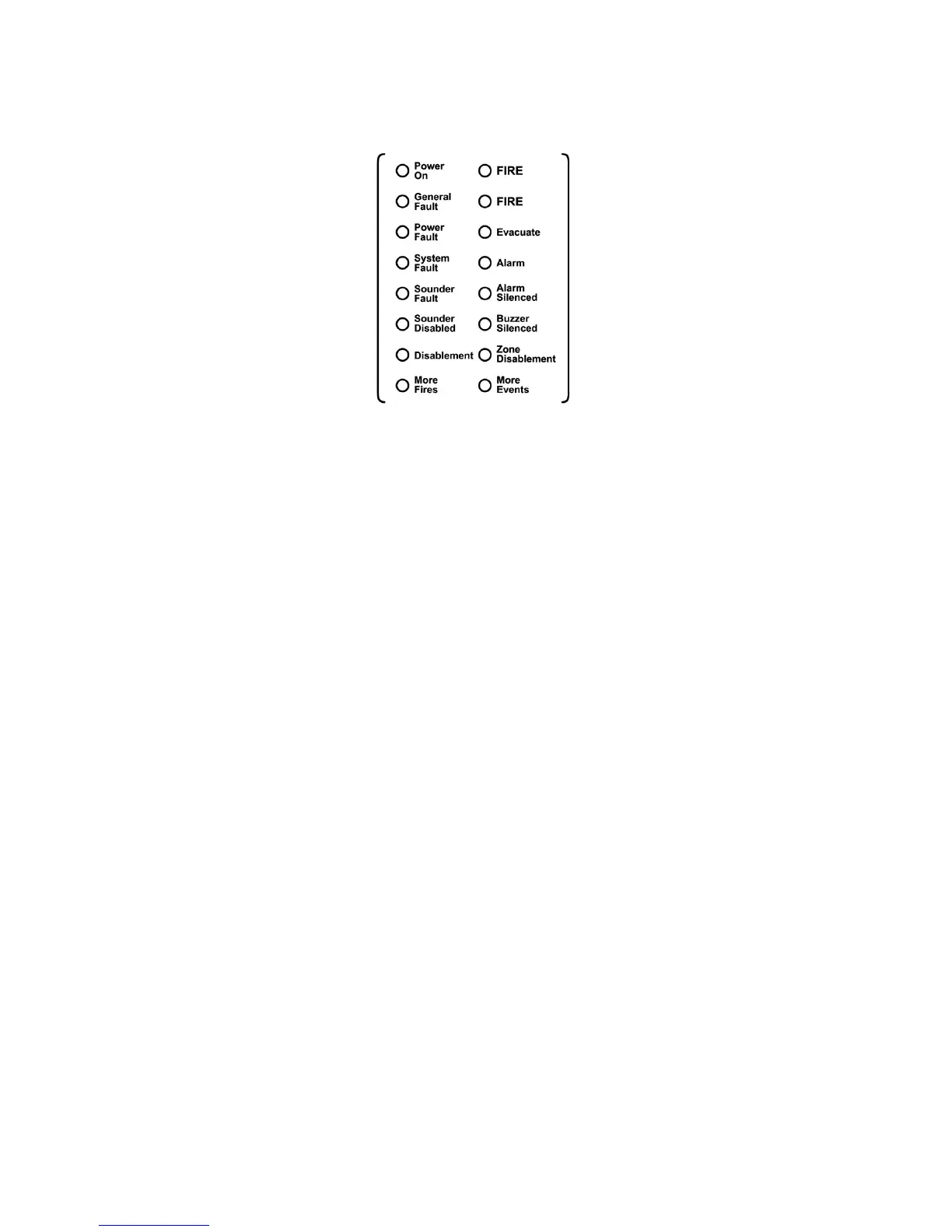
6.2 Front Panel Indicators
FIRE : Fire LEDs illuminate in two conditions; if there is a fire situation in the
system or in case of pressing Evacuate button. Each one of these conditions makes the LEDs
illuminate in ‘Red’ colour.
Power On : Panel is energized and operates normally. It illuminates as ‘Green’
continuously.
General Fault : If any fault occurs during operation. It illuminates with the specified
respective faults such as power fault. It illuminates as ‘Yellow’.
Power Fault : It indicates that there is a mains power failure or a problem of battery.
It illuminates as ‘yellow’ and related fault condition can be viewed on the LCD screen.
System Fault : Main microprocessor fault. It Illuminates as ‘Yellow’.
Sounder Disabled : It shows that the sounder outputs on the panel has been disabled and
illuminates as ‘yellow’.
Disablement : If any device or line disabled in the system this LED illuminates as
‘Yellow’.
More Fires : It indicates the presence of more than one fire in the existing event list
of the system. It illuminates as ‘Yellow’.
Evacuate : It indicates that the Evacuate button is pressed. The Evacuate button
must be programmed by Loop Manager Software Program. It illuminates as ‘Red’.
Alarm : It indicates that the alarm button is pressed, it illuminates as ‘Yellow’.
Alarm Silenced : This led shows that incoming alarms are silenced by pressing ‘Alarm
Silenced’ button. It illuminates as ‘Yellow’.
Buzzer Silenced : It indicates that the Buzzer Silenced button is pressed and it
illuminates as ‘Yellow’.
Zone Disablement : It indicates that one or more zones are disabled from the panel menu.
It illuminates as ‘Yellow’.
More Events : If there is more than one event in the system this LED illuminates as
‘Yellow’.


 To Next Page