3
3.1
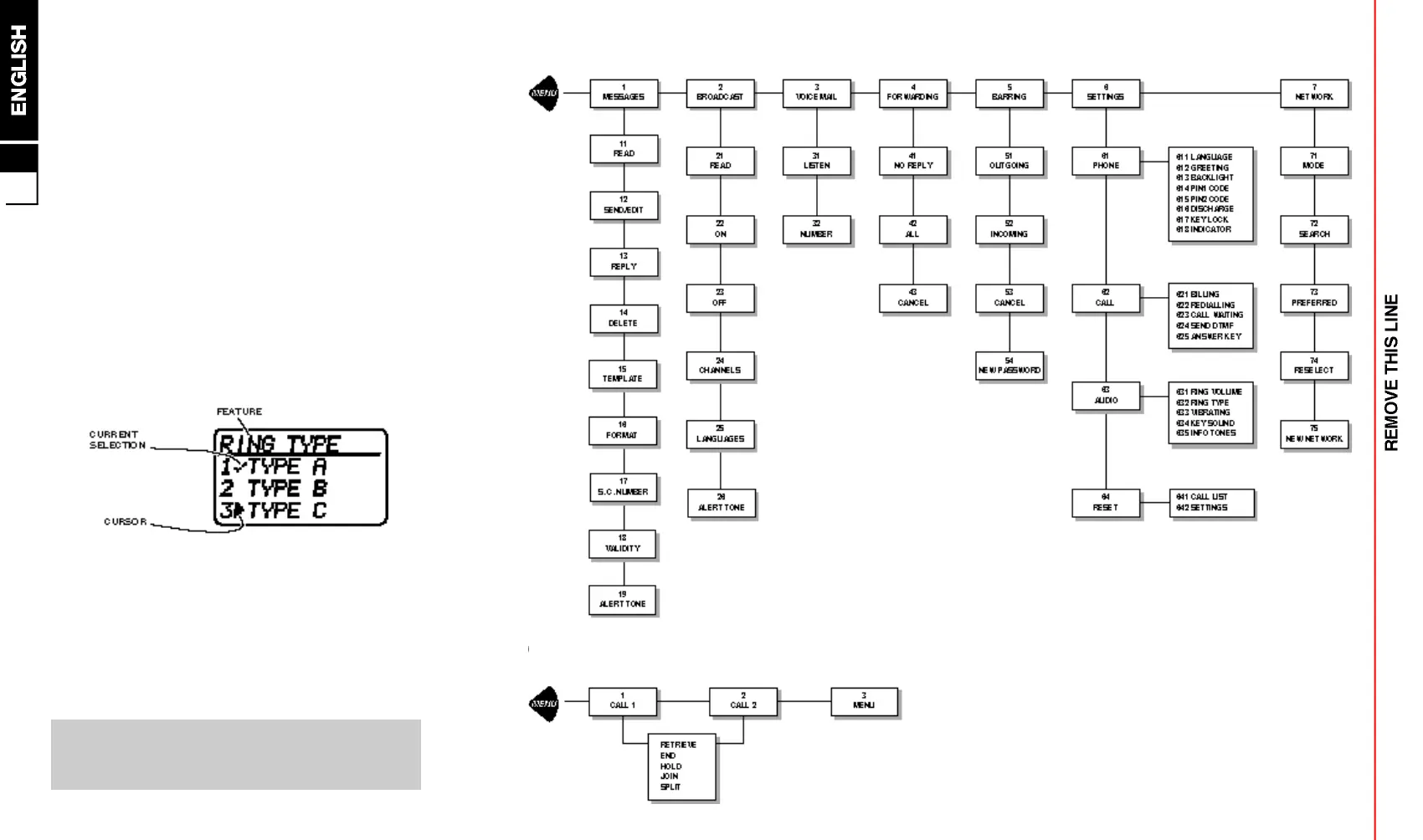
The Feature Menu
All the operating features of the phone are stored in
the easy to use menu. A feature can be selected direct
via its feature number (see list on next page) or by
searching and selecting using the keys (to move the
cursor) at the top of the keypad as follows:
/
- enter the feature menu
[
- select a menu group or feature
- ] - search through the groups and features
=
- go back one step
`
- hold to exit the menu
\
- store an entry or exit a feature
Selecting a Feature by Search
/
■
-
/
]
( g r o u p )
■
[
■
-
/
]
( f e a t u r e )
■
[
Selecting a Feature by Number
/
■
FEATURE NUMBER
■
-
/
]
■
[
■ for example, to change the ring type:
/
■
632
■
-
/
]
■
[
■
`
(hold)
Please note that you can press and hold
`
or
\
to exit a menu feature (the phone will exit on it’s own
after a long delay).
Feature Menu Structure
Call Menu Structure (see section 5 for details)



 To Next Page