1
1.2
The Battery
Your phone is supplied with a rechargeable battery
and quick charger. Before you use the phone for the
first time, it is important that you F U L L Y C H A R G E
THE BATTERY. Failure to do this will affect the life of
the battery and reduce operating times between
recharges.
Full battery capacity will only be achieved after fully
charging and discharging the battery two or three times.
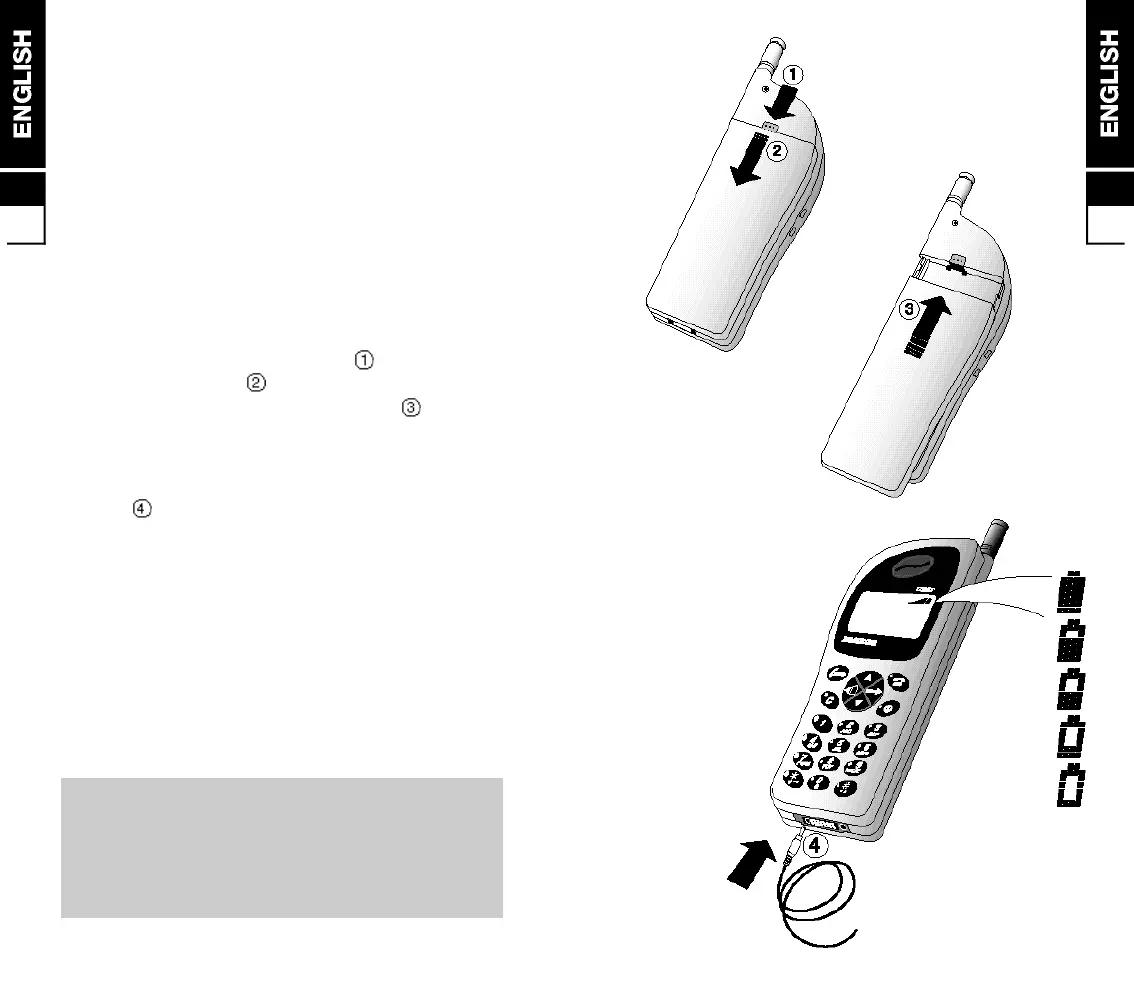
Removing and Attaching the Battery
■ to remove, press the release catch then slide the
battery off the phone
■ to attach, place the battery on the phone then slide
in the direction of the arrow to lock in position
Charging the Battery
■ insert the charger connecter into the base of the
p h o n e
■ plug the charger into the power supply. A filling
battery symbol and ‘CHARGING’ in the display
indicates charging
■ the battery is recharged when the symbol remains all
black and ‘CHARGING COMPLETED’ appears. This
takes approximately 1 hour dependent on the size of
the battery. It is normal for the battery, phone and
charger to become warm during charging
■ after charging, switch OFF the power supply then
disconnect the charger from the phone and the power
s u p p l y
WARNING: Charge the battery in a well ventilated
area between +5°C and +40°C using the supplied
charger. The use of non approved chargers could
result in a fire or injury through an electrical shock
and will invalidate all warranties given on this
product.
1
1.1


 To Next Page