3
3.4
Customising
Display Text
■ the phone will display text in the language of the SIM
(‘AUTOMATIC’) or you can choose a language from a
l i s t
/
■
611
■
-
/
]
■
[
(s e l e c t )
Greeting Message
■ you can input a 36 character message (3 lines of 12)
to be displayed each time the phone is switched ON
/
■
6 1 2
■
INPUT MESSAGE
■
\
■ please refer to ‘The Phone Book’ (page 4.1) if you
don’t know how to enter text. The number of
characters remaining for the message is shown in the
top right of the display
Ring Tones and Melodies
■ the volume and type of ring tone can be changed
v o l u m e :
/
■
6 3 1
■
-
/
]
■
[[
(s e l e c t / h e a r )
t y p e :
/
■
6 3 2
■
-
/
]
■
[[
(s e l e c t / h e a r )
Vibrating Battery
■ if you have a vibrating battery you can set the phone
to vibrate (refer to above)
/
■
633
■
-
/
]
■
[
(s e l e c t )
Keypad Sound
■ to change the sound of the keypad (beep, tones, off)
/
■
634
■
-
/
]
■
[
(select and hear)
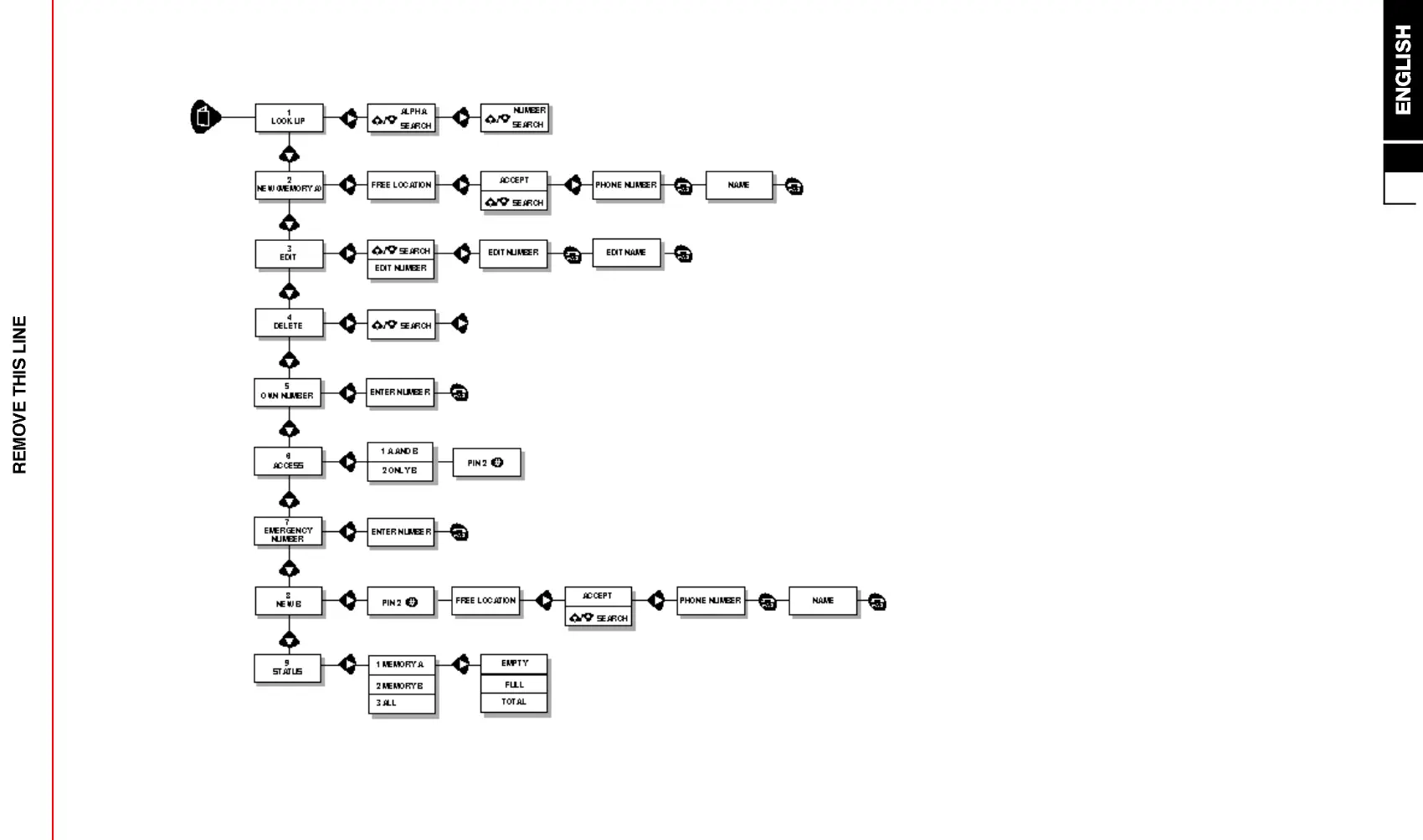
Phone Book Menu Structure (see section 4 for details)


 To Next Page