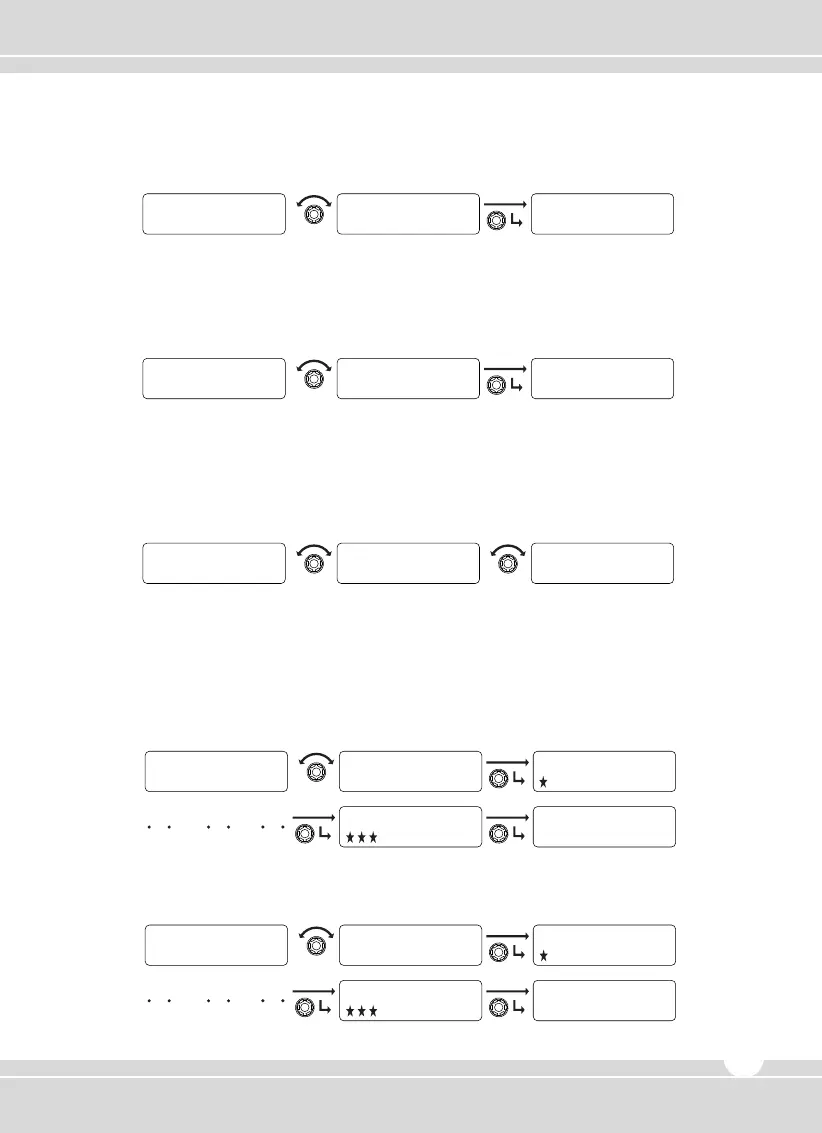
3) Scramble
① Rotate the right selector knob to select and press the knob to set.
② To return to upper menu, press the red button.
4) LCD Contrast
① Rotate the right selector knob to select one of 20 steps and press the knob to set.
② To return to upper menu, press the red button.
5) Big Font
① Rotate the right selector knob to select one of them such as “Name, Number, and Normal”
and press the knob to set.
② To return to upper menu, press the red button.
6) Password
① When a Password is pre-programmed, “PASSWORD INPUT” is displayed on the LCD. Input
the password by rotating the channel selector knob with a press to set the number. The 2nd
set shows how to input a “NEW PASSWORD”.
② When a password is not programmed, “NEW PASSWORD” is shown on the LCD. Input the
new password.
Y E S
Scramble
N O
Scramble
U t i l i t y
Scramble
1
Lcd Contrast
2
Lcd Contrast
U t i l i t y
Lcd Contrast
Normal
Big Font
CHANNEL Name CHANNEL Number
Big Font
Big Font
1
PASSWORD INPUT
2
PASSWORD INPUT
0
PASSWORD INPUT
0
PASSWORD INPUT
0
NEW PASSWORD
2
1
NEW PASSWORD
2
NEW PASSWORD
0
NEW PASSWORD
0
NEW PASSWORD
0
CHECKED PASSWORD
2
www.maxonamerica.com
19


 To Next Page