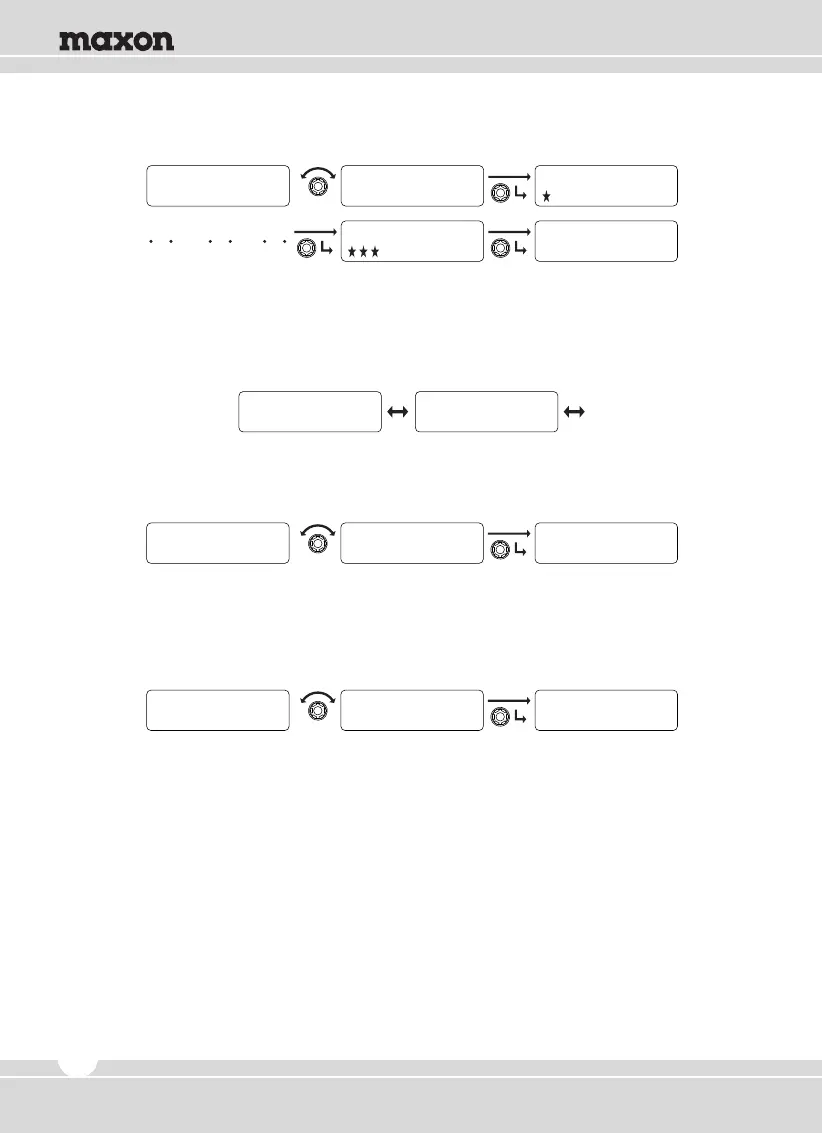
③ When “CHECKED PASSWORD” is shown, input new password once again.
5.5 Vehicle Setting
Consist of Horn Alert and Public Address. Rotate the right selector knob to select one
of them and press the knob to set.
1) Horn Alert
① Rotate the right selector knob to select “Yes” and then press the knob to set.
② To return to upper menu, press the red button.
2) Public AD
① Rotate the right selector knob to select “Yes” and then press the knob to set.
② To return to upper menu, press the red button.
1
CHECKED PASSWORD
2
CHECKED PASSWORD
0
CHECKED PASSWORD
0
CHECKED PASSWORD
SAVE PASSWORD
2
Horn A l e r t P u b l i c AD
V e h i c l e V e h i c l e
Y E S
Horn A l e r t
N O
Horn A l e r t
V e h i c l e
Horn A l e r t
Y E S
P u b l i c AD
Y E S
P u b l i c AD
V e h i c l e
P u b l i c AD
20


 To Next Page