5.6 Sound / Tone
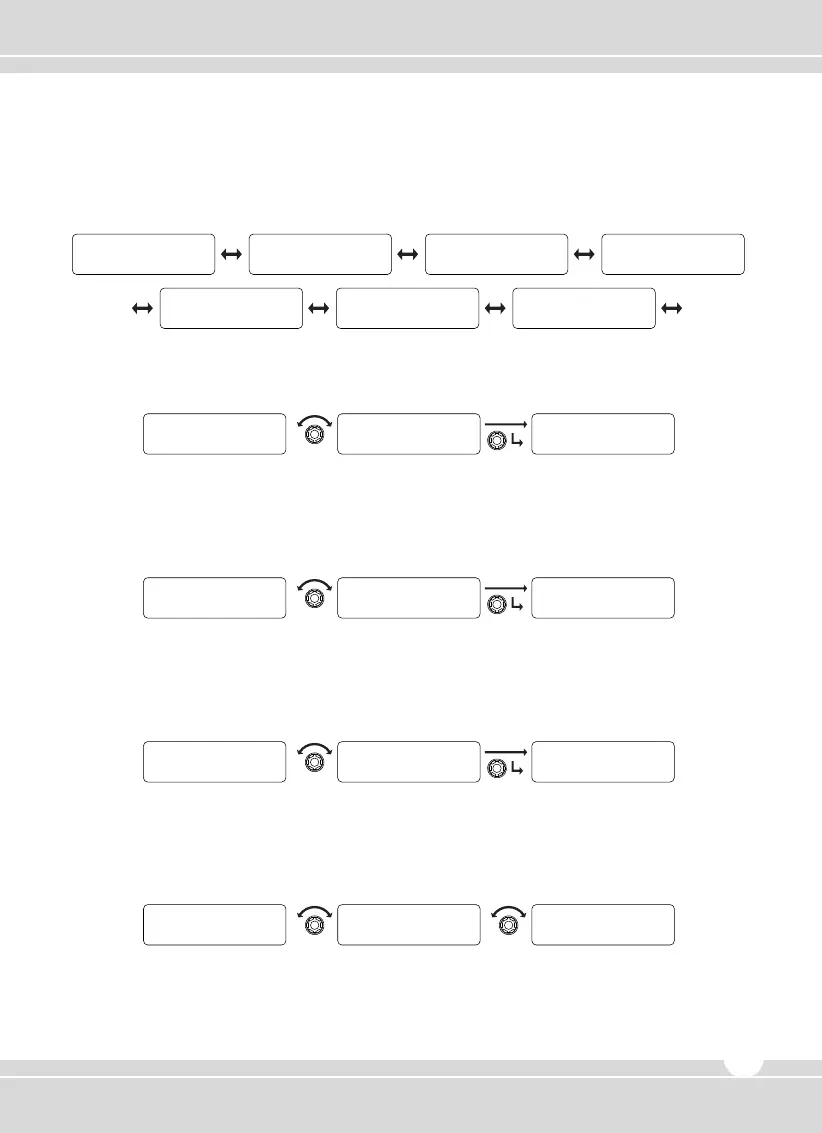
Consists of seven sub-menus of ID Sound, Compander, Key Tone, Speaker, Name Tone, MSG
Tone, and Call Tone. The selection is made available by rotating the right selector knob and then
pressing the knob to set.
1) ID Sound
① Rotate the right selector knob to select “Yes” and then press the knob to set.
② To return to upper menu, press the red button.
2) Compander
① Rotate the right selector knob to select “Yes” and then press the knob to set.
② To return to upper menu, press the red button.
3) Key Tone
① Rotate the right selector knob to select “Yes” and then press the knob to set.
② To return to upper menu, press the red button.
4) Speaker
① Rotate the right selector knob to select Front, Back, or Both, and then press the knob to set.
② To return to upper menu, press the red button.
www.maxonamerica.com
21
Y E S
ID Sound
Y E S
ID Sound
Sound/Tone
ID Sound
Y E S
Compander
Y E S
Compander
Sound/Tone
Compander
Message Tone Call Tone
Sound/ Tone
Name Tone
Sound/ Tone Sound/ Tone
Key Tone Speaker
Sound/ Tone
ID Sound
Sound/ Tone
Compander
Sound/ Tone Sound/ Tone
Y E S
Key Tone
Y E S
Key Tone
Sound/Tone
Key Tone
Front
Speaker
Back Both
Speaker
Speaker


 To Next Page