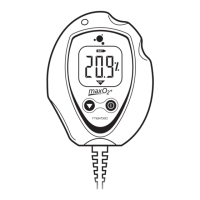
866.4.Maxtec www.maxtecinc.com 7
2. Remove the white barb tting by turning the barb counter-clockwise.
A 7/16” wrench may be needed to aid in the removal.
3. Remove the expired sensor from the sensor compartment and
carefully pull apart the small white connector that connects the black
and red sensor wires to the analog input wiring.
Note: The sensor contains lead and lead acetate, be sure to dispose
of expired sensors in accordance with hospital, local, state and
federal regulations.
4. Remove the new sensor from the packaging and remove the protective
lm from the sensor face.
5. Attach the new MAX-250 sensor connector to the MAXO
2
®
analyzer input
connector. The connector halves are keyed for proper orientation.
6. Position the sensor in the sensor compartment with the threaded end
of the sensor toward the bottom of the unit and the red and black wires
in the upward position, with the connectors tucked in the compartment
space on the right.
7. Replace the barb tting in the bottom of the case by turning the barb
clockwise with a 7/16” wrench. The barb tting needs to be tightened
rmly against the bottom of the sensor.
8. Slide the battery compartment cover back onto the case. Make sure the
tabs on the cover snap into position.
9. Wait approximately 20 minutes for the sensor to reach equilibrium.
10. Calibrate the new sensor.
NOTE: If the analyzer is on when the sensor is detached and replaced,
the analyzer will automatically force a re-calibration. The display will read
“CAL”.
5.0 PROBLEM SOLVING
»
If the "LOW BAT" icon is displayed on the LCD readout at any time, the
batteries should be replaced as soon as possible.
»
When the unit is in the power on mode and the LCD displays "000%," the
sensor is not connected properly. Check the sensor connection and if the
condition persists, contact Maxtec Customer Service.
»
If, at any time, "ErX" (i.e. Er1, Er4, etc.) appears on the LCD readout,
contact Maxtec's Customer Service Department.
6.0 CLEANING AND MAINTENANCE
»
When cleaning or disinfecting the MAXO
2
®
analyzer, take appropriate
care to prevent any solution from entering the instrument.
»
The MAXO
2
®
analyzer’s surface may be cleaned using a mild detergent
and a moist cloth.


 To Next Page