866.4.Maxtec www.maxtecinc.com 1
1.0 SYSTEM OVERVIEW
1.1 Base Unit Description
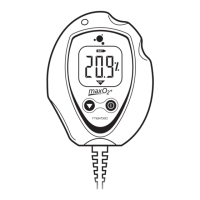
The MAXO
2
®
analyzer (Model OM-25A) provides unparalleled performance
and reliability, due to an advanced design that includes the
following features and operational benets.
»
Fast-responding, oxygen-specic, galvanic sensor that achieves 90% of
nal value in approximately 15 seconds at room temperature.
»
Extra-life oxygen sensor of approximately 1,500,000 O2 percent hours
(minimum 2 years in most applications).
»
Adaptable sample input connection and internal sensor.
»
Operation using 2 AA alkaline batteries (2 x 1.5 volts) for approximately
3000 hours of performance in typical usage. For extra extended long life,
2 AA lithium batteries may be used.
»
Durable, compact case that permits comfortable, hand-held operation.
»
Large, easy-to-read, 3 1/2-digit LCD display for readings in the 0-100%
range.
»
Simple operation and calibration using quick-calibrate key functions.
»
Self-diagnostic check of analog and microprocessor circuitry.
»
Low battery indication.
1.2 Components Description (please refer to page IV)
LCD Readout
1
3 1/2-Digit Display- The 3 1/2-digit liquid crystal display (LCD) provides
direct readout of oxygen concentrations in the range of 0-100%. It also
displays "CAL" when the calibration mode is entered.
2
"%" Sign- The percent sign indicates when the unit is locked or
unlocked and when the unit is calibrating.
3
Low Battery Indicator- The low battery indicator appears on the LCD
display when the power supply voltage drops below acceptable limits.
When the "LOW BAT" icon is visible, batteries should be replaced
immediately.
B
Keypad
4
ON/OFF Key- This key is used to turn the instrument on or off.
5
LOCK/UNLOCK Key- The presence of the "%" sign on the LCD
readout is an indication that the unit is in its normal "LOCKED" state.
Pressing the LOCK key will unlock the keypad and cause the "%" sign to
disappear. If no other keys are pressed within 10 seconds, the "%" sign
will reappear and the unit will revert to the "LOCKED" mode.
6
CALIBRATE Key- When the keypad is unlocked, the CAL key
is used in conjunction with the up and down keys to calibrate the
device.
A


 To Next Page