9
7.
8.
9.
10.
11.
12.
13.
14.
15.
Turn temperature knob and press heating control buttons to adjust temperature.
Turn timer knob to adjust temperature.
If needed, press rotisserie button to turn on rotisserie (especially when using DIY function).
If needed, press convection fan button to turn on convection fan.
Press Start / Stop button to start operating the oven.
When nished cooking, oven will ring / have a beep sound to signal the end of the cooking
cycle.
To remove the food in the oven, please lift up the rotisserie shaft by using the rotisserie
handle.
Make sure that both hooks are evenly place at the edge of the rotisserie shaft .Please lift up
the end which rest on the support rst (square-shape end) and slowly remove the rotisserie
shaft out of the drive socket.
Place the food on a cutting board or plate and remove the rotisserie shaft by taking out the
thumbscrews and rotisserie forks.
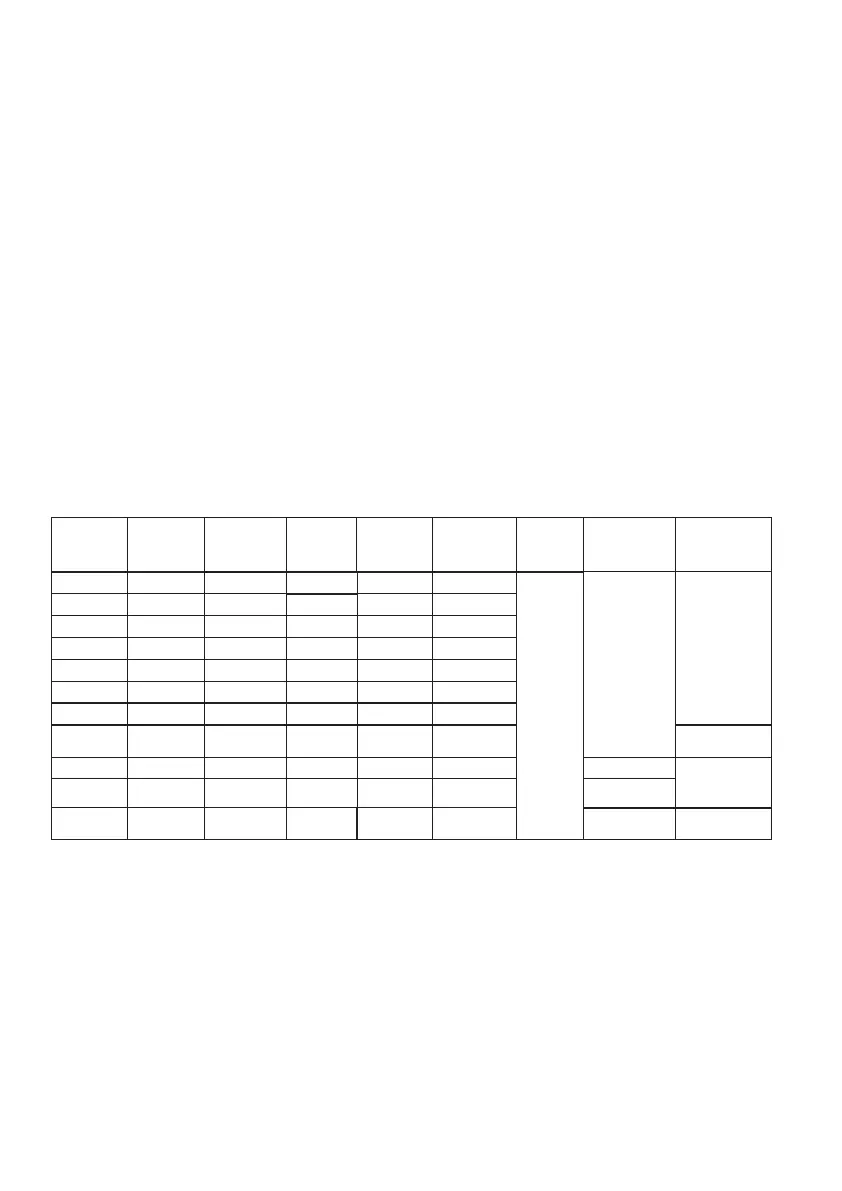
Cooking Function Information:
Note:
To activate DIY Function, turn the function knob until the Functions on the LED screen does
not blink, then turn the temperature and timer knob to adjust your cooking time accordingly.
DEFAULT
UPPER
TEMP °C
FUNCTION
160
200
170
200
170
170
200
DEFAULT
LOWER
TEMP °C
160
200
170
200
165
170
200
TEMP
RANGE °C
50 180
50 180
150 230
120 230
150 230
120 230
45 230
150 230
TIME RANGE
H:MM
0:01 2:00
0:01 2:00
0:01 2:00
0:01 2:00
0:01 2:00
0:01 2:00
0:01 2:00
0:01 2:00
LIGHT
ON
CAN BE
TURNED OFF
CONVECTION
FAN
OFF
CAN BE
TURNED ON
ROTISSERIE
OFF
ON
CAN BE TURNED OFF
DEFAULT
TIME
H:MM
0:30
0:30
0:05
0:30
0:18
0:12
0:20
1:00
GRILL
BROIL
TOAST
BAKE
PIZZA
COOKIES
STEAK
CHICKEN
35 25 50 0:30 15:00 OFF
OFF
1:00FERMENT
68 68 30 120 0:30 15:00
ON
CAN BE TURNED OFF
5:00DRY FRUIT
180 180 50 230 0:01 2:00
OFF
CAN BE TURNED ON
OFF
CAN BE TURNED ON
0:30DIY


 To Next Page