3
Before using you electric oven
•
•
•
•
•
•
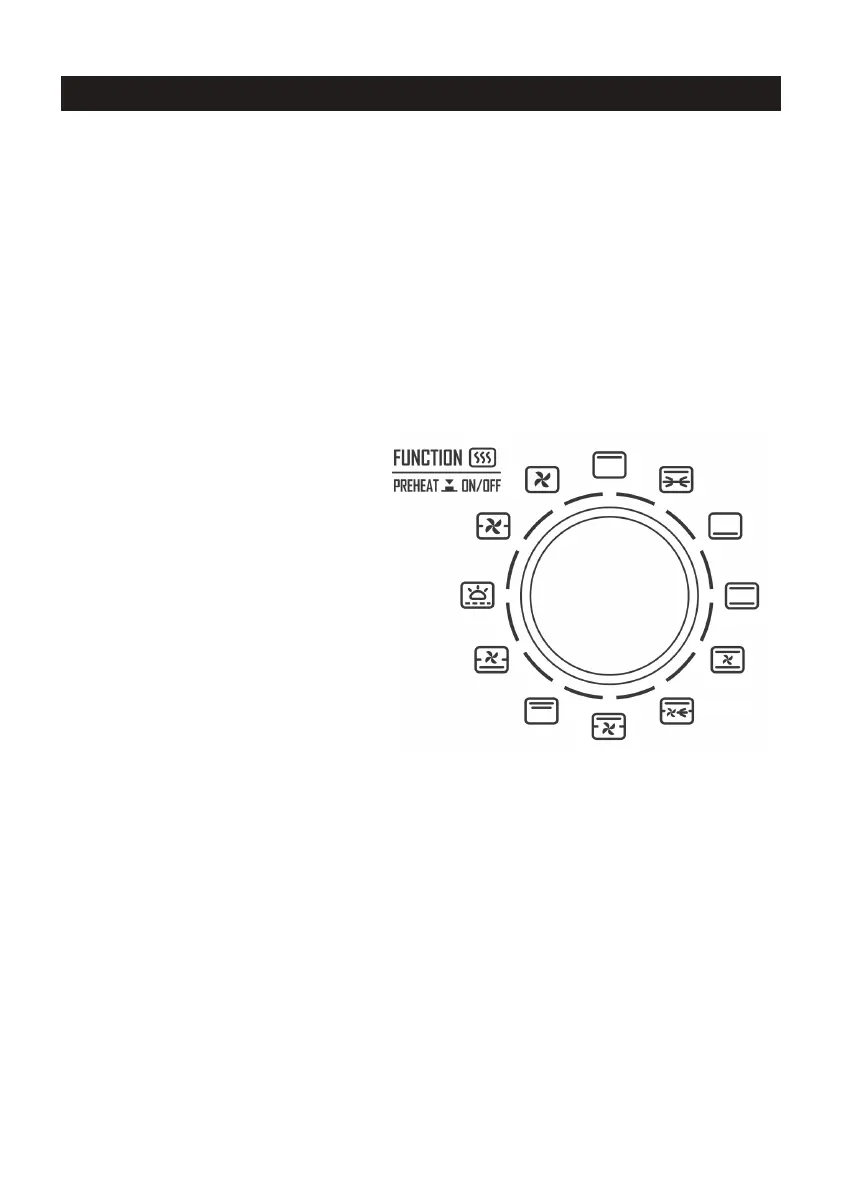
Functions
Power
•
•
•
•
Note:
1.
2.
3.
Function Selector Knob
•
•
Top / Bottom Heat Selector Knob
•
•
Make sure that the appliance is unplugged.
Wash the accessories with mild dish detergent and rinse them thoroughly with water.
Thoroughly dry all accessories and re-assemble them in the appliance before plugging the
appliance into the power outlet.
If the appliance is used for the rst time, we recommend that you run the oven (without any
food or accessories in it) at the highest temperature on the toast function for about 10
minutes, it may slightly emit smell and smoke. This is normal and only last for a short time.
Make sure to use the appliance in a well-ventilated area.
This appliance has a 5 min cut o memory function.
Plug the power cord in.
Press the lowest knob
“On / Pause / O” and the oven will
begin self-testing.
The function menu LED will light up
clockwise, and then the cavity lamp lights up.
The display panel will show 00:00 and
automatically enters standy-by mode.
The oven will switch o after 1 min if there is
no operation.
The beeper ring tones when receiving eective operations.
The upper display panel shows the top heating temperature, the middle display panel
shows the bottom heating temperature, and the lower display panel shows the operation
duration.
The function knob can be rotated clockwise or anti-clockwise for function selection. The
default temperature is shown for each function.
Rotate the knob to cycle through the Menu.
Press for preheating.
Rotate to adjust the temperature from 60˚C - 230˚C.
Press for heat setting.
CONTROLS AND OPERATIONS


 To Next Page