4
Timer Selector Knob
•
•
•
Note:
•
Preheating
1.
2.
3.
4.
Menu Selection
1.
Rotate to adjust the 180 min.
In baking mode, press the knob one to pause or switch on the appliance.
Press the knob and hold to stop the appliance or set it to standby mode.
After baking, the cavity is hot, you can open the front door and set to the cooling
convection function until the cavity has cooled down to reach your food safely.
Turn the function knob to select a function, the display shows the corresponding function
of the default time and temperature.
Press the top knob and the bottom of the display will show “PREH” and the preheating
starts, press the top knob again and the preheating will stop.
Once the preheating is completed, there will be a beep sound, the oven will switch o after
2 min if there is not operation.
Place the food into the oven and start baking.
Turn the function knob to select a function, the display shows the corresponding function
of the default time and temperature.
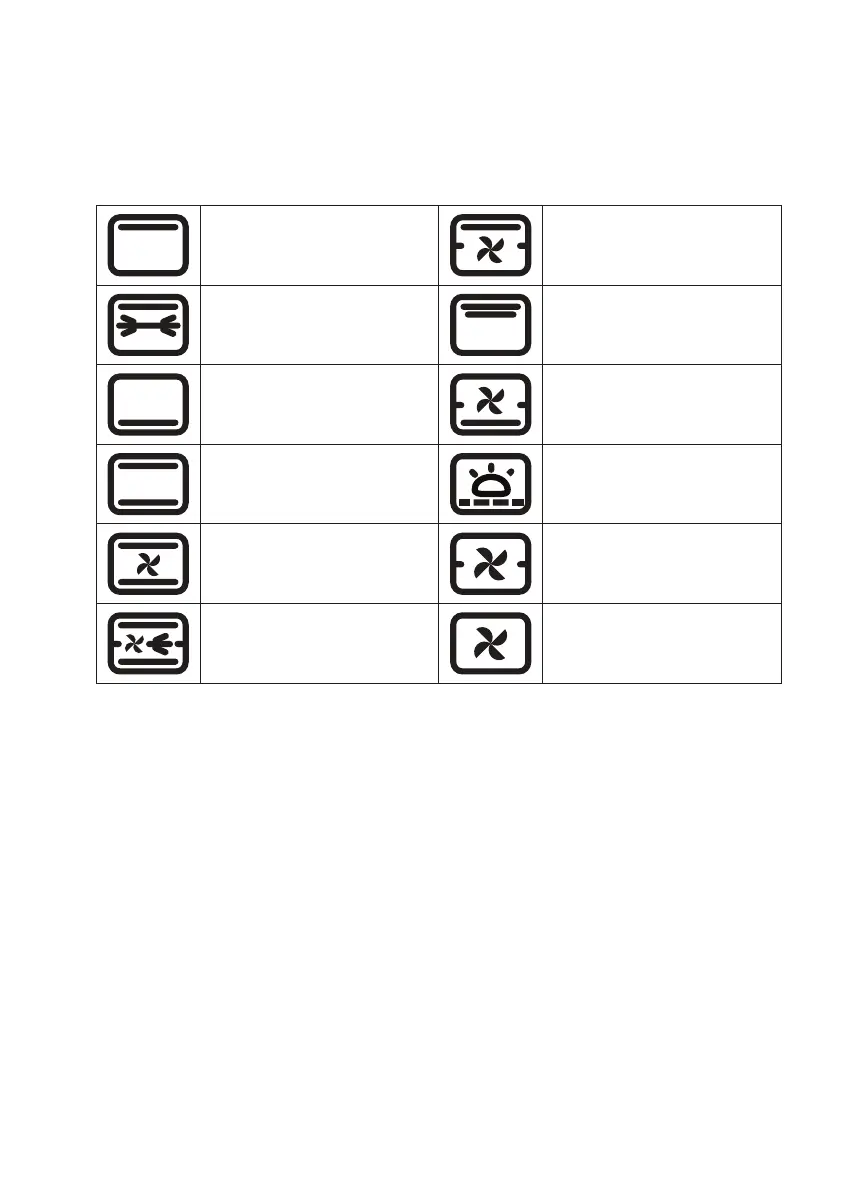
Top Heating:
For sh llet baking and sea
food
Top Heating + Convection:
For skewer and chicken
wings
Top Heating + Rotisserie:
For whole larger poultry
baking and large meat
Top Heating Full Power:
For skewer chicken wings
Bottom Heating:
For bit / thick cake and meat
baking
Bottom Heating +
Convection:
For cooking risotto
Top / Bottom Heating:
or cakes, pork, steak, meat
balls, risotto
Bottom Low Temperature
Heating: For dough, yogurt,
and ferment products
Top / Bottom Heating +
Convection: For cakes, pork,
steak, meat balls, risotto
Convection + Heating:
For defrost
Top Heating + Convection +
Rotisserie:
For nuts
Cooling Convection:
For cavity cooling
Function Guide


 To Next Page