5
2.
3.
4.
On / Pause / O
1.
2.
3.
4.
Note:
•
•
•
•
•
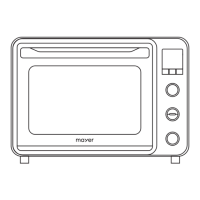
After selecting the function, press the middle knob and the highest layer number will blink,
then the top heating temperature can be set.
Press the middle knob again to set the bottom heating temperature.
After the temperatures have been set, turn the timer knob to set the baking time.
After the functions and temperatures have been set, press the lowest knob to switch on,
pause or o.
Press once to switch it on.
Press again to pause the baking.
Press and hold to stop the baking.
When the oven is baking, rotate the timer knob to adjust the baking time.
When baking the cavity lamp lights up for 1 min when any knob is pressed or turned.
The oven updates the temperature every 5˚C before reaching the target temperature, once
done, it will update every 1˚C when cooling down.
The display panel shows the temperature when baking, press the middle knob to check the
current temperature setting, press again or wait for 5 secs and the display panel will return
to showing the temperature of the oven.
If baked biscuits show even browning results, lower the temperature and extend baking
time. You may experiment and adjust to identify your preference on using dierent
ingredients. Or while baking, turn the pan or adjust the level of rack position to ensure
biscuits brown on both side evenly.


 To Next Page