11
Slide 9
LED/ Switch Test
LED/Switch Test
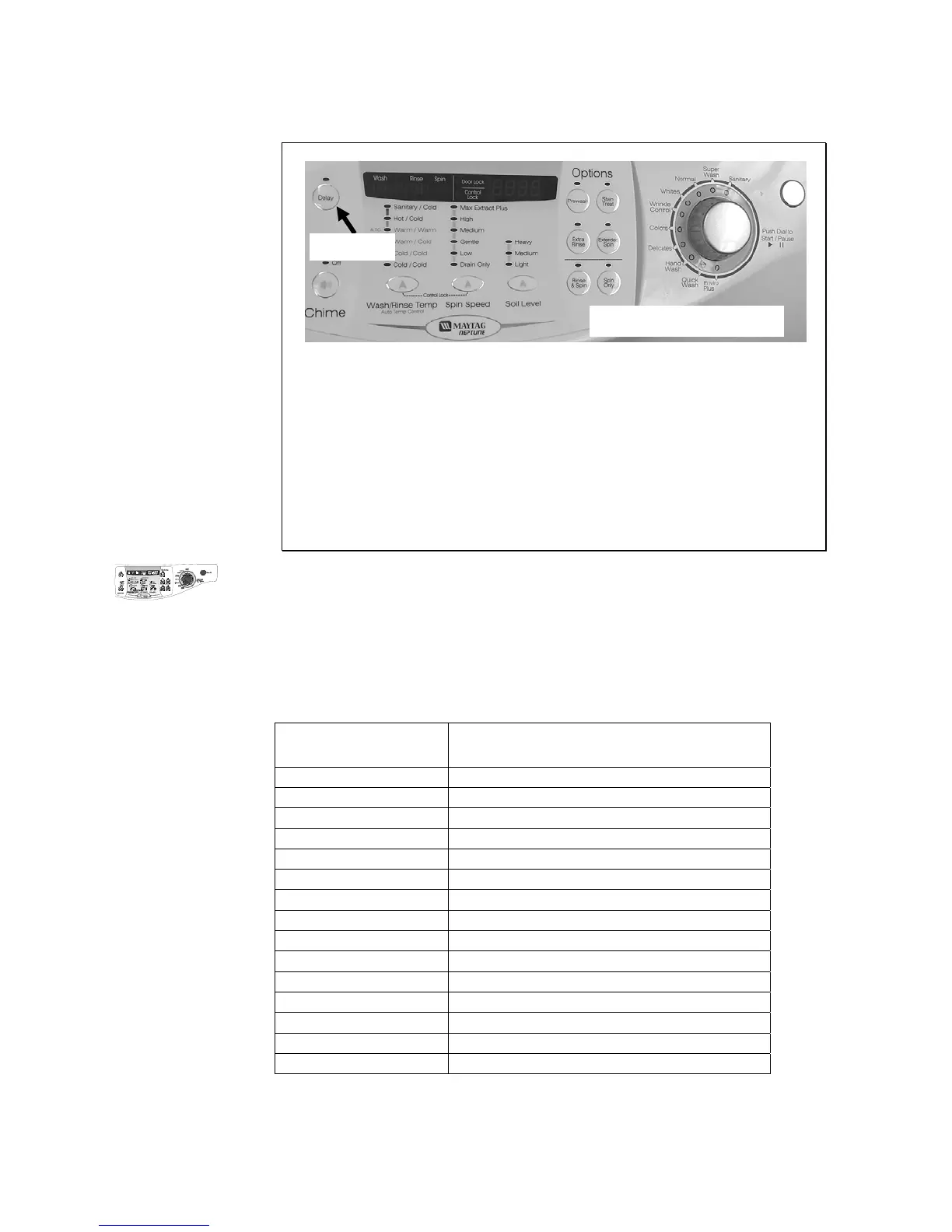
While in Service Mode, press the Delay key to start a LED/Switch check.
All the LED’s can be toggled or slewed by pressing the key associated
with the LED or set of LED’s. All keys (including the OFF button) must be
pressed within 5 minutes for this test to pass. “PA” will be displayed for
five (5) seconds once all keys have been pressed and the test is
completed. Following 20seconds of inactivity at any point, this test will exit
without any display. The Power Off switch pad must be pressed twice
within 30 seconds to cancel this test.
Press
Refer to Technical Data Sheet for Detailed Instructions
LED/Switch Test
While in Service Mode, press the Delay key to start a LED/Switch check. All the
LED’s can be toggled or slewed by pressing the key associated with the LED or set of LED’s. All
keys (including the OFF button) must be pressed within 5 minutes for this test to pass. “PA” will be
displayed for five (5) seconds once all keys have been pressed and the test is completed. Following
20seconds of inactivity at any point, this test will exit without any display. The Power Off switch pad
must be pressed twice within 30 seconds to cancel this test.
Switch Action
Delay Start Press once
Chime Press 3 times
Extra Rinse Press once
Soil Level Press 4 times
Spin Speed Press 5 times
Temperature Press 5 times
Rinse&Spin Press once
Spin Only Press once
Prewash Press once
Extended Spin Press once
Selector Knob Rotate 1 full revolution clockwise
Selector Knob 1 position counterclockwise
Start Pause Press once
Selector Knob Press once
Power Off Press once






 To Next Page