5
Slide 4
The motor speed will be displayed when started (motor not running display will be 0). The present
state of the machine will not be changed (i.e., the current cycle in progress will not be interrupted
and only the display will change). All LED’s will be turned off except the “Door Lock” LED. It will
continue to display the condition of the door lock.
To exit:
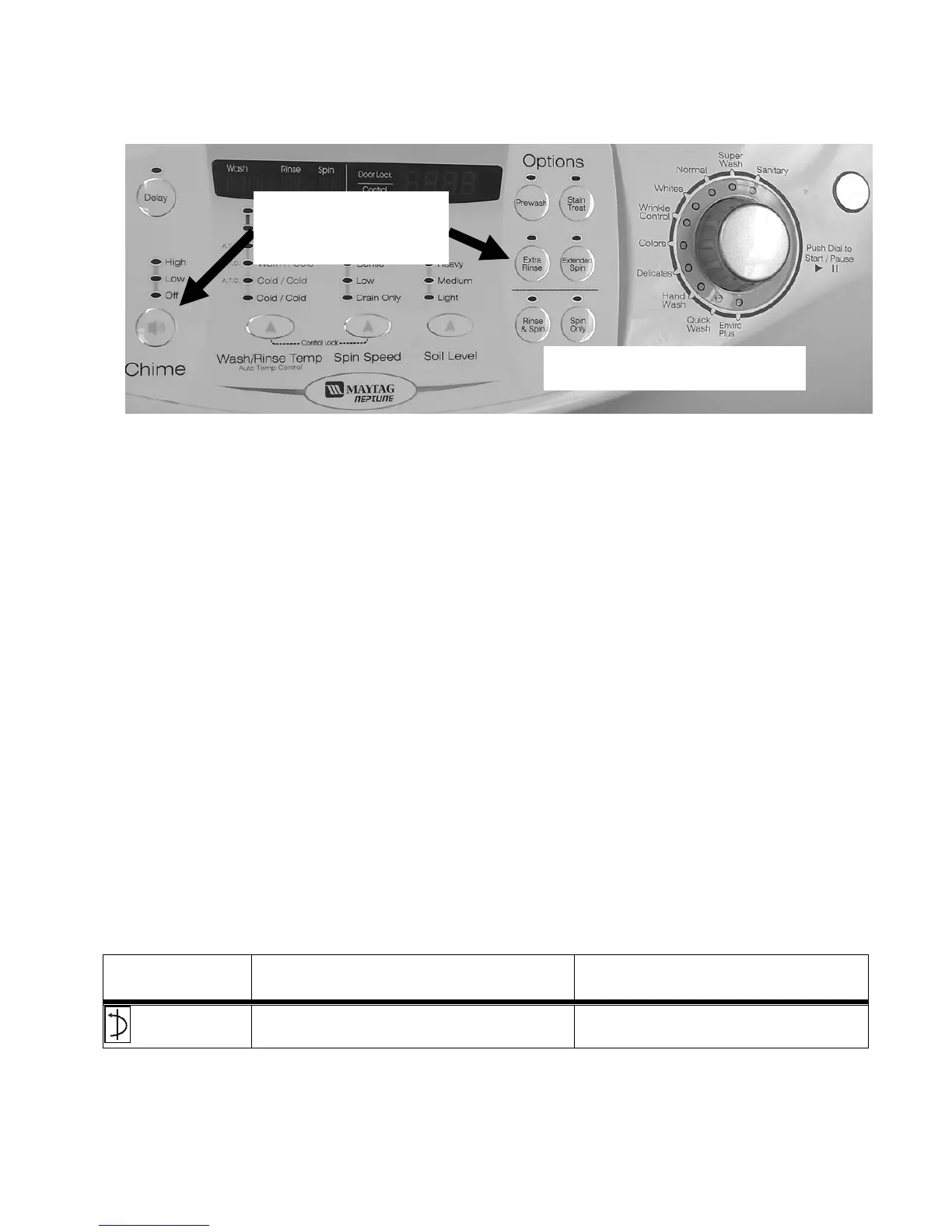
1) Press Chime and Extra Rinse keys for 3 seconds again, or
2) press Off, or
3) unplug the machine. Pressing the Rotary Selector knob while running a test will pause the
individual test, while remaining in Service Mode.
The following table summarizes special tests and features available in Service Mode, along with
methods of activation and cancellation.
Access Service Tests and Diagnostic Features while in Service Mode.
Test or Display
Press LED to Start
Press LED to Cancel
Quick Spin
Test
Press Delay Start and Rinse&Spin Press Delay start and Rinse&Spin
Press Off (exits Service Mode)
Enter / Exit Service Mode
To enter Service Mode press the Chime and Extra Rinse
keys for three seconds or until the control beeps.
NOTE: The washer must be on before the Service Mode
can be entered.
Press and
hold 3 Sec.
Service Mode
Refer to Technical Data Sheet for Detailed Instructions




 To Next Page