516532 B PUBLICATION DATE 1 JUN 2007.DOC PROGRAMMING MANUAL 59
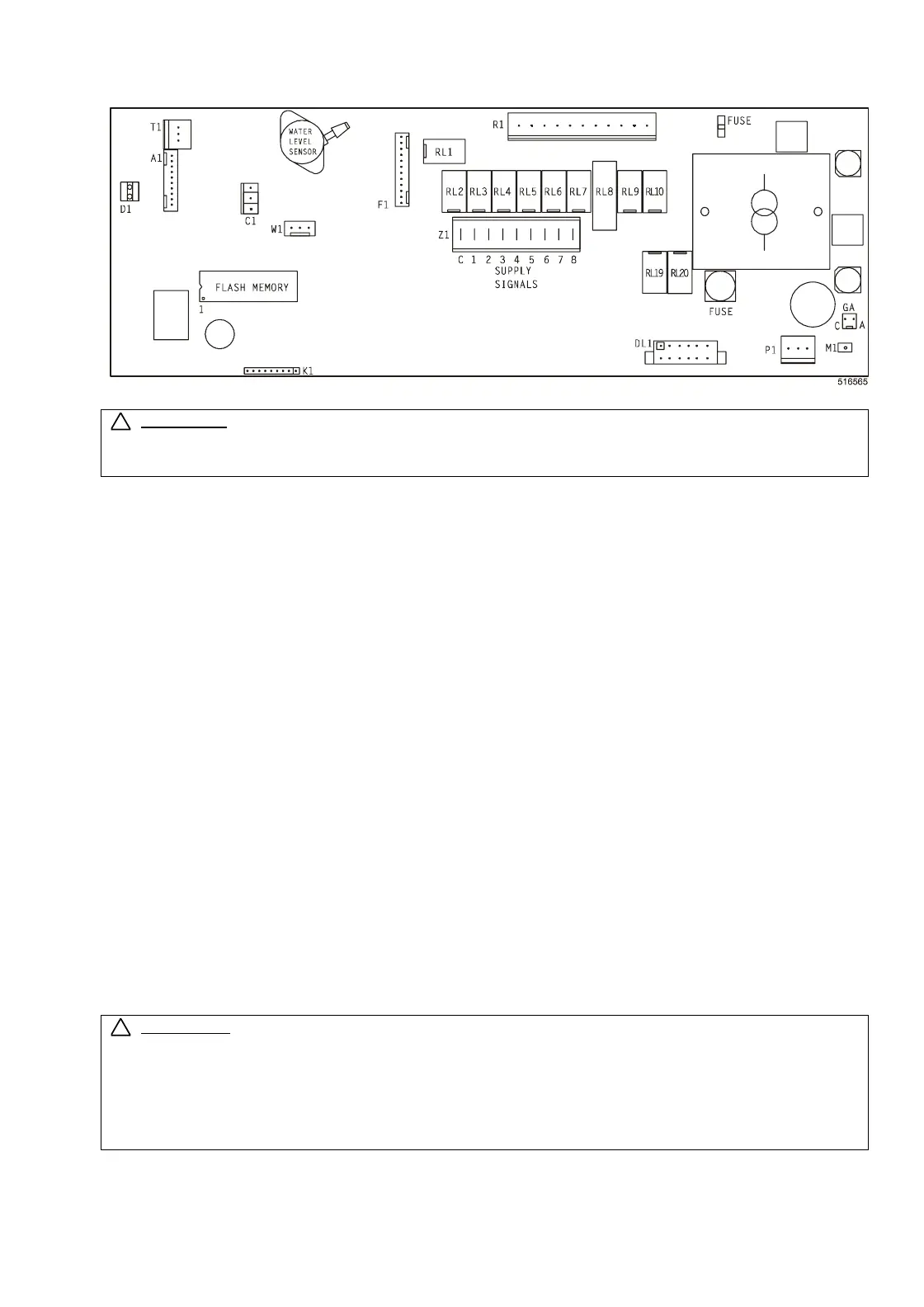
9.3. PROGRAMMER CIRCUIT BOARD
Picture 8.3
WARNING !
CONNECTION TO THE WRONG VOLTAGE SUPPLY MAY CAUSE SERIOUS BODILY INJURY AS
WELL AS DAMAGE TO THE ELECTRONIC PARTS AND TO THE WASHING MACHINE ITSELF.
- Voltage : 200-240 Vac, 50/60 Hz
- Power : max 16 VA
- Memory : Flash Memory (contains the software)
EEPROM (contains the customized programs)
- Outputs : 11 relays
- Serial interface : RS485 (2 wire) networking between wash computer and
external device (PC Computer)
- Display : LCD display
9.4. INSTRUCTIONS FOR REPLACING THE ELECTRONIC BOARD
T Switch off the main power supply.
T Open the cover plate of the washing machine.
T Remove the connectors from the circuit board and remove the hose from the level sensor.
T Remove the combination of the metal support plate - electronic timer by the rear side of the fascia
panel. Remove the two nuts of the metal support plate and pull the assembly carefully by the
rear side.
T Put the new combination support plate – electronic timer into the machine and tighten the two nuts.
T Reconnect all the connectors and put the hose back on the level sensor.
T Close the cover plate of the washing machine.
T Now you can Switch On the power supply.
T The display should illuminate.
ATTENTION
!!!
MAKE SURE THAT THE HOSE OF THE LEVEL SENSOR IS TIGHTENED WELL WITH A FASTENER.
IF THE HOSE IS NOT AIR TIGHT THEN THE LEVEL SENSOR WILL NOT MAKE A CORRECT MEASUREMENT.
MAKE SURE THAT YOU DON’T DAMAGE THE FLEX CABLE OF THE KEYPAD WHEN YOU PUT
THE GRAPHIC CONTROL WASH COMPUTER BACK INTO THE MACHINE.
!
!



 To Next Page