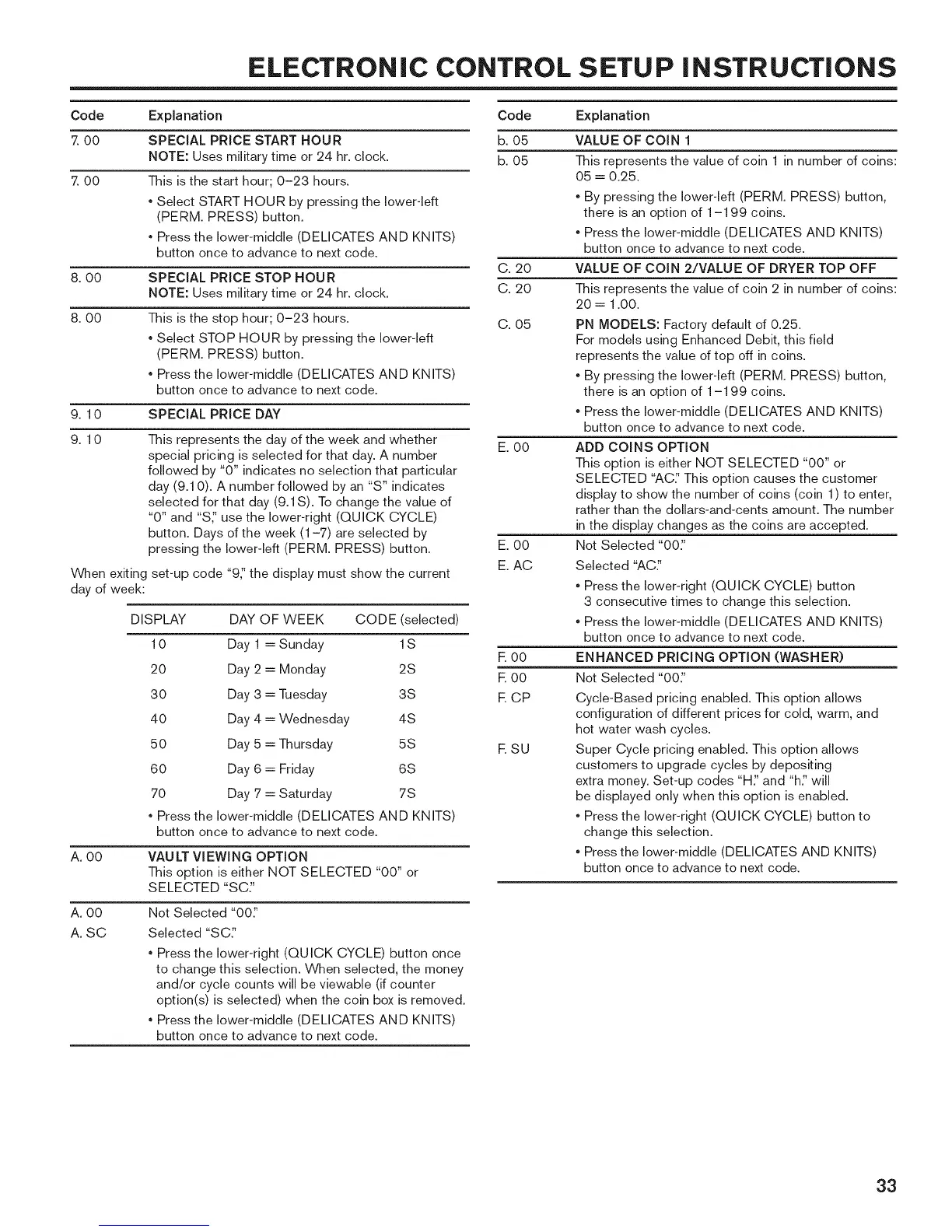
ELECTRONIC CONTROL SETUP iNSTRUCTiONS
Code
7 00
00
Explanation
SPECIAL PRICE START HOUR
NOTE: Uses milkary time or 24 hr. dock.
This is the start hour; 0-23 hours.
, Select START HOUR by pressing the Iowerqeft
(PERM. PRESS) button.
, Press the lower-middle (DELICATES AND KNITS)
button once to advance to next code.
8. 00
8. 00
SPECIAL PRICE STOP HOUR
NOTE: Uses milkary time or 24 hr. dock.
This is the stop hour; 0-23 hours.
, Select STOP HOUR by pressing the lower-left
(PERM. PRESS) button.
, Press the lower-middle (DELICATES AND KNITS)
button once to advance to next code.
9. 10 SPECIAL PRICE DAY
9.10
When exiting
day of week:
This represents the day of the week and whether
special pricing is selected for that day. A number
followed by "0" indicates no selection that particular
day (9.10). A number followed by an "S" indicates
selected for that day (9.1S). To change the value of
"0" and "S_' use the lower-right (QUICK CYCLE)
button. Days of the week (1-7) are selected by
pressing the lower-left (PERM. PRESS) button.
set-up code "9_' the display must show the current
DISPLAY DAY OF WEEK CODE (selected)
10 Day 1 = Sunday 1S
20 Day 2 = Monday 2S
30 Day 3 = Tuesday 3S
40 Day 4 = Wednesday 4S
50 Day 5 = Thursday 5S
60 Day 6 = Friday 6S
70 Day 7 = Saturday 7S
, Press the lower-middle (DELICATES AND KNITS)
button once to advance to next code.
A. O0 VAULT VIEWING OPTION
This option is either NOT SELECTED "00" or
SELECTED "SC"
A. 00
A. SC
Not Selected "00_'
Selected "SC_'
, Press the lower-right (QUICK CYCLE) button once
to change this selection. When selected, the money
and/or cycle counts will be viewable (if counter
option(s) is selected) when the coin box is removed.
, Press the lower-middle (DELICATES AND KNITS)
button once to advance to next code.
Code
b. 05
b. 05
C. 20
C. 20
C. 05
E. O0
E. 00
E. AC
E 00
E 00
E CP
ESU
Explanation
VALUE OF COIN 1
This represents the value of coin 1 in number of coins:
05 = 0.25.
, By pressing the lower-left (PERM. PRESS) button,
there is an option of 1-199 coins.
, Press the lower-middle (DELICATES AND KNITS)
button once to advance to next code.
VALUE OF COIN 2/VALUE OF DRYER TOP OFF
This represents the value of coin 2 in number of coins:
20 = 1.00.
PN MODELS: Factory default of 0.25.
For models using Enhanced Debit, this field
represents the value of top off in coins.
, By pressing the lower-left (PERM. PRESS) button,
there is an option of 1-199 coins.
, Press the lower-middle (DELICATES AND KNITS)
button once to advance to next code.
ADD COINS OPTION
This option is either NOT SELECTED "00" or
SELECTED "AC_' This option causes the customer
display to show the number of coins (coin 1) to enter,
rather than the dollars-and-cents amount. The number
in the display changes as the coins are accepted.
Not Selected "00_'
Selected "AC:'
, Press the lower-right (QUICK CYCLE) button
3 consecutive times to change this selection.
, Press the lower-middle (DELICATES AND KNITS)
button once to advance to next code.
ENHANCED PRICING OPTION (WASHER)
Not Selected "00_'
Cycle-Based pricing enabled. This option allows
configuration of different prices for cold, warm, and
hot water wash cycles.
Super Cycle pricing enabled. This option allows
customers to upgrade cycles by depositing
extra money. Set-up codes "H_' and "h:' will
be displayed only when this option is enabled.
, Press the lower-right (QUICK CYCLE) button to
change this selection.
, Press the lower-middle (DELICATES AND KNITS)
button once to advance to next code.
33



 To Next Page