Maytech Waterproof Remote Control User Manual_20191012 by Eric and Eileen
14
/
17
19. Sub-Menu Description
19.1 Thr. Mode
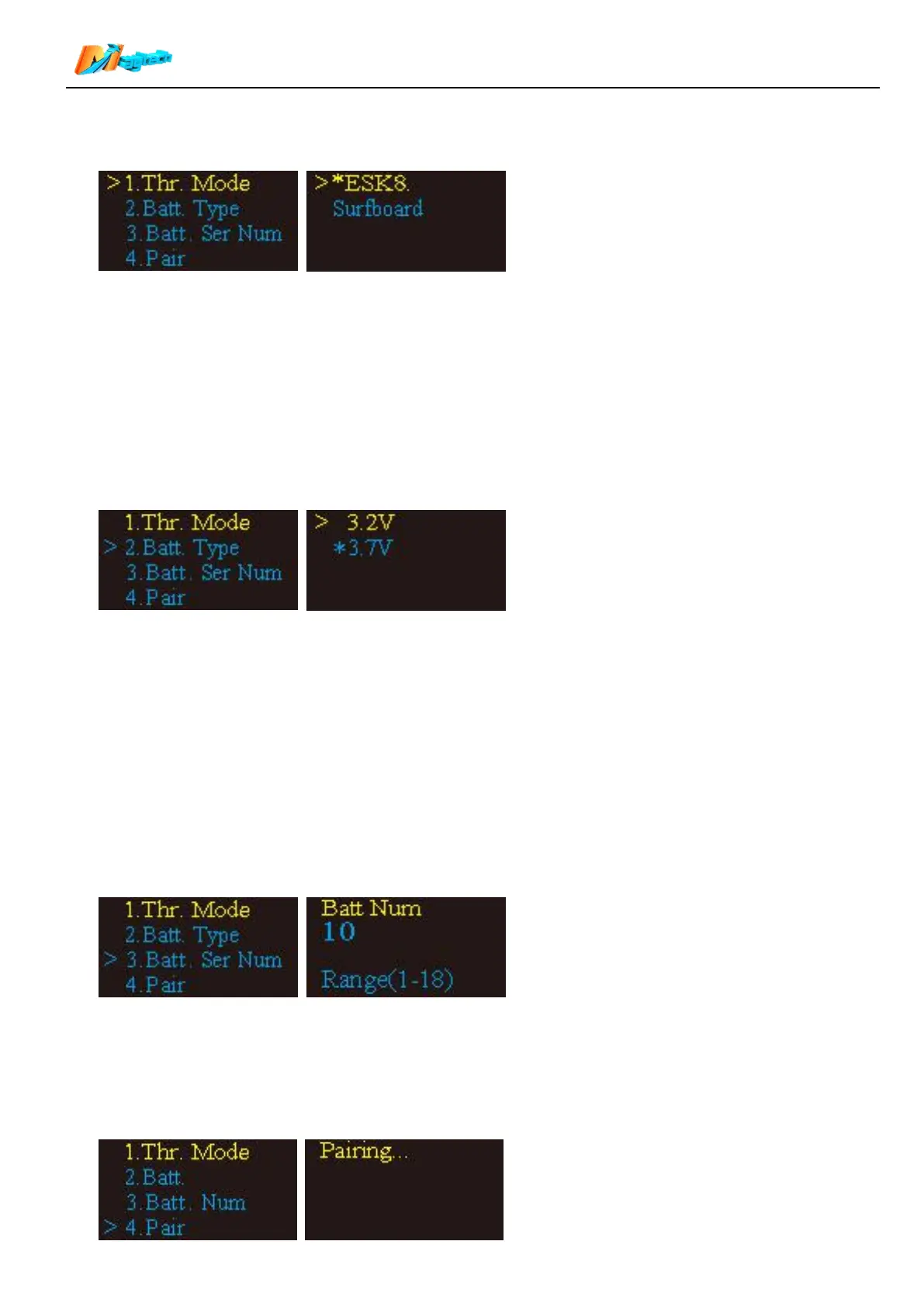
Select 【>1.Thr. Mode】and long press function button for 1 second to enter Sub-menu.
【ESK8.】Electric skateboard mode
【Surfboard】Electric surfboard mode
Please refer to “Item 16. Display” to check the two modes details:
Short press function button to select control mode. Mode with * is current mode, Mode with >is selected
mode. Long press function button to move * to the mode you wanted. After setting, press brake trigger back to
main menu.
Default: Surfboard.
19.2 Batt. Type
Select 【>2.Batt.】and long press function button for 1 second to enter Sub-menu.
【3.2V】Lithium-ion ferrous phosphate batteries; 3.2 V per cell.
【3.7V】Lithium ion or lithium polymer batteries; 3.7 V per cell.
The full voltage of the main battery can be obtained by matching this parameter with “3. Batt. Num”.
According to the collected actual voltage , it will calculate the percentage of power, display it on the top of the
home screen.
Short press function button to select control mode. Mode with * is current mode, Mode with >is selected mode.
Long press function button to move * to the mode you wanted. After setting, press brake trigger back to main
menu.
Default: 3.7 V
19.3 Batt. Ser Num
Select 【>3.Bat.Num】and long press function button for 1 second to enter Sub-menu.
Press function button to add Battery number. Max number is 18.
Press brake trigger to save number and return to main menu.
Default: 10
19.4 Pair


 To Next Page