Maytech Waterproof Remote Control User Manual_20191012 by Eric and Eileen
13
/
17
17. Entry and Exit Main Menu
【Entry Main Menu】Hold brake trigger to the end and press Function button.
【Exit Main Menu】When the parameters are edited, press the brake to the end, exit from the sub-menu to
the main menu, and then press again to exit from the main menu to the main interface. Special case: when
set “Calibration”, trigger will be occupied, please long press function button to exit from Calibration sub-menu
to main menu.
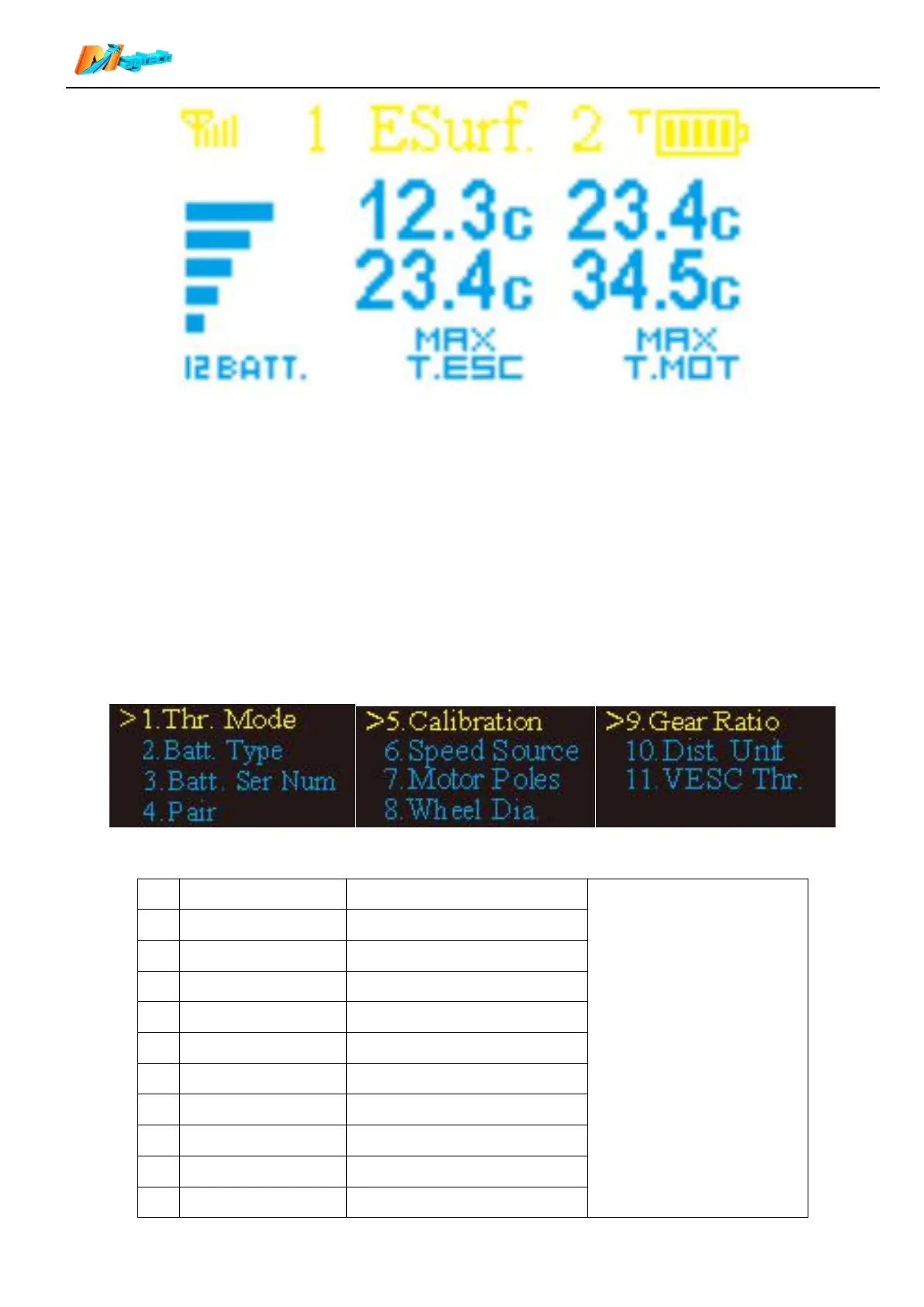
18. Main Menu Description
Main Menu has 11 options, with specific parameters in the sub-menu under each option:
【Select options in Main
Menu】
Short press function button,
jump to the next option;
Long press function button,
select current option
and enter sub-menu.
Main battery Series Number
Remote throttle calibration
=Wheel pulley/motor pulley
VESC throttle control type


 To Next Page