Installation instructions Connecting Solar collector to filter pump
HeatMiser II Installation guide. © 2014, all rights reserved P a g e | 12
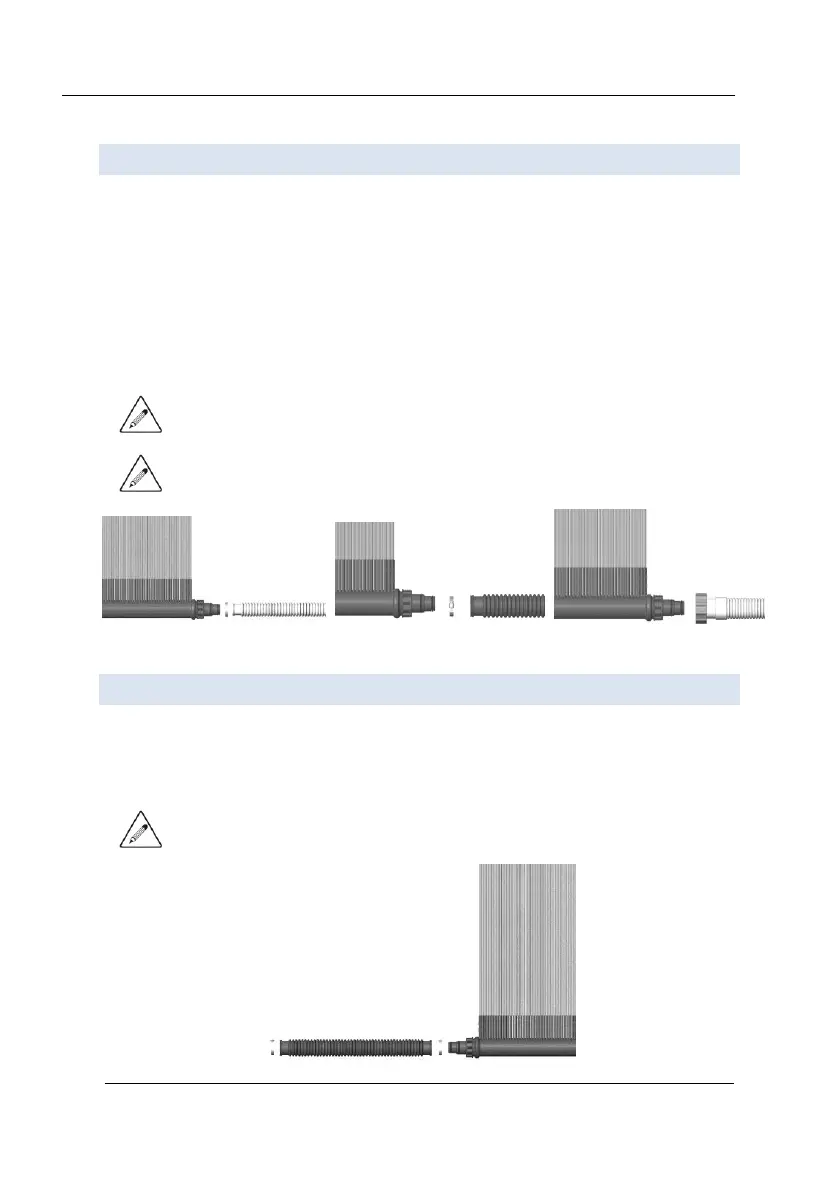
CONNEC TING SOLA R CO L LECT OR TO F I LTER PUMP
1. Turn off the filter pump.
2. Block water flow at both the pool inlet and outlet to prevent water from flowing
through the hoses.
3. Detach the hose from your pool inlet.
4. Connect the detached hose to the hose adapter fitting of the solar collector,
applying lubricant to the 'O ring', and secure hose with the supplied metal hose
clamp. If you are using a pool with a special screw on connector (Intex style
connector), apply a generous amount of Teflon tape (not supplied) to adapter
threads and screw the hose directly to the adapter.
NOTE: When connecting the HeatMiser II, make sure the 'O ring' stays in place and
doesn't get pinched.
NOTE: When installing HeatMiser II allow for removal of the collector for
winterizing.
CONNEC TING SOLA R CO L LECT OR TO P OOL
1. Connect the hose (not included) from the HeatMiser II to the return inlet on your
pool and secure hose using the stainless steel hose clamps for best results.
2. Connect the other side of the hose to your pool.
NOTE: When connecting the flex hose to the hose adapter fitting make sure the 'O
ring' stays in place and doesn't get pinched.



 To Next Page