Icon Function
Displays sound settings to adjust audio quality level.
Refer to Volume/Display/Sound Controls on page 5-37.
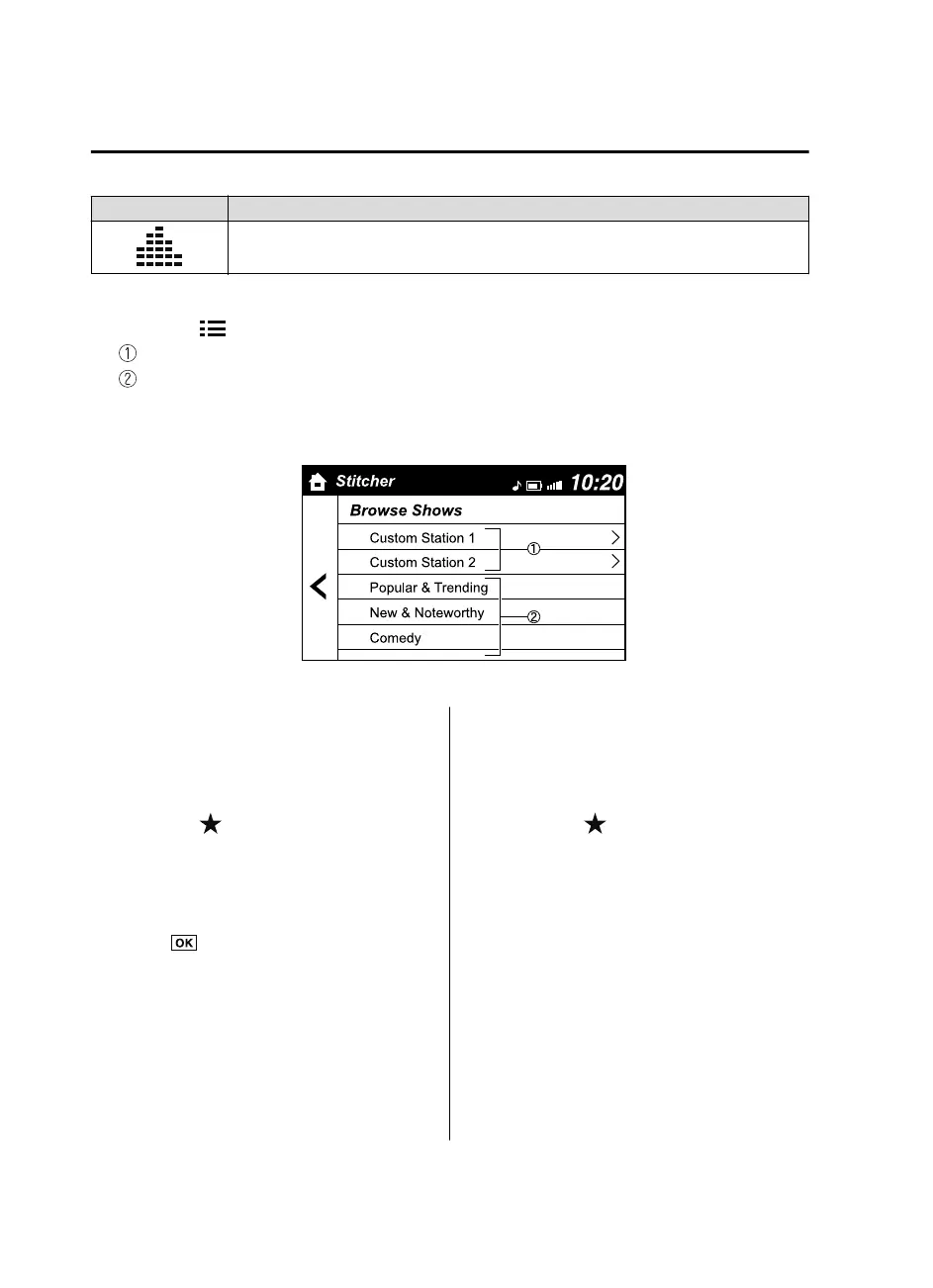
Station list
1. Select the
icon to display the station list.
Favorites station name: Select to display the program registered to your favorites.
Category name: A recommended category selected from your favorites by Stitcher™
is displayed.
Select it to display the category program.
2. Select the program name to play it.
Add to your favorites
If the current program has not been
registered to your favorites, it can be
registered to your favorites.
1. Select the
icon to display the
favorites station which the registration
can be added.
2. Select the station name which you
want to register.
3. Select
to add the program to the
selected favorites station.
NOTE
Multiple favorites stations can be
selected and registered.
Favorites stations registered by oneself
as well those set by default are
displayed.
Delete from your favorites
If the current program has already been
registered to your favorites, the program
can be deleted from your favorites.
1. Select the
icon.
2. The program is automatically deleted
from the favorites station.
Interior Features
Bluetooth®
5-124
Mazda3_8GE4-EA-17F_Edition1 2017-4-7 11:59:21



 To Next Page