EasyManua.ls Logo

Mazda CX-7 2012 - Page 26

Mazda CX-7 2012
58 pages
Print Icon
To Next Page IconTo Next Page
To Previous Page IconTo Previous Page
Loading...
26
Before
Use
Getting
started
Routing
Set Destination
Before Steps
Select
Previous
Home
Memory
Point
Open the [Set
Destination]
Menu
Select
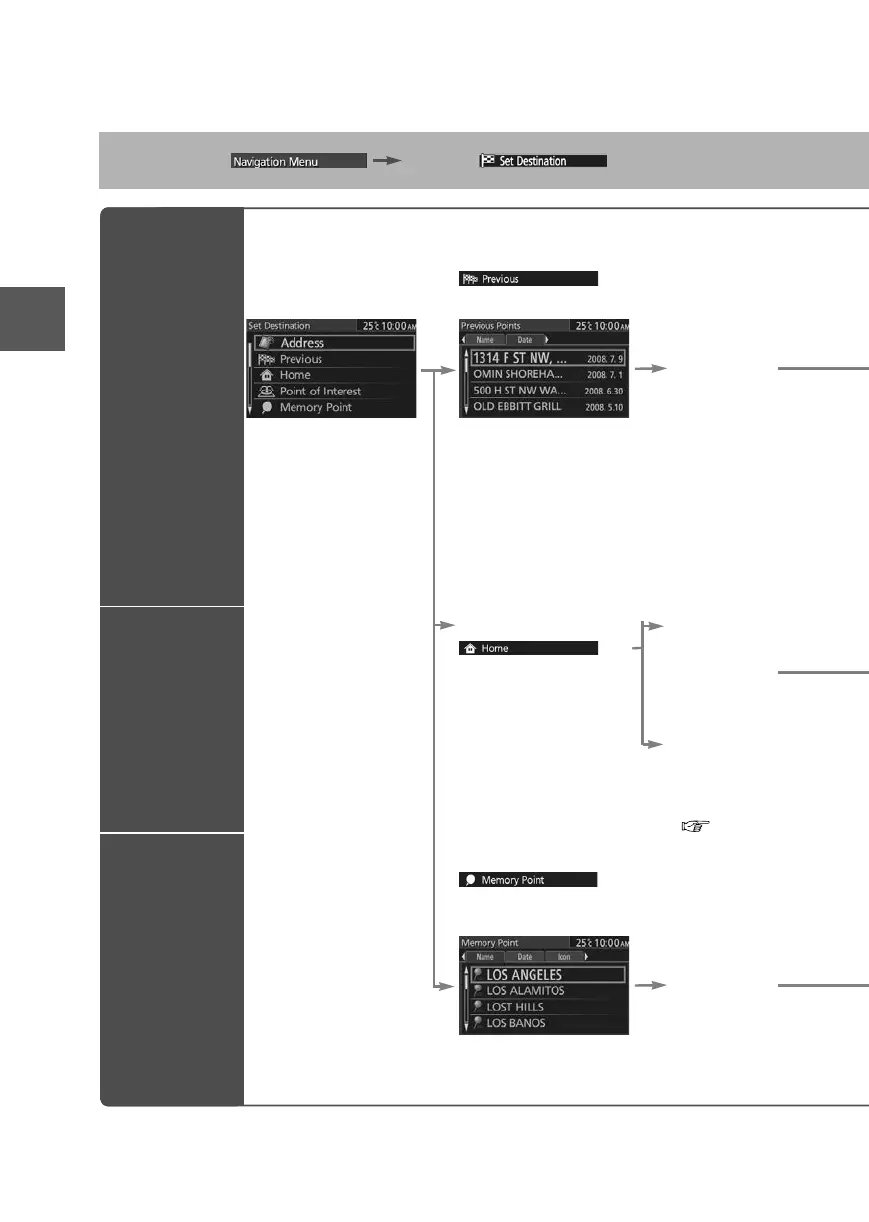
The previously set destinations are displayed.
Select the
desired
Memory
Point.
Name:Displays the list in alphabetical
order.
Date:Displays the list in registration/edit
date order.
Notes
Once the
d
destinatio
n
To add to
t
the first d
e
To re-set t
the first d
e
The numb
Select
A home
address is
already
registered in
the Destination
setting.
A home address
is not registered
in the Destination
setting yet.
( page 21)
Select
Registered memory points and registered
Home can be set in the Destination setting.
Select the
desired
Memory
Point.
Name:Displays the list in alphabetical order.
Date: Displays the list in registration/edit date order.
Icon:
Displays the list of the registered location icons.
0#8687''DQQMࡍ࡯ࠫ㧞㧜㧝㧝ᐕ㧥᦬㧝㧤ᣣޓᣣᦐᣣޓඦ೨㧥ᤨ㧞㧝ಽ

Related product manuals