15 16
NOTE: IftherearAUTObuttonispushedwhilethefrontA/Cbuttonisoff,the
rearairconditioningoperatesonlytocirculateair.Settingthetemperaturetothe
maximumhighorlowwillnotprovidethedesiredtemperatureatafasterrate.
Automatic Climate Control
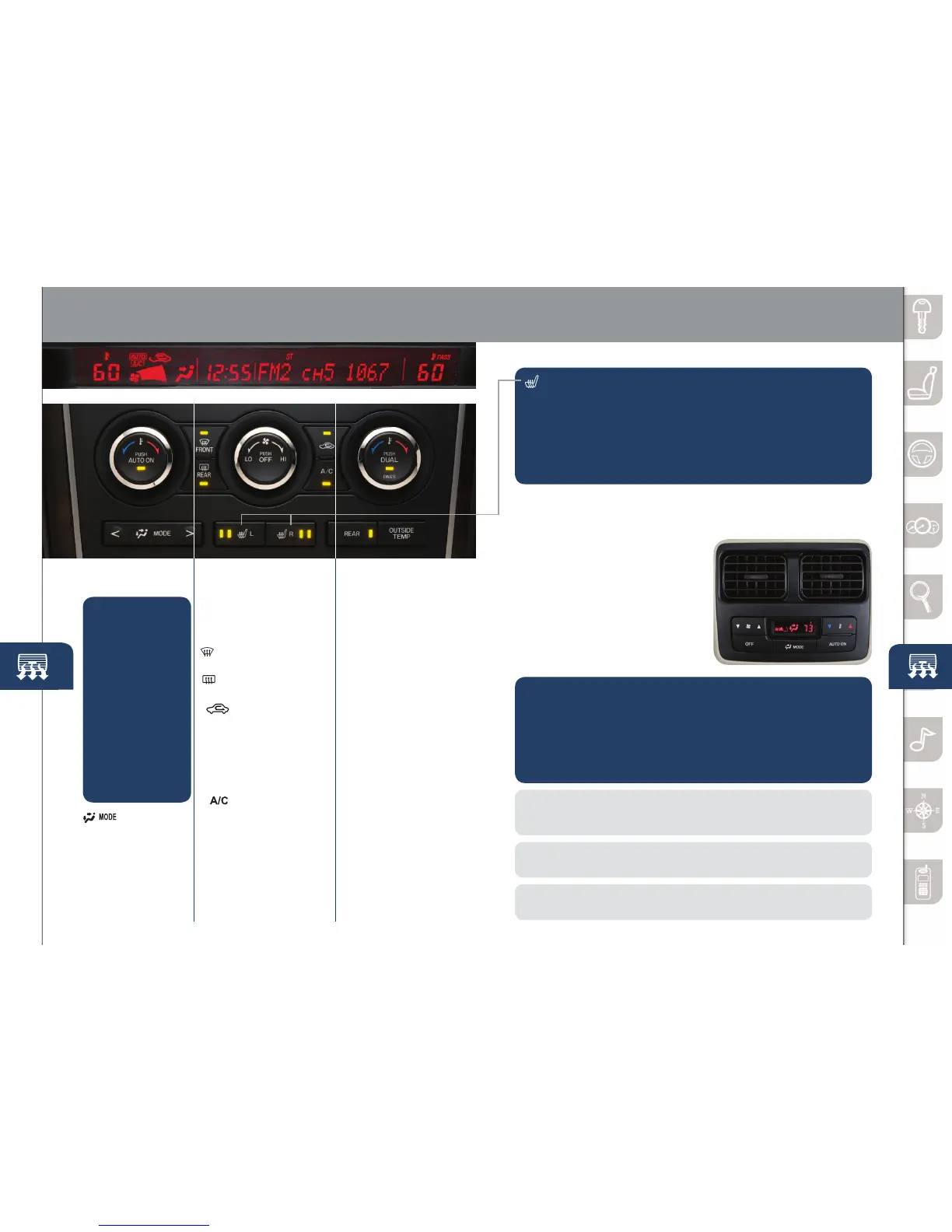
FRONT SEAT WARMERS
Thedriverandfrontpassengerseatscanbewarmedbypushingthe
applicableseatwarmerbuttonwhiletheignitionisON.
• Seattemperatureincreasesasthenumberofindicatorlights
increases.Twolightsequalhigh,onelightequalslow.
• Whentheseatwarmersarenotneeded,pushbuttonuntilindicator
lights are off.
NOTE: Theautomatictemperaturecontrolalwaysworks,eveniftheAUTOON
indicator light comes off after rotating the Fan Control Dial or changing vent mode.
NOTE: Automatic climate control will allow you to maintain individual preset cabin
temperaturesforthedriverandpassengerwhenDUALmodeisselected.
INFORMATION DISPLAY
Passenger
Temperature
Control Dial
•
PushtoturnDUAL
mode on or off.
• With DUAL mode
ON (indicator on),
rotate the dial to
set passenger
side temperature
separate from the
driver’sside(shown
in the Information
Display above).
• With DUAL mode
OFF (indicator off),
driver controls the
temperature setting
on both sides.
Pushtoallow
control from the
rear controls
(indicator on).
P u s h t o
display outside
temperature.
Fan Control Dial
•PushOFFtoturnclimate
control system off.
•Rotatethedialtoselect
the desired fan speed.
Pushtodefrost
windshield.
Pushtodefrost
rear window.
Pushtorecirculate
cabin air to reduce
outside odors and
improve cooling
(indicator on) or
receive fresh air
(indicator off).
P u s h t o
manually turn
air conditioning
ONorOFF.
Driver Temperature
Control Dial
AUTO ON:
Pushdial
to turn Automatic
Air Conditioning
system on. Rotate
dial to select
your desired set
temperature (shown
in information
Displayabove).The
airow mode and
amount of airow
will be automatically
controlled in
accordance with
the set temperature.
Pushtoselect
airow mode.
OUTSIDE
TEMP
REAR
REAR
FRONT
REAR CLIMATE CONTROL
Operation from Front Seats
1 Turnthefrontairconditioningon.
2 PushtheREARcontrolbutton
on the front control panel
(indicator on).
3 Selectionoftheairowmode,
airow amount and temperature
will be automatically controlled
to the same setting as the front
air conditioner.
Operation from Rear Seats
AUTO ON:
1 Turnthefrontairconditioningon.
2 PushAUTOONbuttonontherearcontrolpaneltoturnRear
AutomaticAirConditioningsystemon.PushTemperaturesetting
button on the rear control panel to select your desired set
temperature.Theairowmodeandamountofairowwillbe
automatically controlled in accordance with the set temperature.
Rear Control Panel
www.MazdaUSA.com



 To Next Page