Black plate (249,1)
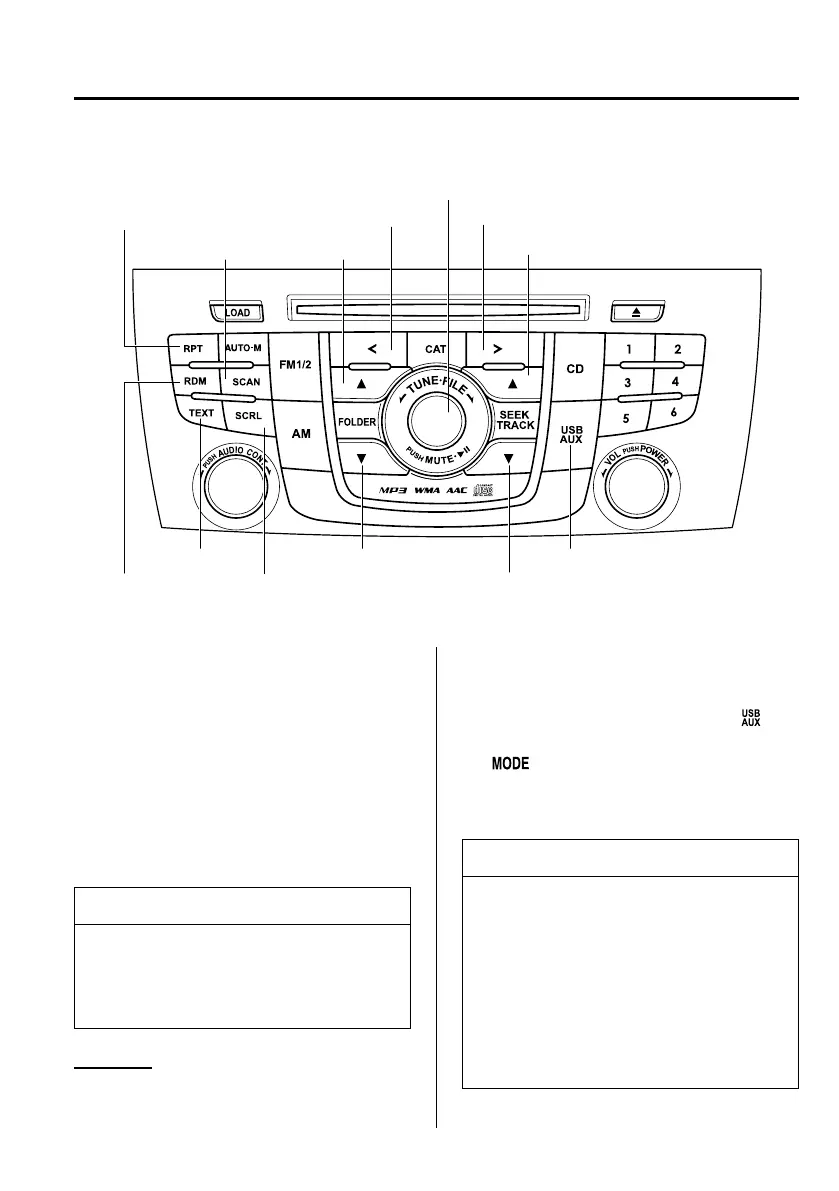
qHow to use iPod mode
Text button
Scroll button
Scan button
List down button Source change button
Track down/Reverse buttonRandom button
Play/Pause button/File dial
List up button
Repeat button
Category down button Category up button
Track up/Fast-forward button
The figure is an example showing type A unit.
Connectable iPod is as follows:
l
iPod: 5G
l
iPod classic
l
iPod nano: 1/2/3/4/5/6G
l
iPod touch
*1
l
iPhone
*1
: 3G/3GS/4
*1 For only iPod functions
NOTE
The iPod functions on the iPod cannot
be operated while it is connected to the
unit because the unit controls the iPod
functions.
Playback
1. Switch the ignition to ACC or ON.
2. Press the power/volume dial to turn the
audio system on.
3. Press the source change button (
)of
the audio unit or the mode switch
(
) of the audio control switches
on the steering wheel to switch to the
iPod mode and start playback.
NOTE
l
When an iPod is not connected, the
mode does not switch to the iPod
mode.
l
When there is no playable data in the
iPod, “NO CONTENTS” is flashed.
l
Do not remove the iPod while in the
iPod mode. Otherwise , the data
could be damaged.
Interior Comfort
Audio System
6-55
Mazda5_8DF6-EI-13J_Edition7 Page249
Thursday, March 9 2017 8:35 PM
Form No.8DF6-EI-13J



 To Next Page