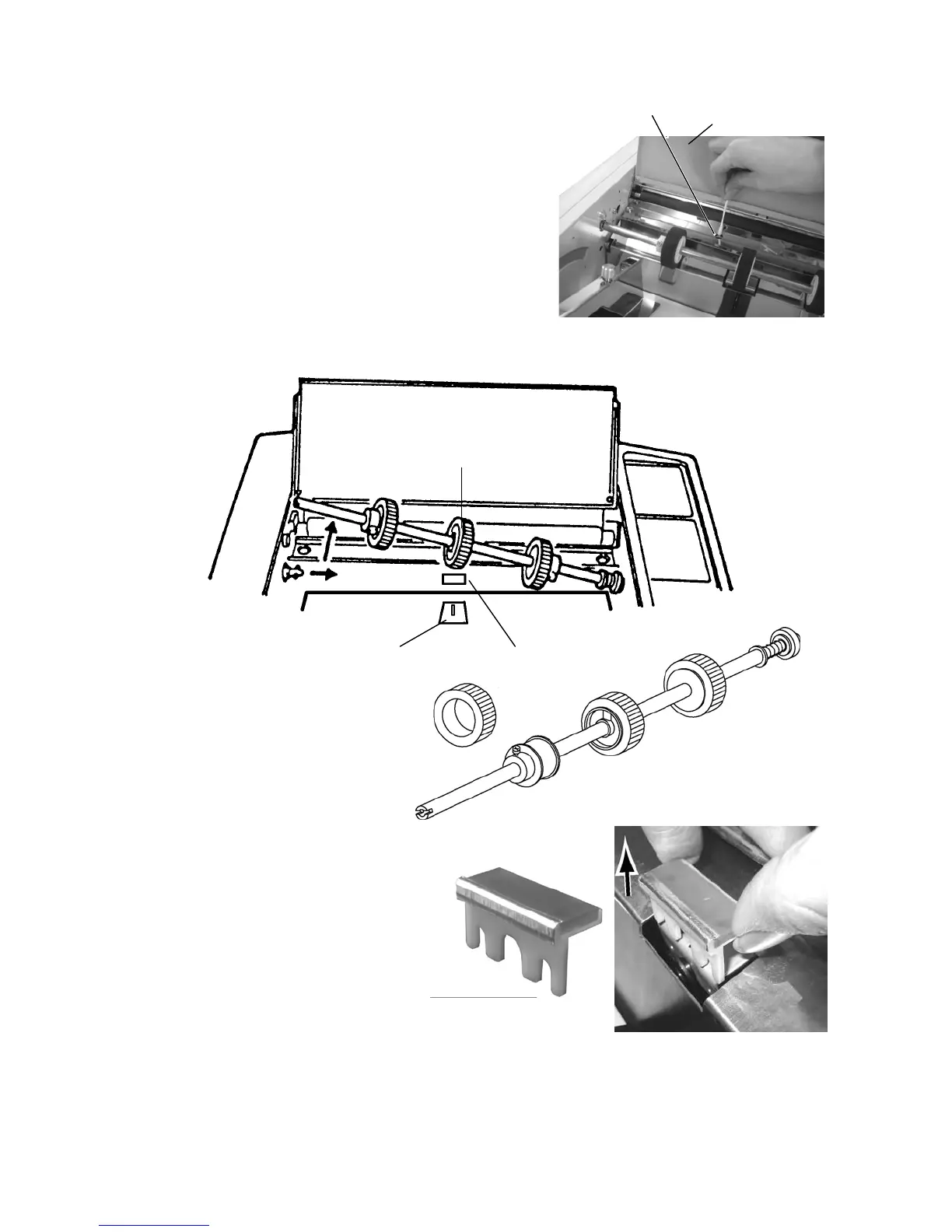
Paper feed roller
Paper separator
Paper feed roller
②
①
<Cleaning the paper feed photo sensor>
Open the safety cover and wipe the surface (black plastic) of
the paper feed photo sensor with the tip of a cotton swap or
similar material moistened in water.
Caution!
When cleaning, make sure that no residue from the cotton
swab is left in the unit or the paper feed may stop with an
error after feeding a single sheet (Check lamp (1) flashes).
→ See "(11) Troubleshooting, Check lamp (1)" on page 22.
Sensor position
Safty cover
When replacing the paper feed roller and paper separator, proceed in the order (1) → (2).
Brake pad (fixed with dual-sided adhesive tape)
Grasp the paper separator (with plastic part) at both ends and pull it out.
To install, reverse the procedure.
Paper separator
To order the parts above, please contact your dealer.
21
http://www.monomachines.com/
http://www.monomachines.com/
~~7J/\
I.--:-~"""""'--


 To Next Page