(11) Troubleshooting
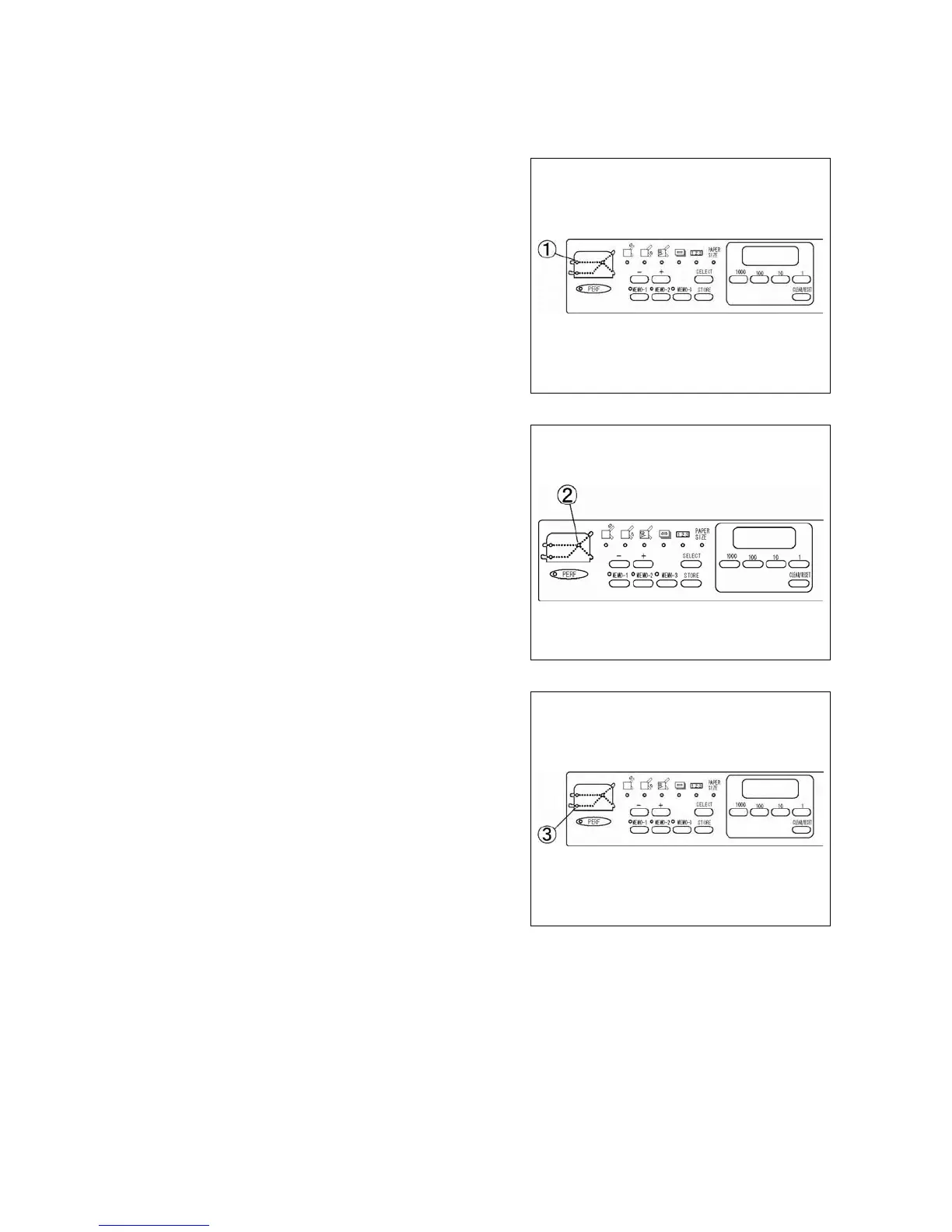
If Check lamp (1) is flashing it may indicate:
1) No paper
2) Paper jam at paper feed photo sensor
3) Paper feed photo sensor is dirty
If Check lamp (2) is flashing it may indicate:
1) Paper jam at fold tables
2) Plug is disconnected
If Check lamp (3) is flashing it may indicate:
1) Paper jam at paper eject photo sensor
2) Paper eject photo sensor is dirty
Note:
If paper is loaded immediately after printing, problems such as jamming, double feed, slipping, and
wrinkling may occur. Make sure that the paper is completely dry before loading.
If the unit is placed in the vicinity of a fluorescent lamp that operates irregularly, the paper size detection
sensor may not function properly. In such a case, increase the distance between the unit and the fluorescent
lamp.
22
http://www.monomachines.com/
http://www.monomachines.com/
_;.
uua
C=>C=>
C=>
OI£IH
°
':&1
°
l1M[
C=>C=> C=> C=>
;.
$[1,,«:1
c:::Jc:::J c:::J
OlE
101t
1:0ltJl)oS
Ual(
c:::Jc:::J c:::J c:::J
_ + :(ua
C=>C=>
C=>
0I£IHO'OH0mM
C1M[
C=>C=> C=> C=>
[ )
DDC:)(~
CUW.11
c:::J


 To Next Page