(5) Operation of the Counter
(A) Addition Counter
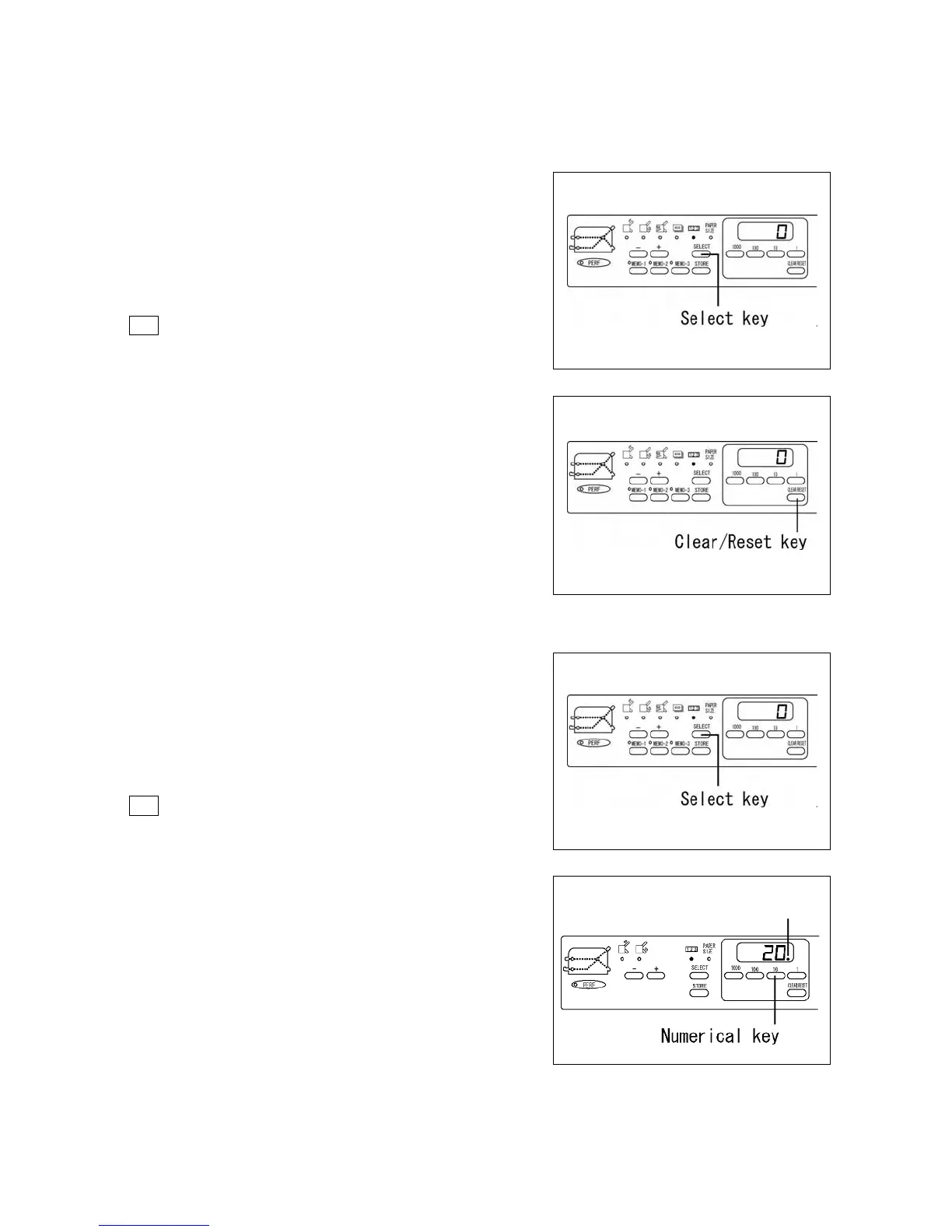
The number indicated on the counter increases by one each time
a sheet of paper is folded.
Press the Select key and select the Counter Input Mode Lamp
123.
Press the Clear/Reset key and reset the number to zero (0).
(B) Subtraction Counter
The number indicated on the counter decreases by one each time
a sheet of paper is folded.
Press the Select key and select the Counter Input Mode Lamp
123.
Input the desired number using the Numerical keys.
(20 is input in this case)
Subtraction Mode Lamp will light.
Subt r act i on mode l am
8
http://www.monomachines.com/
http://www.monomachines.com/
Select
key
I
Clear/Reset
key
Select
key
Batch
Counting
mode
lamp
I
."
ci
~
c:::7f
••
~
-
~
c)c)
<CillD
":'
:~.
[
cOil
o
06C'~6
SHIlE
CUJj1l1!
C)
C)
Numerical
key


 To Next Page