Home
MBM
Folding Machines
93M
Page 11
MBM 93M - Page 11
20 pages
Manual
Save Page as PDF
To Next Page
To Next Page
To Previous Page
To Previous Page
Loading...
Operation
Guide
10
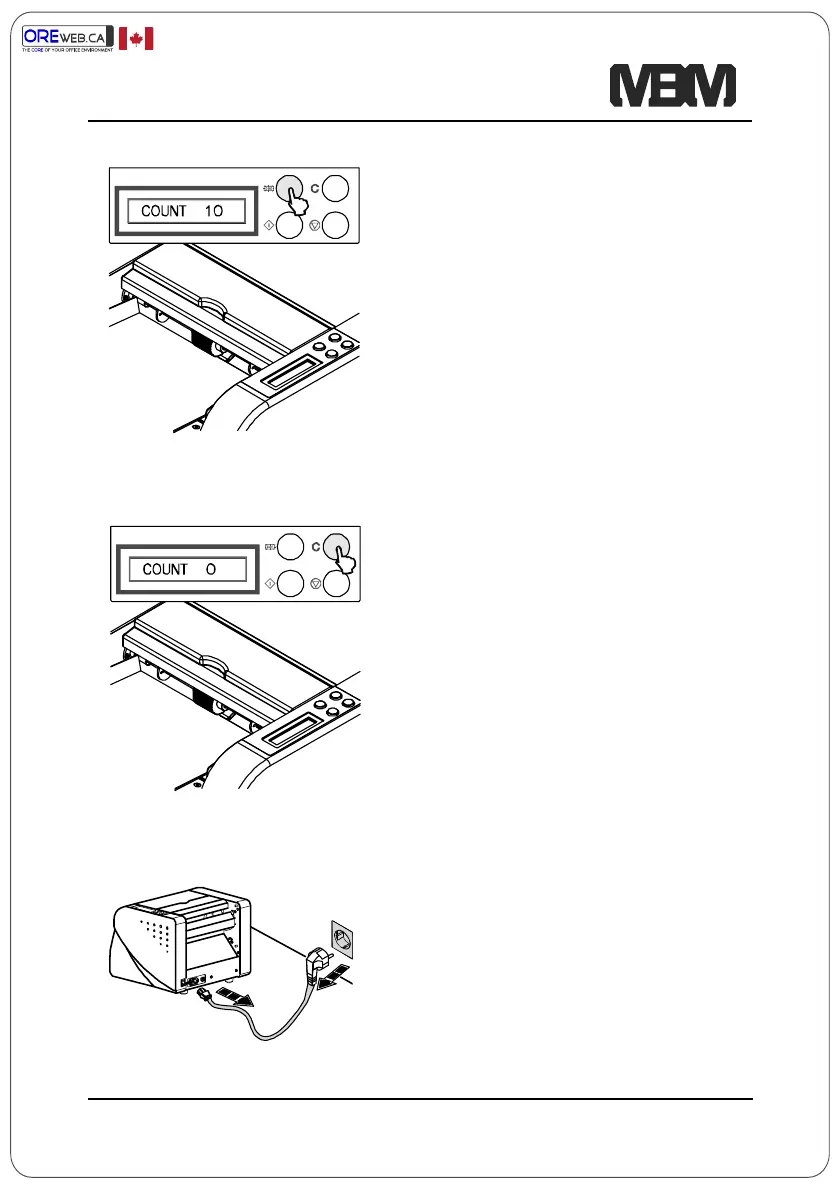
If number of folding paper setting is
required, press increase button. Press
once, each for 10 sheets up.
Counter returns to “0” when pressing
the “C” button.
Disconnect from the main socket if not
used for a longer period.
Authorized
Dealer Canada
10
12
Table of Contents
Main Page
Safety Precautions
2
Installation
4
Adjust 2Nd Fold Plate
9
Instruction Label
9
Operation Guide
10
Troubleshooting
12
Adjustment
16
Related product manuals
MBM 207M
20 pages
MBM 206M
19 pages
MBM 306A
22 pages
MBM 408A
48 pages
MBM 1800S
20 pages
MBM 508A
52 pages
MBM 208J
24 pages
MBM FO0605
52 pages
MBM 405A
52 pages
MBM AeroFold 1500S
52 pages


 To Next Page