User’s manual
SEEDER MONITOR MCK 800
12
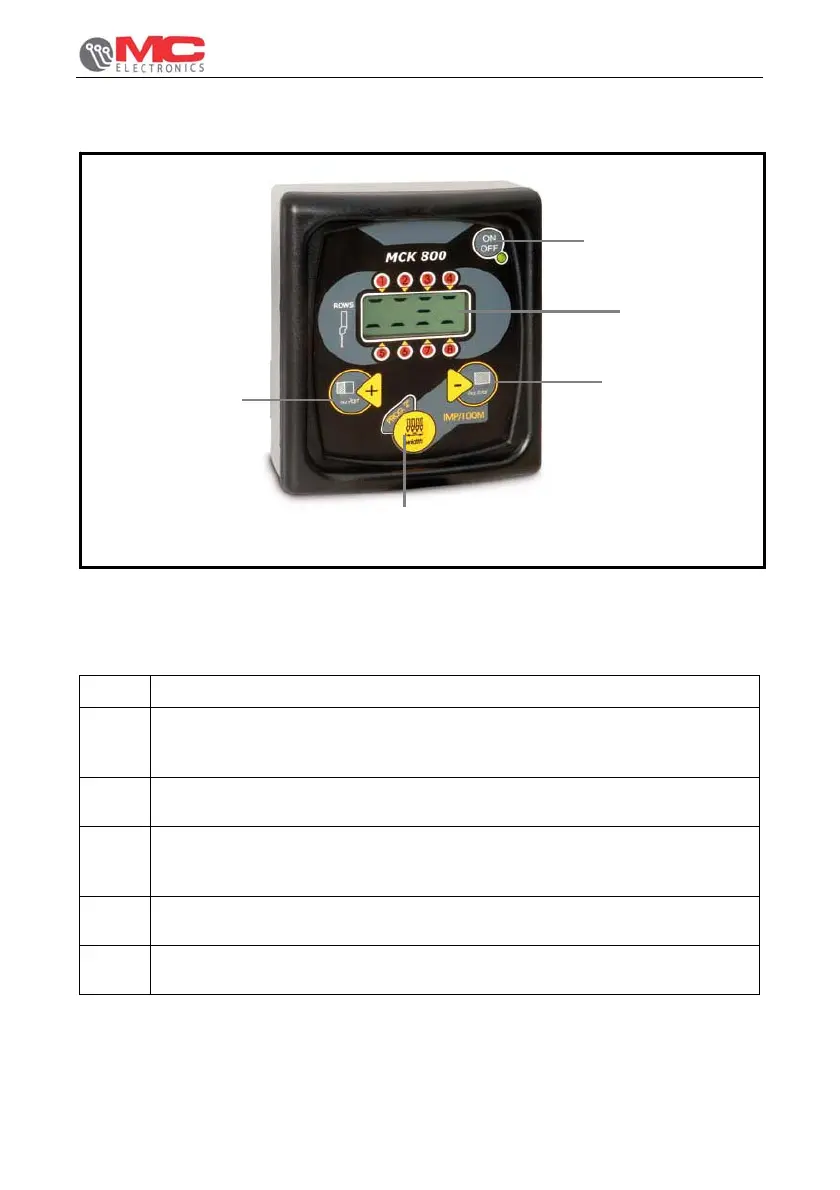
3. Front view
Figure 1. Front view.
The front panel allows the operator to display all the data of the working cycle. The
following elements can be distinguished:
REF. DESCRIPTION
A.
“ha PART” e “+” key : it shows the partial area worked in hectares
(range: from 0.01 to 999.9 ha); during the programming phase, it increases
the displayed value.
B. “WIDTH – PROG “ key : it allows the operator to display and change the
working width.
C. “ha TOTAL” e “-“ key : it shows the total area worked in hectares (range:
from 0.01 to 999.9 ha); during the programming phase, it decreases the
displayed value.
D. Liquid crystal display : it constantly shows the rows status and data
requested by the switchboard.
E. “ON – OFF” key: its switching on is shown by the corresponding green
led.
A
B
C
D
E


 To Next Page