User’s manual
SEEDER MONITOR MCK 800
18
6.3 Automatic calibration of “C” parameter
The automatic calibration of “C” parameter is effected by covering a fixed distance of
100 metres according to the instructions listed below:
1) Measure a distance of 100 metres on the ground and place the machine on
the starting point;
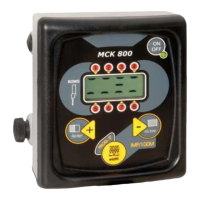
2) Display “C” parameter; press “+” (ref A) and „-“ (ref. C) keys simultaneously
to start counting (the display will be reset); release keys;
3) Drive along a way of 100 metres and stop after covering that fixed distance;
during the counting phase the display will show the number of impulses
received by the sensor;
4) Stop counting by pressing “width - PROG.” key (ref. B). The impulses
obtained will be automatically programmed in “C” parameter.
6.4 How to set the rows-alarm sensitivity
To program the rows-alarm sensitivity (values from 1 to 20) the monitor must be off.
Press B and C keys (see picture 1 page 12) simultaneously and hold them pressed;
at the same tome power on the monitor, and keep on holding B and C keys pressed
until „S-“ text is displayed, followed by the current sensitivity value; press C(-) or A(+)
keys to change the displayed value, while press and hold A key pressed for at least 2
seconds to store the desired value. From now on the monitor will start its normal
working cycle.
The sensitivity value which is to be programmed depends upon the type of sowing
effected; we advise you to program it as reported below:
MAIZE /SUNFLOWER BEETS SOYA SMALL SEEDS
Sen = 4 – 6 Sen = 6 - 9 Sen = 7 -12 Sen = 12 - 19


 To Next Page