4 Identify network ports
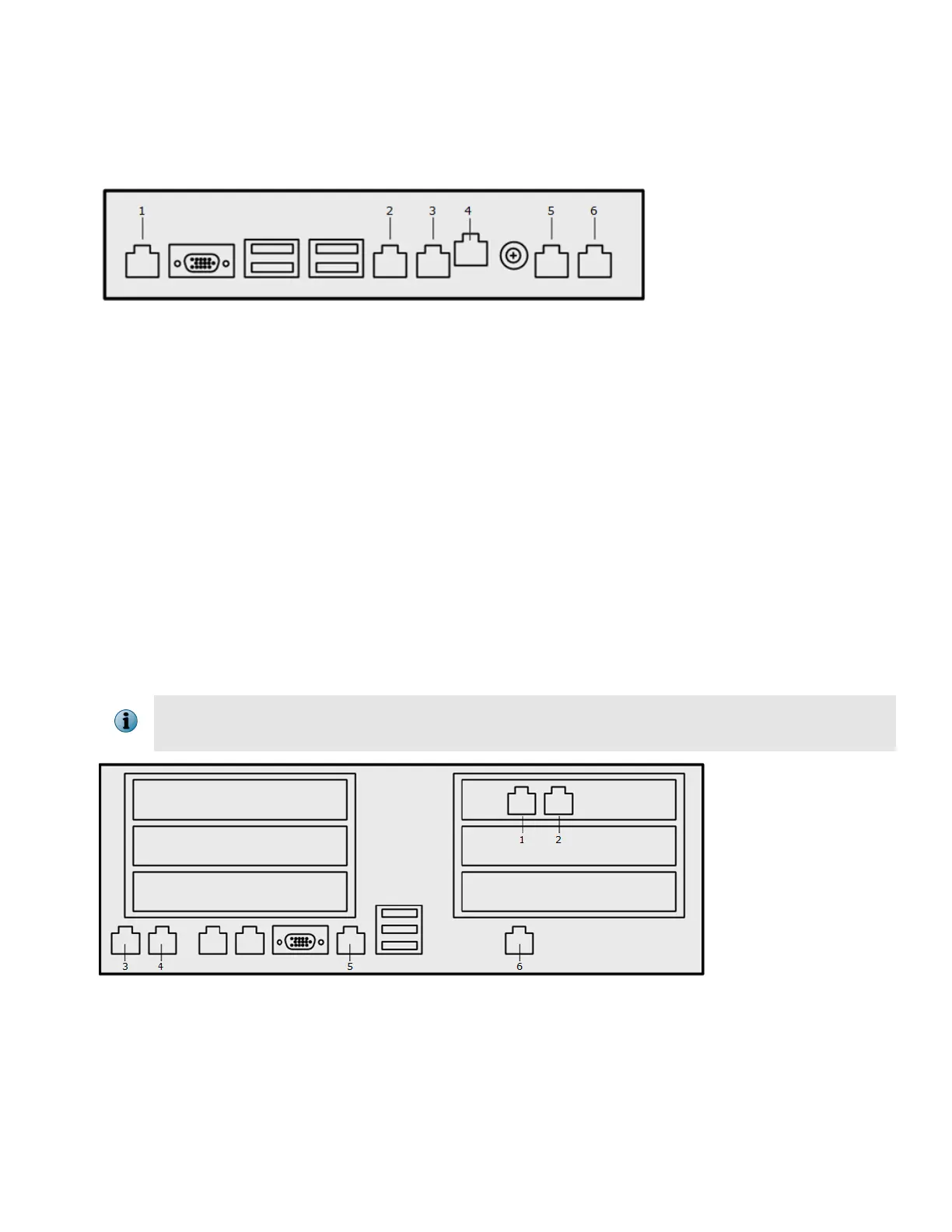
Locate the network ports on your appliance. Unlabeled ports are not used.
Figure 1 Model 4400 appliance port conguration
1
Serial port
2
OOB port
3
LAN1 port
4
Remote access port (RMM)
5
Ethernet port or ber port *
• McAfee DLP Prevent — Unused
• McAfee DLP Monitor — Capture port 1
6
Ethernet port — Unused
* If the appliance has a ber NIC:
• For McAfee DLP Prevent, the ber port becomes LAN1.
• For McAfee DLP Monitor, the ber port becomes Capture port 1.
On some 4400 models, the capture ports might be on a slotted NIC instead of on the motherboard.
In this case, these two ports are swapped over.
Figure 2 Model 5500 appliance port conguration
1
Ethernet port or
ber port — Unused
2
Ethernet port or ber port *
• McAfee DLP Prevent — Unused
• McAfee DLP Monitor — Capture port 1
2



 To Next Page