3
OOB port
4
LAN1 *
5
Serial port
6
Remote access port (RMM)
* If the appliance has a ber NIC:
• For McAfee DLP Prevent, this ber port (callout 2) becomes the LAN1 port.
• For McAfee DLP Monitor, this ber port (callout 2) becomes Capture port 1.
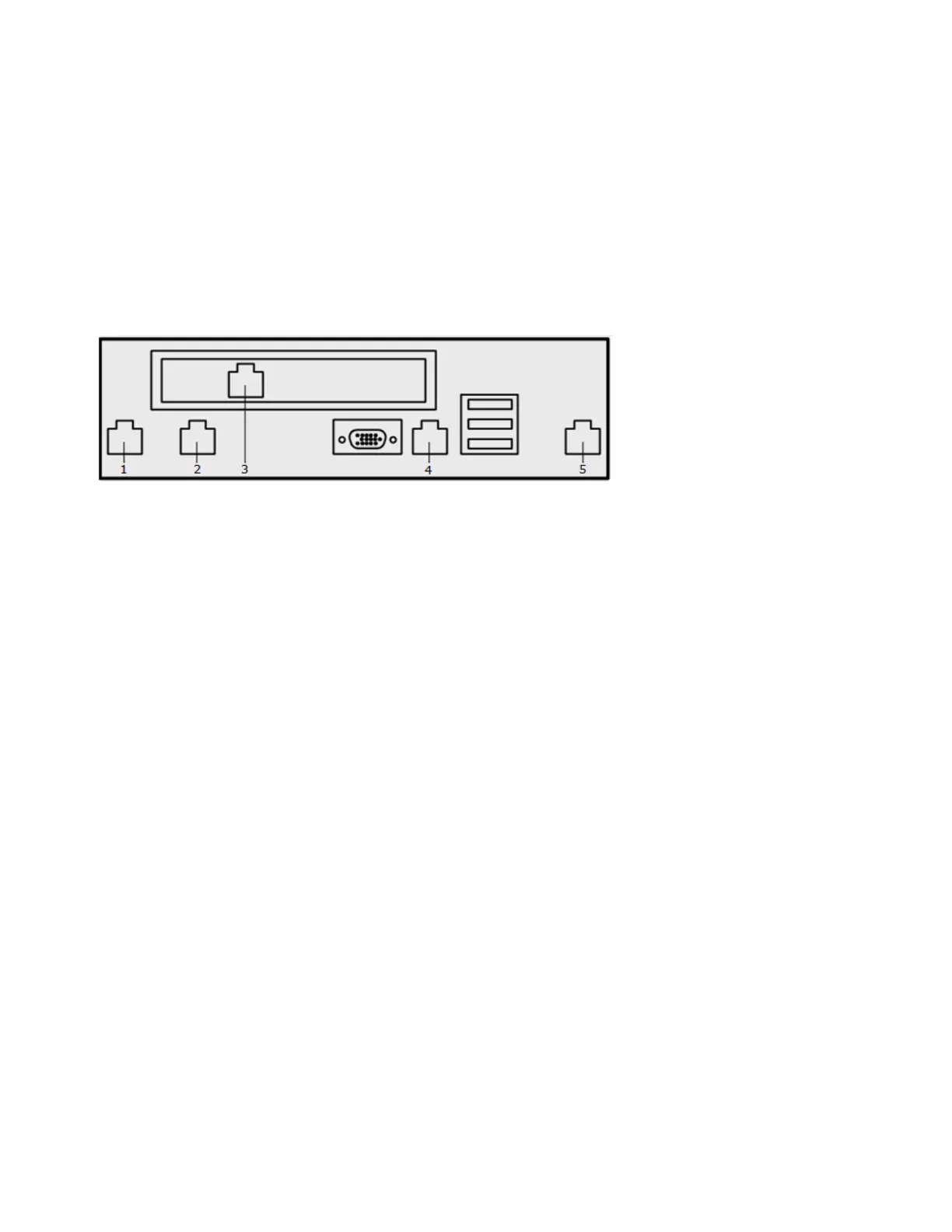
Figure 3 Model 6600 appliance port conguration
1
LAN1
2
McAfee DLP Prevent — Unused
McAfee DLP Monitor — Capture port 1
3
OOB port
4
Serial port
5
Remote access port (RMM)
5 Install the extensions
Prepare the McAfee ePO server for integration with McAfee DLP Appliance Management.
For information about manually installing the extensions, see the product guide.
For details about product features, usage, and best practices, click ? or Help.
a In McAfee ePO, select Menu | Software | Software Manager.
b In the left pane, expand Software (by Label) and select Data Loss Prevention.
c Select the entry for McAfee Network Data Loss Prevention.
These extensions are included:
• McAfee DLP
• Common UI
• Appliance Management Extension
• McAfee DLP Appliance Management
3



 To Next Page