EasyManua.ls Logo

mCareWatch HW2 - CARER;FAMILY: How to track the watch (Mobile APP)

mCareWatch HW2
24 pages
Print Icon
To Next Page IconTo Next Page
To Previous Page IconTo Previous Page
Loading...
CARER/FAMILY: How to track the watch (Mobile APP)
mcarewatch.com.au
16
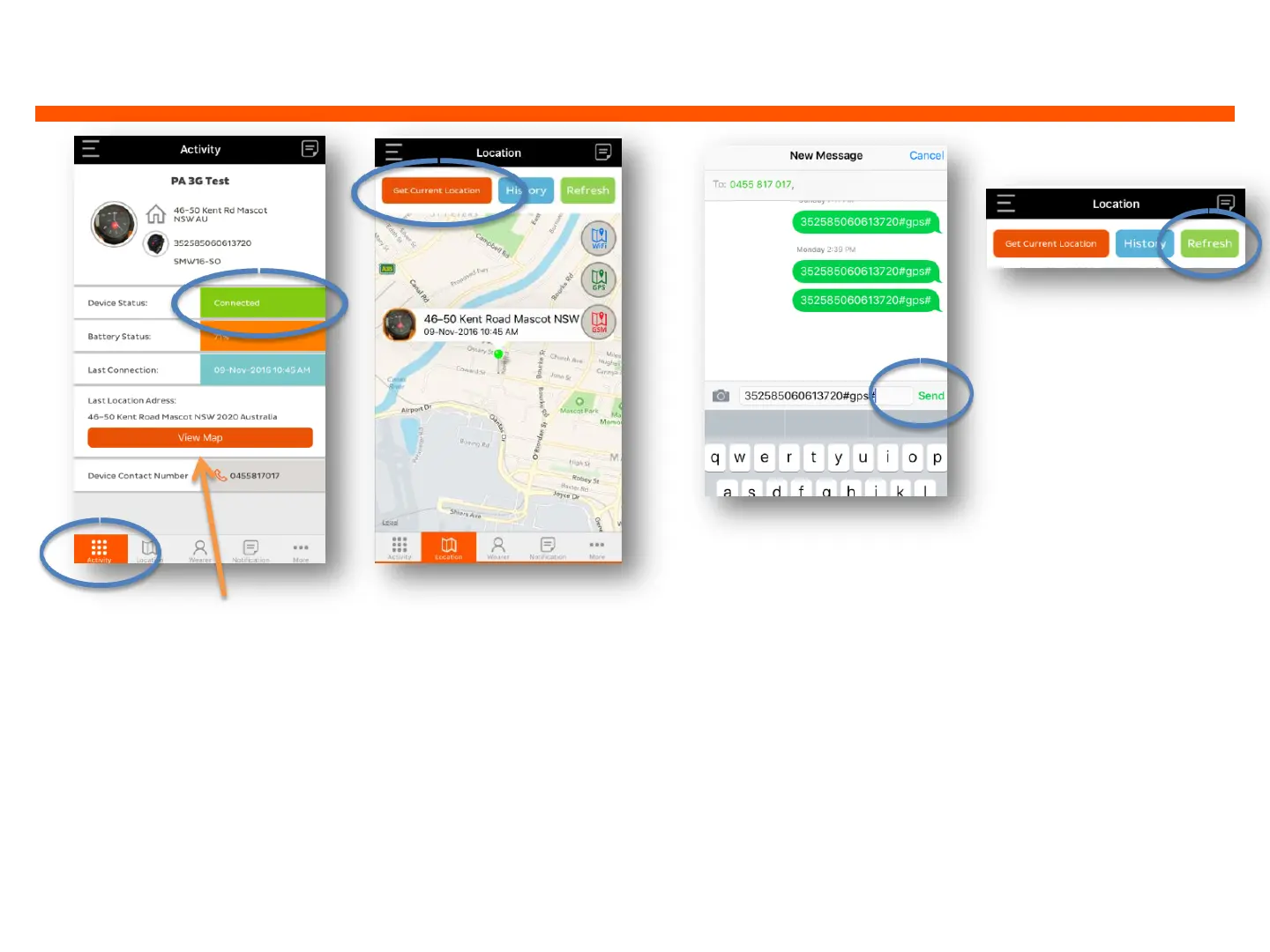
1. Open app to
ACTIVITYsection to
view watch status.
Make sure the watch is
‘Connectedand then
click on ‘VIEW MAP
2. APP will display map
with watch location with
address, date and time
of the last connection.
To get latest location
click on ‘GET CURRENT
LOCATION’
3. If you are using
an Android phone
a message will be
sent automatically
to the watch. For
iPhones, the above
screen will appear
and you will need to
click ‘SEND’
4. The On
demand location
sent to the watch
will take between
2-3 minutes to
update the map
with the latest
location. Click the
‘REFERSH’ button
to receive
updated location

Other manuals for mCareWatch HW2