22
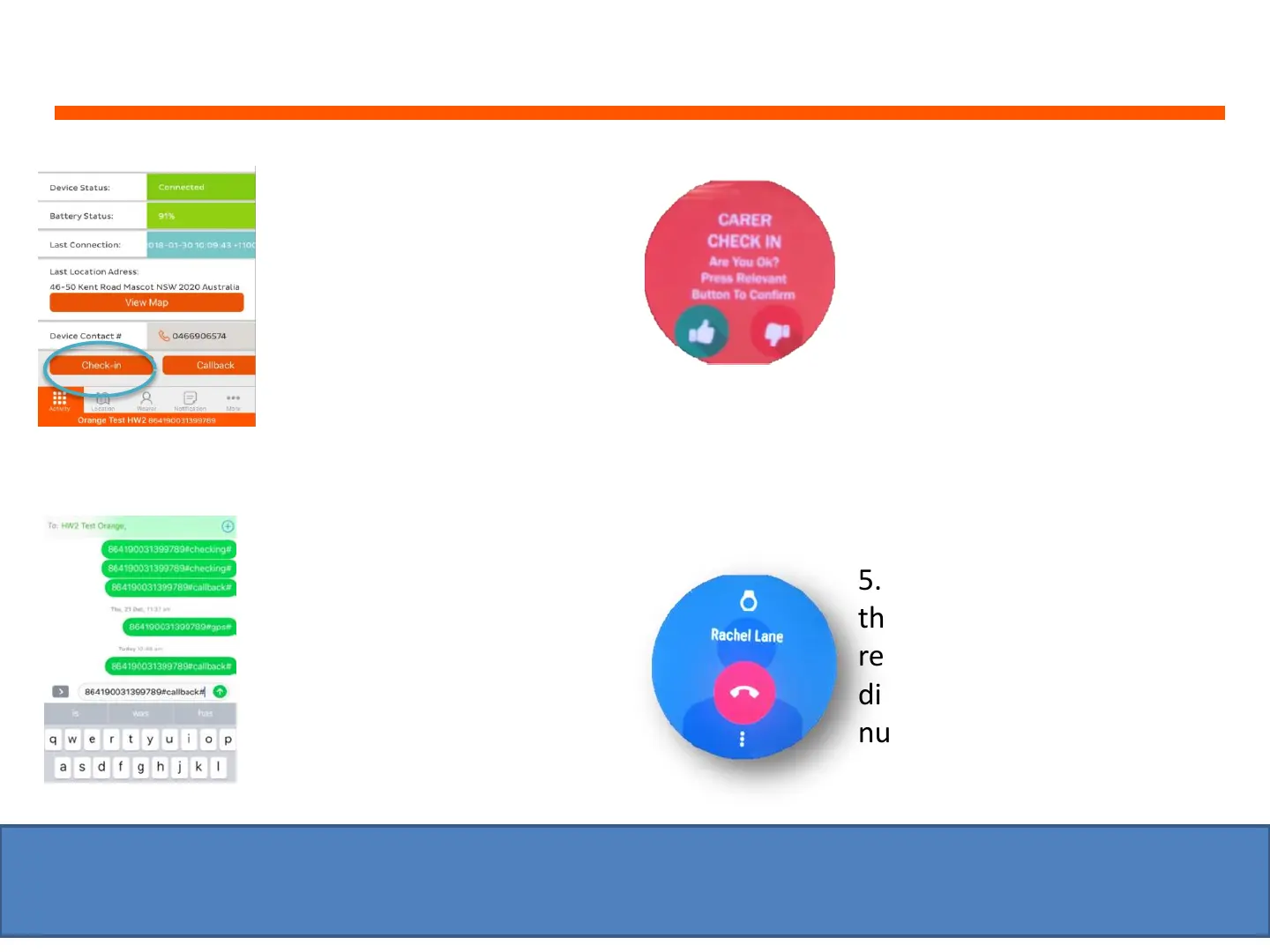
How to send a ‘Check-In’ message to the watch
You can send a ‘Check-In’
message to the watch
asking the wearer: ‘Are you
OK?’
1. Open the app and then
tap on the ‘Activity’ tab
(left) and then tap on
‘Check-In’ (bottom left)
3. The watch will then
display the ‘Carer Check In’
message on the wearer’s
watch screen and announce
‘Are you OK?’
4. Wearer can click on the
green thumbs up & nothing
happens.
5. If wearer clicks on the red
thumbs dumb or does not
respond, the watch will start
dialling the carer’s contact
number
2. When ‘Check-In’, is
pressed an SMS text
message will appear (for
iPhone only). Click SEND
to send the SMS text
message to the watch
(wearer will not receive
any message).
IMPORTANT: The watch will only call back contact numbers that have been added onto the ‘Call
Back Contacts’ list located on the web platform (under ‘Wearer/Contacts’ section)


 To Next Page