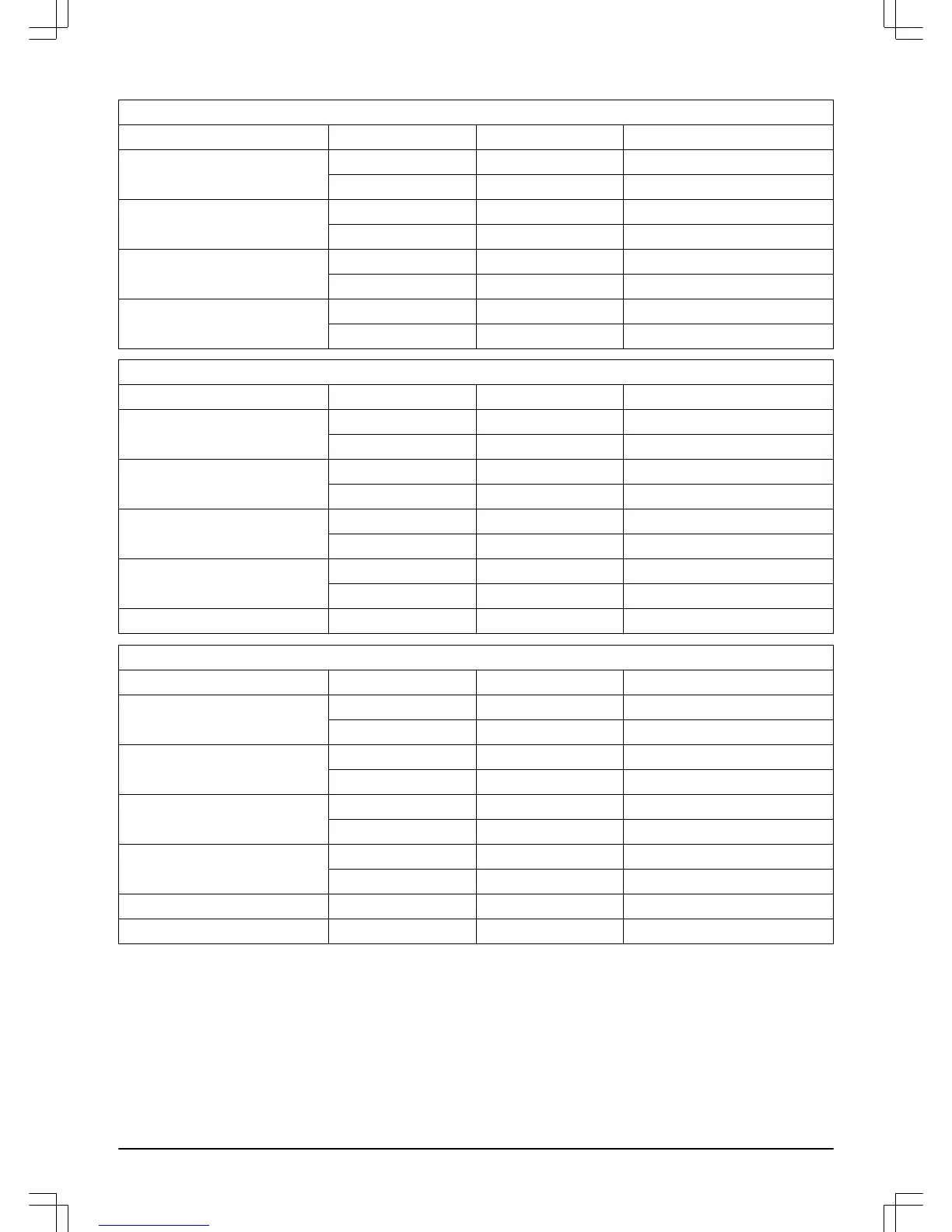
3.13.1 Timer suggestions
ROB R600
Work area Work days per week Work hours per day Suggested time interval
100 m
2
/ 1100 sq. ft 5 3 07:00 am - 10:00 am
7 2.5 07:00 am - 9:30 am
200 m
2
/ 2200 sq. ft 5 6.5 07:00 am - 01:30 pm
7 4.5 07:00 am - 11:30 am
400 m
2
/ 4300 sq. ft 5 13 07:00 am - 08:00 pm
7 9 07:00 am - 04:00 pm
600 m
2
/ 6500 sq. ft 6 16 07:00 am - 11:00 pm
7 13.5 07:00 am - 08:30 pm
ROB R800
Work area Work days per week Work hours per day Suggested time time interval
100 m
2
/ 1100 sq. ft 5 3 07:00 am - 10:00 am
7 2 07:00 am - 09:00 am
200 m
2
/ 2200 sq. ft 5 5.5 07:00 am - 12:30 pm
7 4 07:00 am - 11:00 am
400 m
2
/ 4300 sq. ft 5 11.5 07:00 am - 06:30 pm
7 8 07:00 am - 03:00 pm
600 m
2
/ 6500 sq. ft 6 14 07:00 am - 09:00 pm
7 12 07:00 am - 07:00 pm
800 m
2
/ 8600 sq. ft 7 16 07:00 am - 11:00 pm
ROB R1000
Work area Work days per week Work hours per day Suggested time time interval
100 m
2
/ 1100 sq. ft 5 3 07:00 am - 10:00 am
7 2 07:00 am - 09:00 am
200 m
2
/ 2200 sq. ft 5 5.5 07:00 am - 12:30 pm
7 4 07:00 am - 11:00 am
400 m
2
/ 4300 sq. ft 5 11.5 07:00 am - 06:30 pm
7 8 07:00 am - 03:00 pm
600 m
2
/ 6500 sq. ft 6 14 07:00 am - 09:00 pm
7 12 07:00 am - 07:00 pm
800 m
2
/ 8600 sq. ft 7 16 07:00 am - 11:00 pm
1000 m
2
/ 10 800 sq. ft 7 20 05:00 am - 01:00 am
3.13.2 To set the timer
•
Work hours 1:
To set start and stop times for
Work
hours 1
, enter each required time in hours and
minutes and press
OK
to confirm the entered time.
•
Work hours 2:
To set start and stop times for
Work
hours 2
, enter each required time in hours and
minutes and press
OK
to confirm the entered time.
•
Work days:
To select the days the robotic
lawnmower must work, tick off the days the robotic
lawnmower will work
•
Reset timer:
To reset values to the factory settings,
select the
Reset timer
and press
OK
.
To inactivate
Work hours 1
or
Work hours 2
, enter the
time 00:00 - 00:00 to reset the timer to --:-- - --:--.
A clock symbol is displayed on the start page when the
timer settings are set. The clock symbol is black when
the robotic lawnmower is not allowed to mow due to a
timer setting.
358 - 002 - Installation - 23




 To Next Page