Me2, Fog Generator
Operating Guide, Rev: A/a 11 / 30
MENU TREE
The menu is divided in four (4) main menus:
Status Menu summarizes all the state of the fog generator. None of its sub menus can be
modified.
Control Menu allows the user to control locally the MDG Me2. All its sub menus can be set,
as long as the generator is not in DMX/RDM mode.
Interface Menu allows the user to define or verify the communication via DMX/RDM.
Settings Menu summarizes general configuration of the generator.
The menu is refreshed every second.
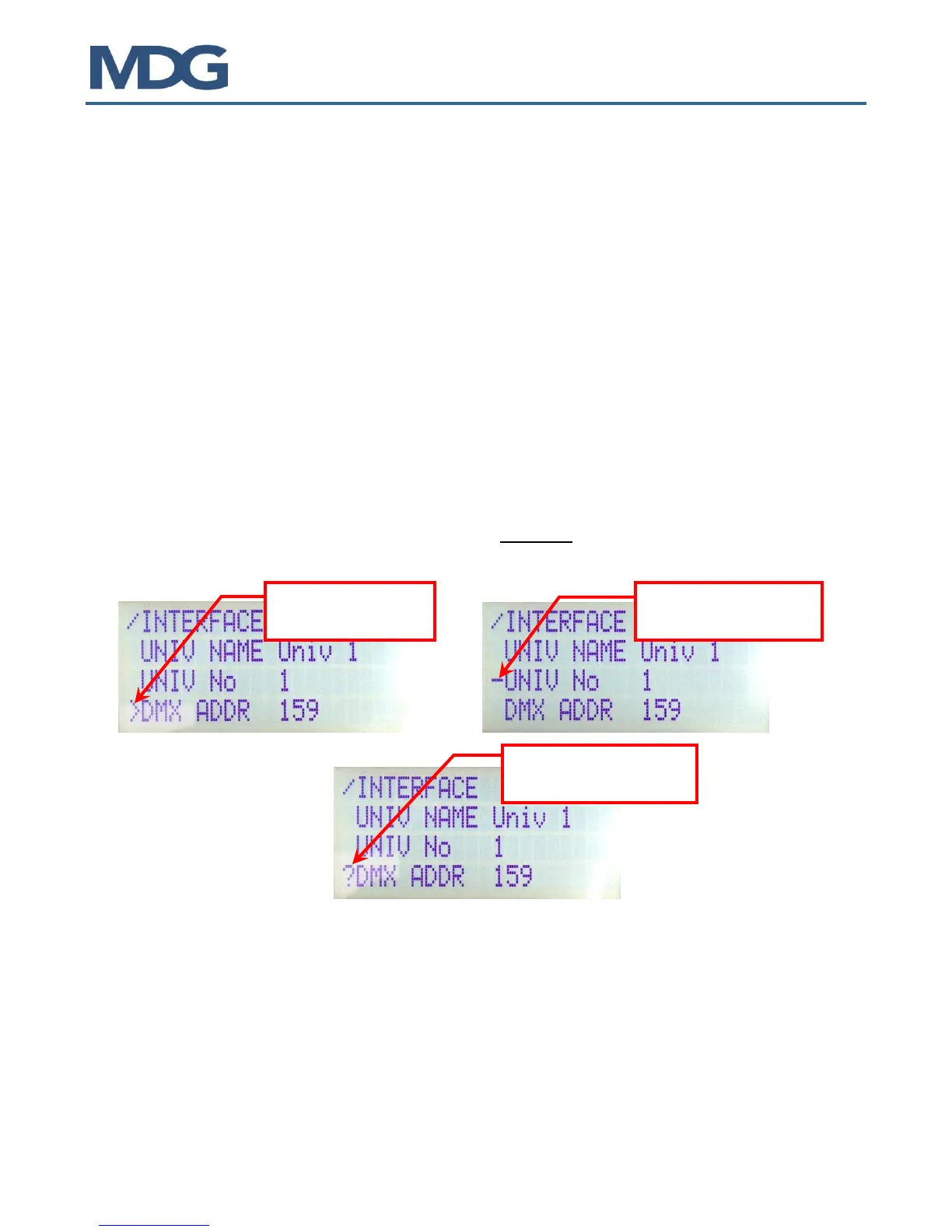
- Items preceded by the « - » character are state messages or parameters, updated by the
program. The user cannot modify them.
- Items preceded by the « » character are control parameters.
- The user, within specific ranges or choices, can MODIFY them. In user input mode, the value
or the choice is preceded with the « ? » character.
This menu can be
modified by user
This menu cannot
be modified by user
The value is presently
modified by user


 To Next Page