9
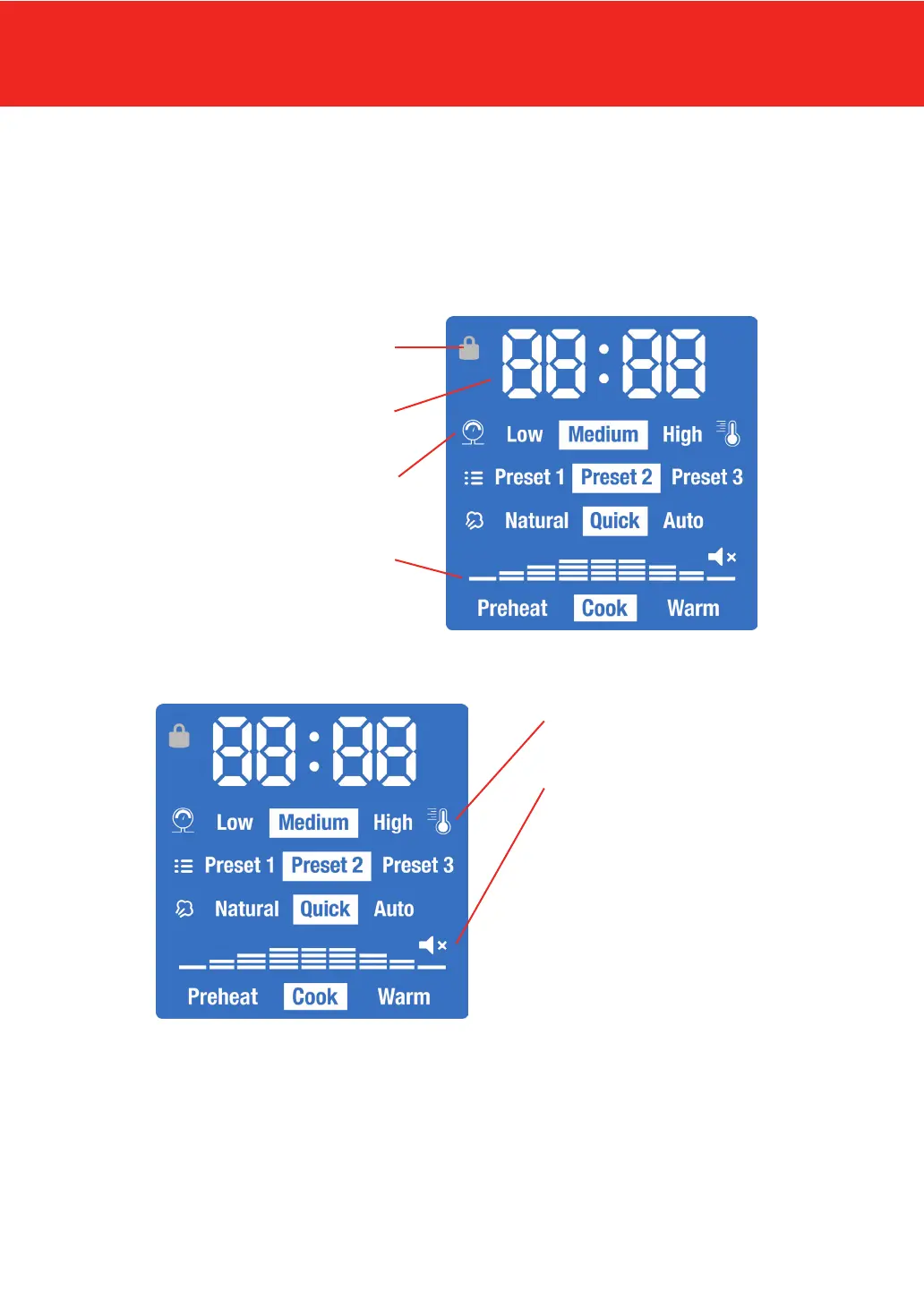
LCD Screen
The LCD display uses icons, words, and numbers to depict time, pressure levels (Low, High),
temperature (Sauté, Low/Medium/High; Slow Cook, Low/High), preset program numbers (Presets 1,
2, 3), pressure/steam release style (Natural, Quick, Auto), a cooking progress indicator (progress bars
and cooking stages: Preheat, Cook, Warm), and sound status (On/Off).
Sound Indicator:
Displays whether sound is ON or
OFF. Safety alerts never turn OFF.
To turn the sound off:
1. Press Cancel to stop all
programs.
The LCD screen will display OFF.
2. Press and hold the – button for
at least 4 seconds. The LCD screen
will display SOFF.
To turn the sound on:
1. Press Cancel to stop all
programs. The LCD screen will
display OFF.
2. Press and hold the + button for
at least 4 seconds. The LCD screen
will display S on.
Lid Locked/Unlocked:
Displays whether lid is locked
Time & Message Display:
Depicts cook time or messages
Pressure Level Indicator:
Low or High
Preset Selection Progress Indicator:
Displays progress stage
(Preheat, Cook, or Warm)
Temperature Indicator:
Low, Medium, or High


 To Next Page