12
CHAPTER 3. CONTROL DEVICES
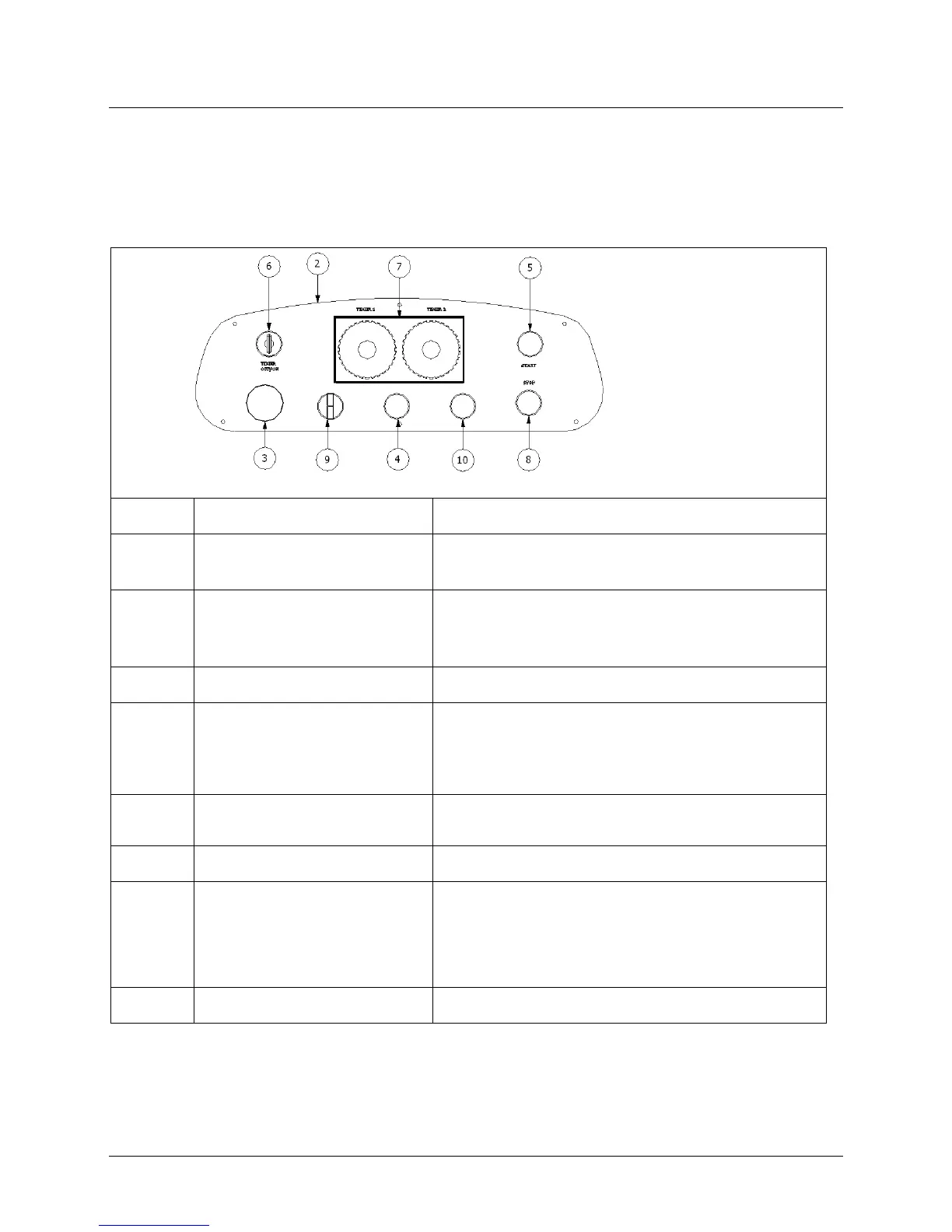
The control panel of the machine (Pict. 3.1) is placed in front of the machine and it includes all the necessary
push-buttons for its working /driving gears, planning of the dough times, reversal of the rotator movement of
the bowl)
3.1 ELECTRO-MECHANICAL CONTROL PANEL
RED MUSHROOM EMERGENCY
BUTTON
When pressed, it stops the machine completely by cutting off the
voltage from the electric circuits.
After turning the main switch (look at Pict. 2.3, Pos. 3) to position
“
I
”
,
if it lights, means that the machine is connected to the
local
electricity
network.
When turned to the left : manual operation cycle is enabled. (the timers
are excluded)
When turned to the right : automatic operation cycle is enabled.
Timer 1: Controls time of 1
st
speed
Timer 2: Controls time of 2
st
speed
REVERSE BOWL ROTATION
SELECTOR
Left position: clockwise bowl rotation
Middle position: no bowl rotation
Right position: anticlockwise bowl rotation
Jogs the bowl to help the dough extraction.


 To Next Page