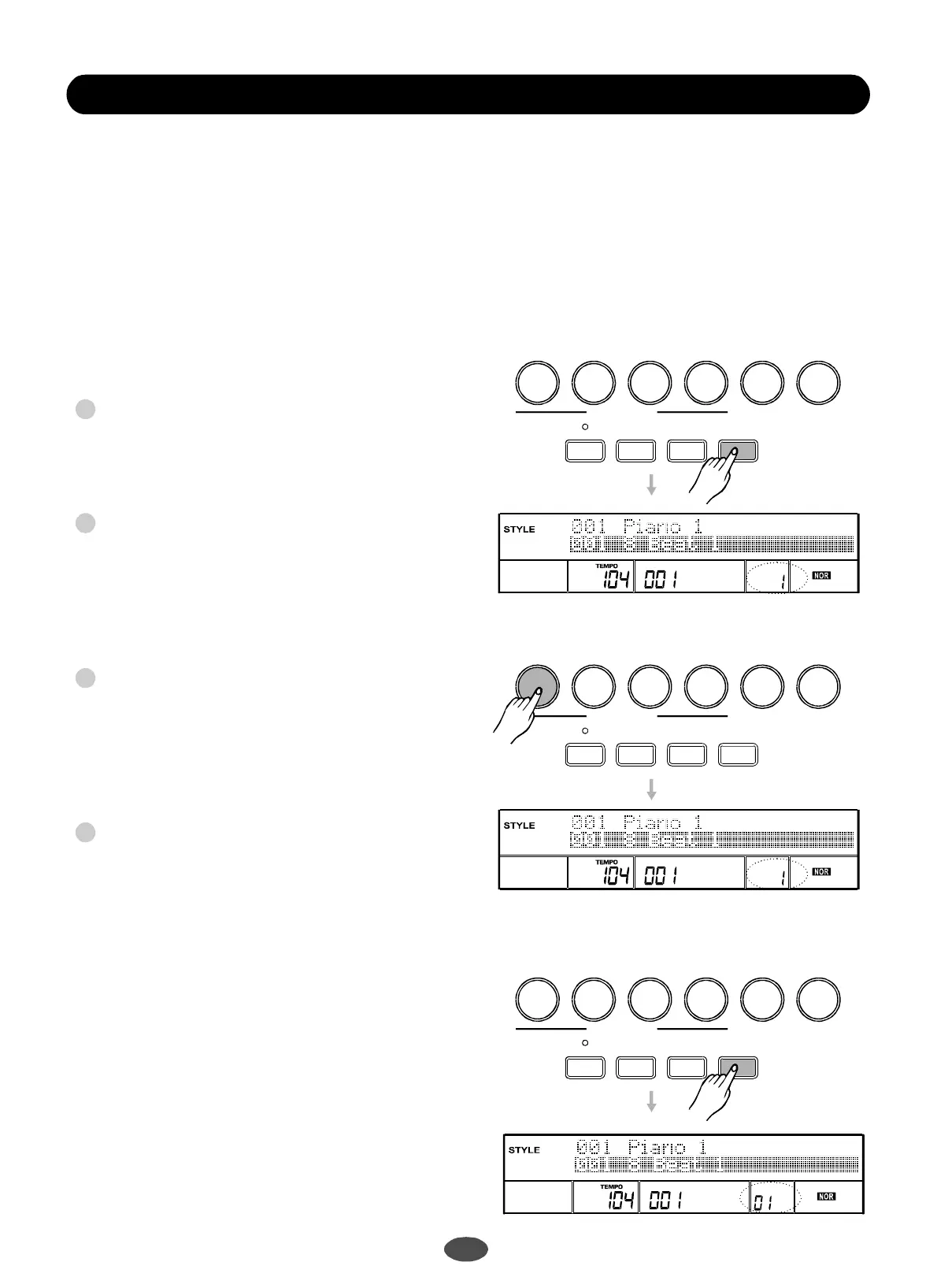
Selectoneofthestyles.
Eachstylehasfourpresets.
Pressthebuttonandthescreenwill
displayO.T.S.A.B.Cwouldbeturnedonauto-
matically.
Pressanyofthebuttonswhichiscorre-
spondingtothepresetandthescreenwilldisplay:
O.T.S1--O.T.S4.
Whenastyleisplaying,presstoturnon
theO.T.Smode;itwillinserta"Fillin"automatically.
Insert"FILLA''whenpressingorbutton;
Insert"FILLB"whenpressingor.
Whenastyleisstopped,pressanyofthe
buttons;no"FILLIN"willbeinserted.
PressbuttonagaintoexittheO.T.Smode;
LCDdisplay:MEMORY".
HowtorecallaOne-TouchSetting
[O.T.S.]
[M1]-[M4]
[O.T.S.]
[M1][M2]
[M3][M4]
Note
[M1]-
[M4]
[O.T.S.]
"";
:
"
OneTouchSettingisapowerfulandconvenient
modefunctionthatallowsyoutoreconfigure
allsettingsoftheinstrumentwiththetouchofa
singlebutton.
""style
23
M1M2
M3
M4
M5M6
M1M2M3M4M5M6
M1M2M3M4M5M6
ONETOUCHSETTING
ONETOUCHSETTING
ONETOUCHSETTING
MEASURE
MEASURE
BEAT
BEAT
MEMORY
MEMORY
TICK O.T.S.
TICK O.T.S.
MEASUREBEAT
MEMORY
TICKO.T.S.
OneTouchSetting
Parameters:
VoiceR1numberandvolume
Dualfunction
VoiceR2numberandvolume
REVERBandCHORUStypeandlevel
Octave
FREEZE
FREEZE
FREEZE
BANK
BANK
BANK
STORE
STORE
STORE
O.T.S.
O.T.S.
O.T.S.
1
2
3
4
PDF 文件使用 "pdfFactory Pro" 试用版本创建 www.fineprint.com.cn


 To Next Page