28
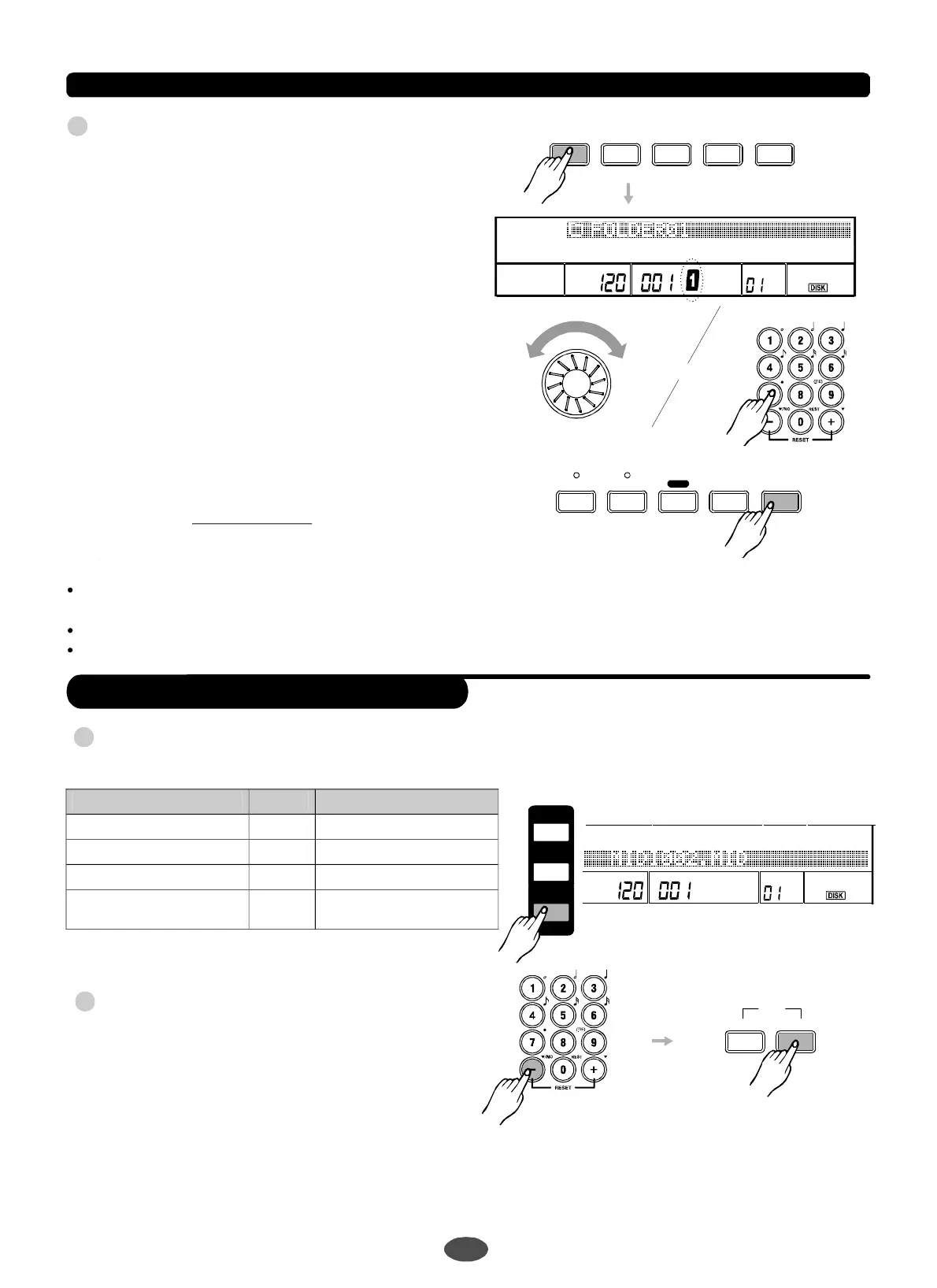
PlaybacktheMIDIfilesfromthecard
pressafterselectingyourfavorite
midisong,itgoestoplaybackthesong.
Pressagaintostopthesong
playing.Youcanalsousetopausethe
songplaying.
Ifyouwanttochooseanothersongwhenamidi
songisplaying,useorbutton.
Itwillstopthecurrentsongplayingthento
playthenextsong.
TrytopressbuttoninMIDIPLAY
menu.
SMFFORMAT0orFORMAT1MIDIfileswitha
fileextensionMID.
Lessthan64tracks.
Ticksperquarternotesshouldbelessthan1024.
[START/STOP]
[START/STOP]
[PLAY]
dial[+]/[-]
[DIRECTMENU]
NOTE:
SupportedMIDIfiletype:
""
(SeeDIRECTMENU)
2
TEMPO
VEL
MEASUREBEATMEMORY
TICKO.T.S.
MIDI001.MID
SDFunction
START/STOP INTRO
FILLIN
NORMAL
FILLIN
VARIATION ENDING
A.B.C.
SYNCSTART SYNCSTOP MIXER
DECT
MENU
3
OR
SaveFiles
1
2
Insertacard,youcanchoosethefiletypeyou
wanttosavebypressingbutton.[SAVE]
Afterchoosingthefiletypebyusing,you
canpressbuttontoenterothersaving
optionornamethefile.ThentosavetoSDcard.
IftheSDcardinsertediswrite-protected,the
warninginformationwillbedisplayedonLCD
anditwillquitthecurrentmenu.
[+]/[-]
[NEXT]
NOTE:
Filetype Suffix Location
Recordfile*.MID
CARD\MC860\RECORD\
Memoryfile*.MEM
CARD\MC860\MEMROY\
Userstyle*.STY
CARD\MC860\STYLE\
Packfileincluding
Memoryfile
&Userstyle
*.PCK
CARD\MC860\PACKAGE\
LOAD
UTILITY
SAVE
<BACK NEXT>
EXIT
>
>
3
TEMPO
VEL
MEASUREBEAT
MEMORY
TICKO.T.S.
MIDI001.MID
PDF 文件使用 "pdfFactory Pro" 试用版本创建 ÿ www.fineprint.com.cn


 To Next Page