Recording
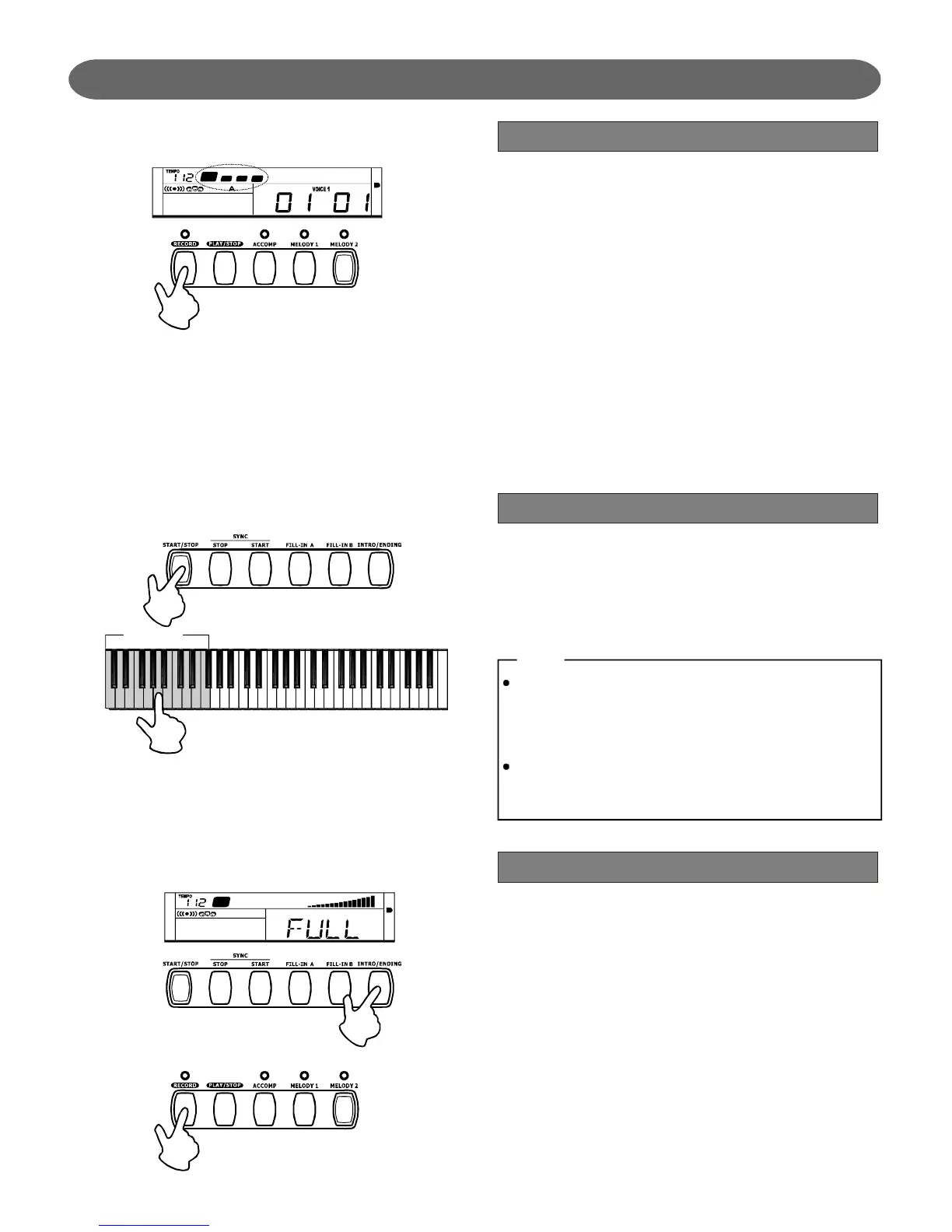
RecordWaiting
RecordStart
RecordStop
Press[RECORD]button.FourbeatsonLCDflash
simultaneity,whichindicatestherecordwaiting
status.Voice,style,memoryandrecordingtracks
canbeselectedinthisstatus.
TheACCOMPtrackandMELODYtrackcanbe
recordedtogetherandalsocanberecorded
separately.Butnoticethat2MELODYtracks
cannotberecordedatthesametime.
Afterselectingtherecordingtrack,therelevantLED
willflash,Whichindicatesthatthetrackisreadyfor
recording.
Ifthetrackyouselectedhasrecorddata,itwillbe
playedwhenrecording.
2.
2.
3.
4.
1.
1.
Afterhavingsetallthesettingsinrecordwaiting
status,playthekeyboard(thechordareawhen
recordingACCOMP)orpress[START/STOP]
button.Itwillstartrecordingandthebeatwillfollow
thecurrenttempo.
Oncestartrecordingonetrack,theoriginaldatainthe
trackwillbeoverwritten.
IftherehasdataintheACCOMPtrack,thenthe
playbacktempowillaccordtothetempoofACCOMP
track.
IftherehasnodataintheACCOMPtrack,thenthe
MELODYtempowillbeoneoftheMELODYtrack's
tempowhenplayingrecord.
Thechordarea
StopAutomatically:
Stopmanually:
Ifthecapacityisfull,therecordingwillbestopped
automaticallywhenrecordingisinprocess,andit
displays:FULLonLCD.Whenthestyleisplaying,
press[INTRO/ENDING]button,thenafterthe
ending,itwillstoprecordingautomatically.
Press[RECORD]buttonagaininrecordingtostop
recordingimmediately.Inthesametime,theLEDof
recordtrackwillbelightened,indicatesthatthis
trackhasrecorddataandbereadytoplay.
14
NOTE:
PDF 文件使用 "pdfFactory Pro" 试用版本创建 www.fineprint.com.cn


 To Next Page