Conducting a treatment session
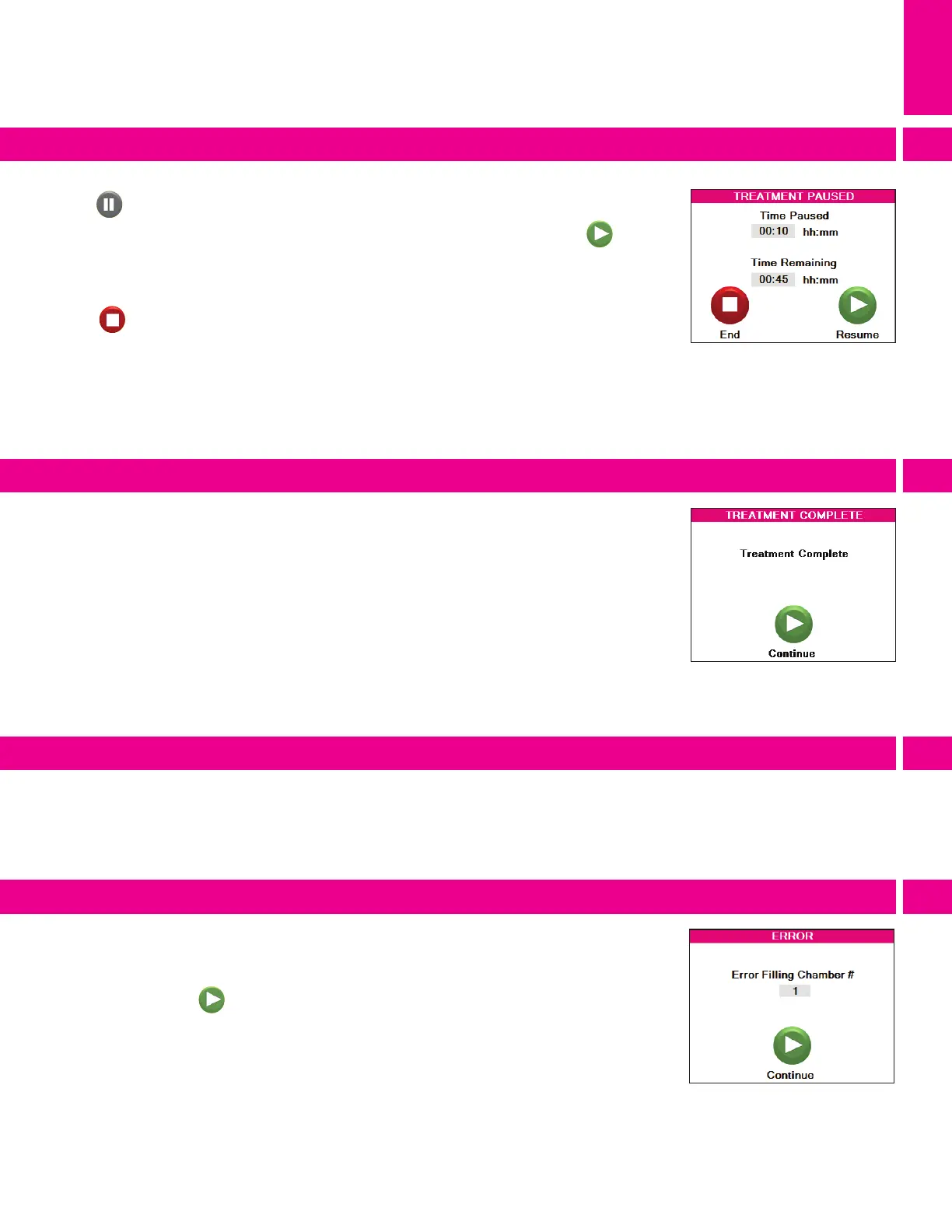
When the Time Remaining on the Treatment Running screen reaches 00:00, the PCU will
automatically proceed to the Treatment Complete screen (6.6) after completing the active
treatment cycle. All air chambers will vent completely and the beeper will sound if the
beeper is set to On.
If an inflation issue is encountered the beeper will sound and the Error screen will display.
(6.7) It will include the chamber number that caused the error. Please note the chamber
number and see 8. Troubleshooting & Technical Information on resolving errors. Pressing
the continue button will end the beeper and return to Treatment Summary Screen.
Press the power switch on the back of the PCU to turn off the medi pcs brio. Please note
that the PCU inflation & deflation valves close while the PCU is turned off. If a garment is
connected it will not be able to be deflated further until it is disconnected from the PCU or
the PCU is turned on.
.
.
Press on the Treatment Running screen to pause treatment. The Treatment Paused
screen will appear (Fig. 6.5) after the garment(s) have vented. After venting, press to
resume treatment. Treatment will restart, continuing treatment for the remaining amount
of time. If treatment is not resumed within one hour, the treatment session will be ended.
Press to end treatment entirely. The Treatment Summary screen will automatically
reappear.
.
Completing a session
Pausing a session
Error screen
Turning off the PCU
.
.
.
.
6



 To Next Page