7
Connecting Your Smartphone
to the Vivera Stretcher Trolley
Conditions for Connection
The following points must be observed to connect to the stretcher trolley:
• Turn on Bluetooth on your device.
• Break the Bluetooth connection with other devices.
• Shut down all applications running in the background.
• Keep your device close to the stretcher trolley.
For the application to work properly, never pair the stretcher trolley using the
Bluetooth settings on your device.
Connecting to the Stretcher Trolley
1. Activate the stretcher trolley (display panel lights up – battery status indicators).
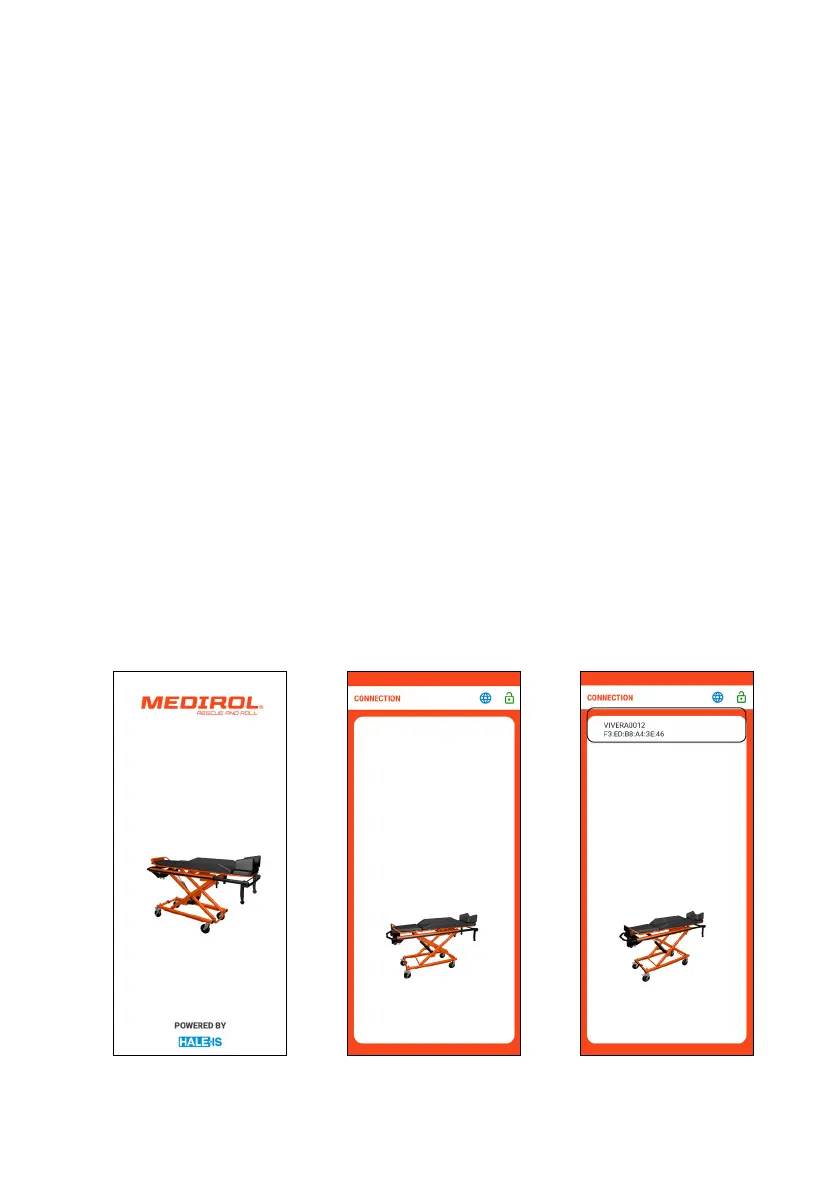
2. Launch the “Vivera Nosítka” app (Fig. 1).
3. After loading the application, the initial screen is displayed (Fig. 2).
4. The application will automatically start searching for stretcher trolleys in the
vicinity. All found stretcher trolleys will be displayed in sequence on the page, e.g.
VIVERA20001 (Fig. 3).
5. Select the stretcher trolley you want to connect to from the list.
Fig. 1
Fig. 2
Fig. 3
Starting the application Connection screen
Found stretcher trolleys


 To Next Page