Important
Information
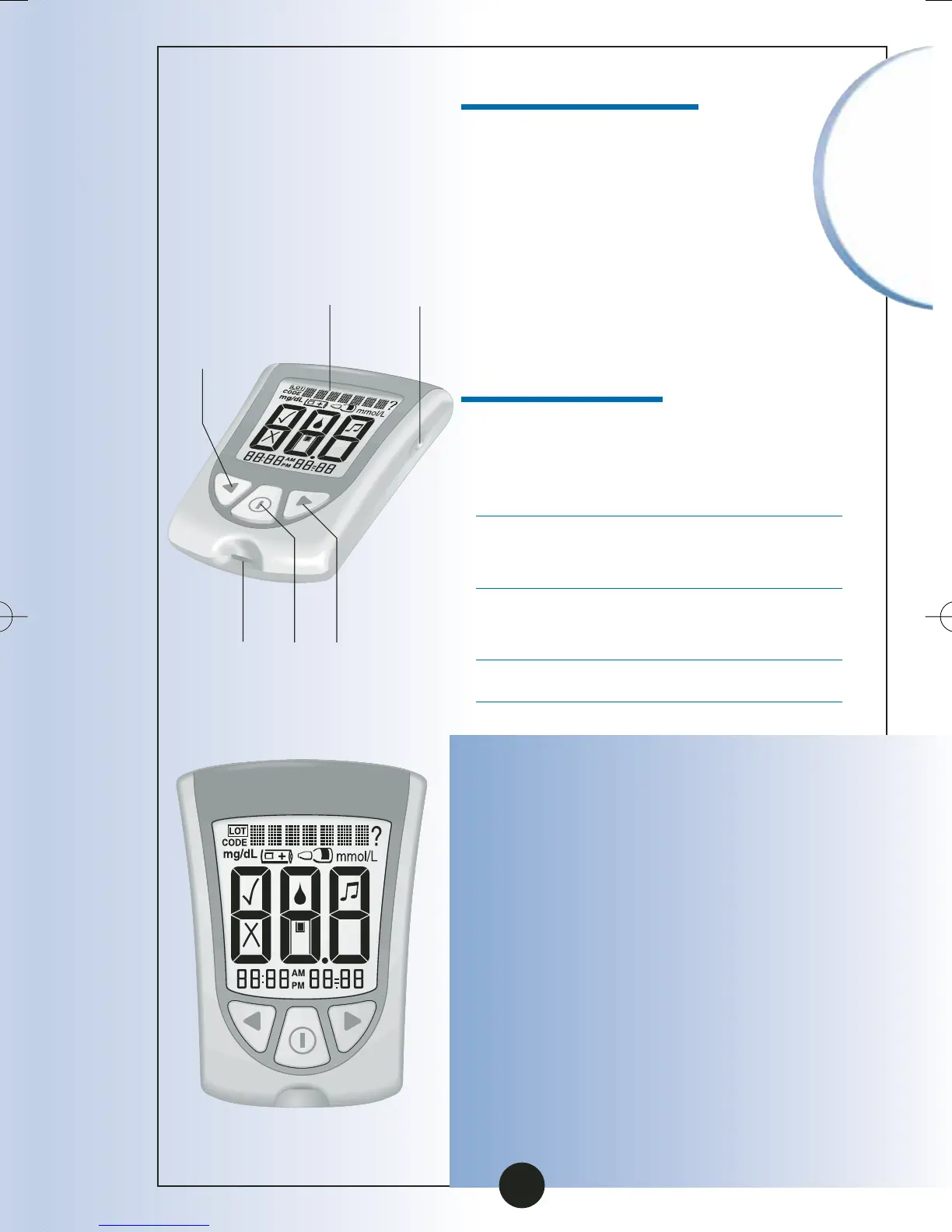
Display Check
Back
Button
Backlight
Button
Strip
Port
Mode
Button
Forward
Button
Display
Window
▼
Items not included:
MediSense Control Solutions
Blood ß-Ketone Test Strips
and Instructions for Use
Data Management System
Getting to Know Your
Monitor’s Features
Display Window
This shows:
•Blood glucose and blood
ß-Ketone results
•Glucose LOT numbers and
ß-Ketone calibration CODEs
•Previous test results and
error messages
•Blood glucose averages
IMPORTANT:
Each time you turn your
monitor on, a full display shows.
This is called a Display Check.
Look at the Display Check each
time it appears on your
monitor’s display window,
especially before you check
your blood glucose or blood
ß-Ketone. The Display Check
shows on the display
window briefly.
6
ART06986-Rev-B-MAN 8/22/05 11:02 AM Page 9



 To Next Page