EasyManua.ls Logo

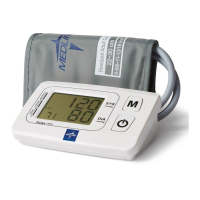
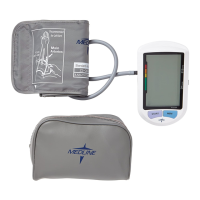
Medline MDS3001 - User Manual

Medline MDS3001
112 pages
Print Icon
To Next Page IconTo Next Page
Loading...
MDS3001UMDS3001PLUSMDS3001
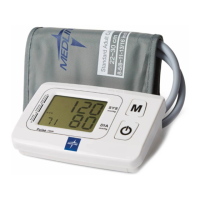
FULLY AUTOMATIC
ARM CUFF BLOOD
PRESSURE MONITOR
(ELECTRONIC SPHYGMOMANOMETER)
OPERATION GUIDE

Table of Contents

Other manuals for Medline MDS3001

Questions and Answers

  • E
    ethanhernandezAug 3, 2025
    Why does my Medline Blood Pressure Monitor show an abnormal result?
    • K
      Kevin GuerraAug 3, 2025
      An abnormal result on your Medline Blood Pressure Monitor could be due to several reasons. It may be that the cuff was not positioned correctly or wasn't properly tightened; in this case, apply the cuff correctly and try again. Your body posture might have been incorrect during the test; review the instructions regarding body posture during measurement and re-test. Movement, speaking, or emotional state (anger, excitement, or nervousness) during testing can also cause this; re-test when calm, without speaking or moving. Finally, an irregular heartbeat (arrhythmia) may also be the cause; note that this device is not appropriate for people with serious arrhythmia.
  • V
    Victoria ColeAug 8, 2025
    How to fix a Medline MDS3001 Blood Pressure Monitor when the LCD shows a low battery symbol?
    • A
      Anne HillAug 8, 2025
      If your Medline Blood Pressure Monitor displays a low battery symbol, it means the batteries are low. You should change the batteries.
  • J
    Jason LozanoAug 13, 2025
    What to do if my Medline Blood Pressure Monitor doesn't respond when I press a button?
    • M
      Mary JonesAug 13, 2025
      If your Medline Blood Pressure Monitor doesn't respond when you press a button or load the battery, it could be due to incorrect operation or strong electromagnetic interference. To resolve this, take out the batteries for five minutes, and then reinstall all batteries.
  • A
    Alicia HollandAug 18, 2025
    What does 'Er 3' mean on my Medline MDS3001 Blood Pressure Monitor?
    • S
      sharpleslieAug 18, 2025
      If your Medline Blood Pressure Monitor LCD shows 'Er 3', it indicates that the pneumatic system is blocked or the cuff is too tight during inflation. To fix this, apply the cuff correctly and try again.
  • B
    Brittany MatthewsAug 23, 2025
    What does error code 'Er 0' mean on a Medline MDS3001 Blood Pressure Monitor?
    • T
      Timothy DixonAug 25, 2025
      If the LCD on your Medline Blood Pressure Monitor shows 'Er 0', it indicates that the pressure system is unstable before measurement. To resolve this, remain still and try again.
  • S
    sgarciaAug 29, 2025
    What to do if Medline MDS3001 Blood Pressure Monitor displays 'Er 5'?
    • J
      jennifersullivanAug 29, 2025
      If your Medline Blood Pressure Monitor displays 'Er 5', it means the cuff pressure is above 300mmHg. Wait five minutes and measure again. If the monitor is still abnormal, please contact the local distributor or the factory.

Summary

Important Information on Blood Pressure

Normal Blood Pressure Fluctuation

Discusses normal blood pressure fluctuation and provides recommendations for accurate measurements.

Contents and Display Indicators

Display Indicators and Symbols

Explains symbols and readings on the blood pressure monitor's LCD screen for interpretation.

Intended Use and Contraindications

Intended Use of the Monitor

Defines the purpose and target users of the electronic blood pressure monitor.

Contraindications for Use

Highlights conditions where the device should not be used, such as serious arrhythmia.

Product Description and Standards

Product Description

Explains the technology, storage capacity, and standards compliance of the monitor.

Technical Specifications

Specifications Overview

Details device model, size, cuff circumference, weight, measurement range, and memory.

Important Notices and Safety Warnings

General Notices and Precautions

Provides critical safety and usage instructions, including preparation and general precautions.

Setup and Operating Procedures: Battery and Adapter

Battery Loading and AC Adapter Loading

Instructions for inserting batteries and connecting the AC adapter for powering the monitor.

Setup and Operating Procedures: Clock and Date

Clock and Date Adjustment

Steps to set the time and date on the monitor for accurate record-keeping and readings.

Setup and Operating Procedures: Cuff and Alarms

Connecting the Cuff to the Monitor

Guides on how to properly connect the blood pressure cuff tubing to the monitor unit.

Technical Alarm Description

Explains the meaning of technical alarms like 'HI' or 'Lo' displayed on the LCD screen.

Applying the Blood Pressure Cuff Correctly

Applying the Cuff

Detailed instructions on how to prepare and correctly position the cuff on the arm for accurate measurement.

Body Posture During Measurement

Body Posture for Measurement

Guidance on correct sitting and lying down postures to ensure accurate blood pressure readings.

Taking Your Blood Pressure Reading

Taking Your Blood Pressure Reading

Steps for initiating a measurement, including self-test, inflation, and calculation of results.

Displaying and Managing Stored Results

Displaying Stored Results

Instructions on how to view, retrieve, and manage past blood pressure measurements stored in memory.

Memory Management and Health Assessment

Deleting Measurements from Memory

Procedure for clearing stored blood pressure readings from the monitor's memory bank.

Assessing High Blood Pressure for Adults

Provides a guideline for understanding high blood pressure levels based on WHO standards.

Troubleshooting Common Issues (Part 1)

Troubleshooting Abnormal Results

Addresses problems like abnormal results due to cuff position, posture, movement, or arrhythmia.

Troubleshooting Common Issues (Part 2)

Troubleshooting LCD Errors (Er 0-4)

Covers LCD errors like low battery, 'Er 0' to 'Er 4', and their potential causes and solutions.

Troubleshooting Common Issues (Part 3)

Troubleshooting LCD Errors (Er 5-A)

Details solutions for LCD errors 'Er 5' to 'Er A' and device non-responsiveness issues.

Maintenance and Care Instructions

Maintenance and Care

Guidelines for proper cleaning, storage, and recommended service checks to maintain monitor performance.

Explanation of Symbols on the Unit

Unit Symbol Explanations

Defines the meaning of various symbols found on the blood pressure monitor unit and its packaging.

Warranty and Service Center Information

Warranty Information

Details the 2-year warranty period and provides contact information for the manufacturer's service center.

Electromagnetic Compatibility Information

EMC Guidance and Declarations

Provides guidance and declarations regarding RF emissions and harmonic distortion compliance for the device.

Medline MDS3001 Specifications

General IconGeneral
BrandMedline
ModelMDS3001
CategoryBlood Pressure Monitor
LanguageEnglish

Related product manuals