Medtrum Simplifying Diabetes
www.medtrum.com
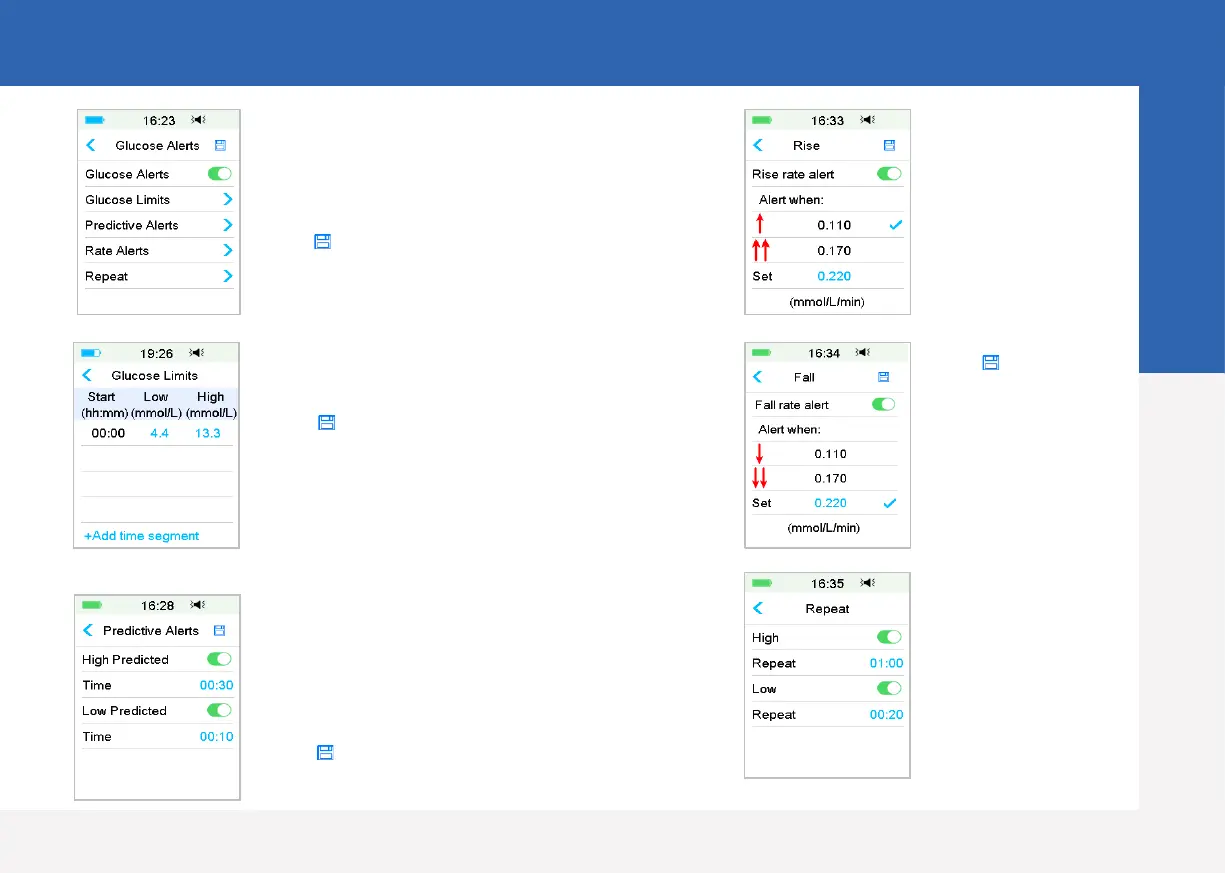
Rate Alerts
• Choose or set the
alert rate
• Tap to save the
settings
Main Menu ➔ EasyLoop ➔ Glucose Alerts
Repeat
• If set, an alert will
repeat itself until
the condition that
caused the alert is
resolved
Turn on/off Alert
• Turn on/off the Alert switch
• Tap to save the settings
High/Low Limits
• Up to 8 segments for each day
• Tap to save the settings
• Tap +Add Time Segment to add a new segment
• Slide to left on each segment, tap Delete. The start
time of next segment will be adjusted
• Slide on segment back to right to cancel deleting
Predictive Alerts
• You will be reminded of a predicted high or low
glucose value some time (the predictive alert time)
in advance
• Tap to save the settings
CGM Alerts Settings
6


 To Next Page